Apple today officially released iOS 11, the newest operating system designed for the iPad, iPhone, and iPad touch. iOS 11 is available on the iPhone 5s and later, the iPad mini 2 and later, the iPad Air and later, and the 6th-generation iPod touch.
The update is available on all eligible devices over-the-air in the Settings app. To access the update, go to Settings --> General --> Software Update. It could potentially take a few minutes for the update to propagate to all users due to high demand.
iOS 11 is a major update that brings a refreshed look and feel to both the iPhone and the iPad. It introduces subtle design changes to interface elements throughout the OS, like bolder text, a new look for apps, revamped icons, and a redesigned usage experience for the Lock screen and the Control Center.
Apple has merged the Lock screen and the Notification Center, so a downwards swipe now brings up the Lock screen and notifications. The Control Center is now customizable and does more, and 3D Touch integration has been expanded.
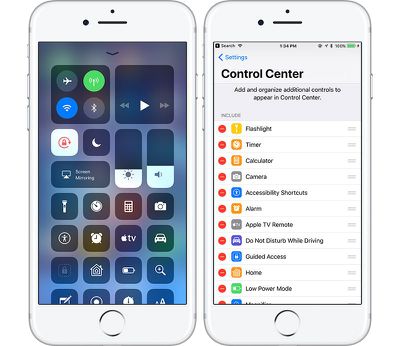
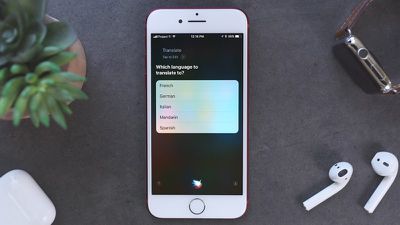
Siri is smarter than ever and has a new, more natural voice, and Siri is now cross-device, letting the personal assistant learn more about you. Siri can also translate English into several different languages like Spanish and Chinese.
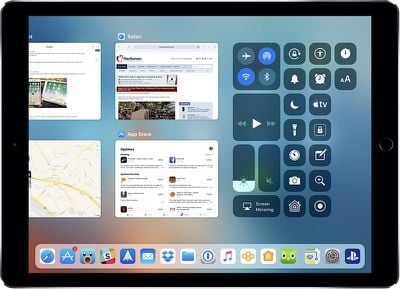
iOS 11 feels a lot different on an iPad. There's now a persistent Dock at the bottom of the display that you can bring up anytime with a swipe, and there's a new App Switcher that's similar to Mission Control on the Mac, letting you see all of your apps -- even those in split-view windows -- at a glance. Apple Pencil does more on iPad Pro, and a new Drag and Drop feature lets you drag links, images, files, and more from one app to another.
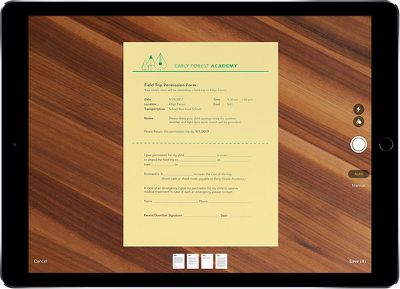
A new Files app introduces improved file management, and many apps have new features. Notes offers searchable handwriting and document scanning, Maps has lane guidance and speed limit info, Apple Music lets you see what your friends are listening to, and there are a new tools for editing Live Photos.
HomeKit now supports speakers and AirPlay 2 adds multi-room functionality, while Do Not Disturb has been expanded to encompass driving. In a future update, Apple plans to add iCloud Messages and a person-to-person Apple Pay feature.
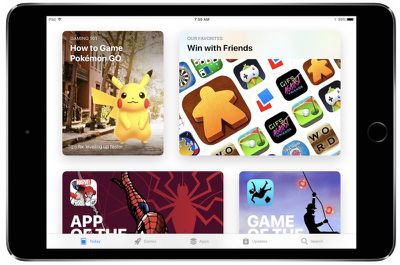
On the iPad, there's a handy new "Flick" keyboard, while the iPhone has new one-handed keyboard options. You'll see a completely different App Store after installing iOS 11, and a whole host of apps with new capabilities thanks to ARKit and other under-the-hood improvements.
Note: When iOS 11 is installed, all older 32-bit apps will no longer launch. These are apps that have not been updated for several years, and Apple has discontinued support. Only 64-bit apps are compatible with the new update.
For a full rundown on all of the new features you'll find in iOS 11, make sure to check out our iOS 11 roundup and check out the list below for our extended coverage of tips and how-tos. We'll keep updating the list as we publish these articles throughout the remainder of launch day and beyond.
- How to Find Notifications in iOS 11's New Lock Screen and Cover Sheet
- How to Use and Customize Control Center in iOS 11
- Here's a Look at the First Wave of Augmented Reality ARKit Apps Hitting the iOS App Store Today
- How to Use Drag and Drop on an iPad and iPhone With iOS 11
- How to Use the New iPad Dock in iOS 11
- Drag and Drop Apps for iPad Now Widely Rolling Out on App Store
- How to Use the iPad App Switcher in iOS 11
- What's New in Maps in iOS 11: Indoor Mapping, Lane Guidance and Speed Limits
- How to Use the New Files App in iOS 11
- How to Set Your AirPods to Change Music Tracks in iOS 11
- How to Record Your iPhone or iPad Screen in iOS 11
- PSA: Snapchat Still Notifies You When Someone Screen Records Privately Messaged Snaps on iOS 11
- Bluetooth and Wi-Fi Aren't Fully Disabled When Toggled Off in Control Center on iOS 11
- How to Use the New One-Handed Keyboard in iOS 11
- How to Enable Type to Siri in iOS 11
- How to Use Siri's New Translation Feature in iOS 11
- How to Use the Redesigned Messages App Drawer in iOS 11
- Safari in iOS 11: Enabling Cross-Site Tracking Prevention to Protect Your Privacy
- How to Make an Apple Music Profile to Connect With Friends in iOS 11
- How to Use Emergency SOS on iPhone in iOS 11
- How to Use Do Not Disturb While Driving in iOS 11
- How to Save Space in iOS 11 With New Storage Features
- How to Turn a Photo Into an Apple Watch Face in iOS 11 and watchOS 4
- How to Use Instant Markup to Quickly Edit Screenshots in iOS 11
- How to Sign Up for iCloud Family Storage Plans in iOS 11
- How to Use Automatic Setup in iOS 11 to Transfer Settings to a New Device
- How to Hide Text Previews for Every App Notification on iOS 11's Lock Screen
- How to Use the iPad's New Flick Keyboard in iOS 11
- How to Use the New iOS 11 Document Scanner in Notes on iPad and iPhone
- How to Edit Live Photos in iOS 11
- How to Use Instant Notes on iPad in iOS 11
- How to Prevent Apps From Showing Up in Search and Siri Suggestions in iOS 11