

How to Use Drag and Drop on an iPad and iPhone - MacRumorsOpen MenuShow RoundupsShow Forums menuVisit ForumsOpen Sidebar
Skip to Content

How to Use Drag and Drop on an iPad and iPhone

by

Starting with iOS 11, Apple overhauled the way we interact with the iPad, introducing several features designed to make the iPad experience better mimic the way we use a Mac or a PC. Central among these new features is a revamped Dock that holds more apps, an improved app switcher, and most importantly, system-wide Drag and Drop.

With Drag and Drop, text, links, photos, files, and more can be transferred between one app and another without the need to use in-app Share Sheets. It's a great way to do things like add photos or links to an email, save PDFs or documents from an email to the Files app, share links with friends in Messages, and more.

Below, we'll walk you through the steps on how to use Drag and Drop and offer some examples of how it can be used in different apps.

How to Use Drag and Drop

  1. Tap and hold on a link, text, a photo, or a file within any app on the iPad.
  2. While maintaining a finger on the file in question, move your finger away to initiate a drag gesture.
  3. You now have a file, link, or photo that can be dropped into any other app. safaridraganddropios11

  4. To open up another app, you can tap it from the Home screen, bring up the dock with a swipe, use the app switcher, or use a Split-View multitasking window. Dragging multiple files between apps is particularly useful with two apps open at once.
  5. Continue dragging the file/link/photo into the other app.

How to Drag and Drop Multiple Files at Once

Drag and Drop works with more than one file at a time, so if you want to move multiple files to the Files app or drag multiple photos from the Photos app to another location on the iPad, you can do so with Drag and Drop.

  1. Grab a file with a drag gesture (tap, hold, and pull away).
  2. Keep your finger on the file.
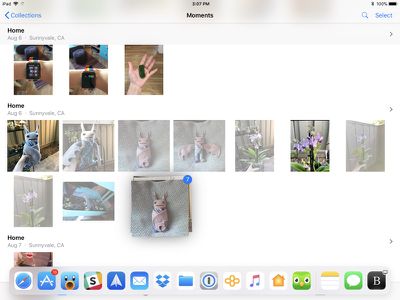
  3. With another finger or your other hand, simply tap additional files. multiitemdraganddropios11
  4. The new files will be added to the file under your first finger and you'll see a little blue badge letting you know how many files are being dragged.
  5. Multiple files work just like a single file - open up another app to drop your content where it needs to go.
Drag and Drop Usage Examples

Because Drag and Drop is a system-wide feature on the iPad, you can drag all kinds of files between any app, just like you can do on a Mac or a PC. It makes moving content between apps so much simpler than iOS 10. Below are some of the ways it can be used:

  • Dragging photos from the Photos app to Mail or Messages
  • Dragging a link from Safari to Notes, Mail, or Messages
  • Transferring a photo from a web page in Safari to the Photos app
  • Copying a PDF from the Mail app to the Files app, Notes or another app
  • Dragging your location in Maps from the Maps app to Messages or Mail
  • Dragging a calendar event from the Calendar app to Mail or Messages
  • Dragging a contact from the Contacts app to Messages to share contact info with friends
  • Selecting a block of text and then transferring it from one app to another
  • Dragging an address from Maps to another app
  • Dragging a Reminder into Mail or Messages
  • Dragging an Apple News story into Mail or Messages to share a link
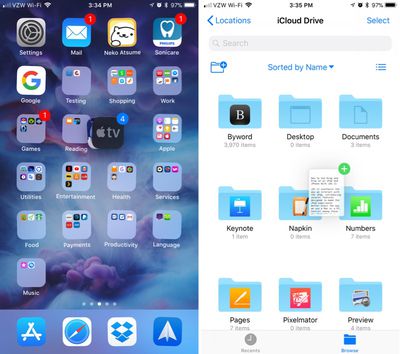
  • Move multiple apps on the Home screen into a folder with multi-drag

While Drag and Drop is a feature available anywhere on the iPad, third-party apps still need to implement support for it, so it may not be immediately available in all apps right when iOS 11 launches.

Drag and Drop on the iPhone

While Drag and Drop was primarily built for the iPad, there are a limited number of Drag and Drop features that also work on the iPhone.
iphonedraganddropios11
You can use the multi-drag feature to drag more than one app from the Home screen into a folder or onto another screen, and you can drag and drop files between different folders in the Files app. Outside of these two use cases, there's no other Drag and Drop functionality available on the iPhone at this time.


Related Forum: iOS 11

Top Rated Comments

Macyourdayy Avatar
119 months ago
Which devices does d&d actually work with?
[doublepost=1505870994][/doublepost]
All of this finger dragging would still be much faster with some mouse support on the iPad pro.
Funny you should be joining in with all the liars in that case, "former Apple user".
Score: 1 Votes (Like | Disagree)
119 months ago
Drag and drop has to be one of my favorite features with iOS 11. Nice implementation for the iPad.
Score: 1 Votes (Like | Disagree)

Popular Stories

iPhone Duo Display Cracking

Apple Alerts Stores to iPhone Duo's Display Cracking Issue

Friday October 30, 2026 3:20 pm PDT by
In a memo shared with Apple Stores and Apple Authorized Service Providers this week, and later obtained by MacRumors, Apple provided technicians with guidance on how to diagnose and address the iPhone Duo's inner display cracking issue. If a customer reports the issue, Apple advised technicians to inspect the iPhone Duo and repair or replace it in accordance with their standard procedures....


iPad mini OLED feature 1

Apple Executive Comments on New iPad Mini Lacking 120Hz Display

Thursday October 29, 2026 1:47 pm PDT by
While the new iPad mini has an OLED display, the device does not support ProMotion, meaning the display's refresh rate is limited to 60Hz instead of 120Hz. ProMotion support would have allowed for the iPad mini's refresh rate to automatically adjust from 10Hz to 120Hz depending on the content being displayed, but evidently Apple has kept the feature exclusive to the iPad Pro among iPad...
Pinched iPad Mini

Apple Avoids Showing Pinched Fingers on iPad Mini Page in South Korea

Thursday October 29, 2026 11:52 am PDT by
In the U.S. and most other countries, Apple's website shows the new iPad mini being held by pinched fingers, but this is not the case in South Korea. The new iPad mini shown with pinched fingers on Apple's website in the U.S. On its South Korean website, Apple simply shows an image of the iPad mini on its own. The new iPad mini shown without pinched fingers on Apple's website in South Korea ...
Latest Stories
Apple Watch Ultra 4 Hits All-Time Low Price With Amazon's $99 Discount
16 hours ago
Reminder: Apple's Big Discount on Beats 360 Ear Cushions Ends Today
16 hours ago
Here's a New Tour of Apple's HomeView Software
16 hours ago
Apple Reveals New iPad Mini's Battery Capacity
17 hours ago
Top Stories: Apple's Big MacBook Pro, iPad mini and iMac Updates
19 hours ago
'Pluribus' Season 2 Reportedly Starts Production Today
1 day ago
iPhone 18 Pro Sales Surge in China, Offsetting Decline in U.S. and Japan
1 day ago
HomeView Software 27.2: Wallpapers, Control Center, and More
1 day ago
Apple Alerts Stores to iPhone Duo's Display Cracking Issue
1 day ago
iOS 27.3 Will Enable These Apple Intelligence Features in China
1 day ago
Apple Says iOS 27.3 Beta Coming Next Week
1 day ago
Apple's Flash Storage Suppliers Are Finally 'Getting Their Revenge'
1 day ago
14 New Things Your iPhone Can Do in iOS 27.2
2 days ago
iPhone Duo Review: One Week Later
2 days ago
Samsung Mocks iPhone Duo Display Cracks in New Ad Campaign
2 days ago
The MacRumors Show: OLED MacBook Pro, iPad Mini 8, and More
2 days ago
MacBook Pro With Touch Display: 15 More Details Revealed
2 days ago
Russia Places Apple on State Surveillance Registry
2 days ago
Halloween Weekend Brings Discounts on Apple Accessories and Pre-Orders
2 days ago
Apple Has Released More Than 25 New Products in the Past Two Months
2 days ago
Local Code Launches as Free, Private AI Assistant Tool for Mac
2 days ago
Apple Acquires Ascend.io
2 days ago
HomePod Mini 2 Launches Today: All the New Features
2 days ago
AirTag 2 4-Pack Drops to New Low Price of $69.99
2 days ago
Rian Johnson's iPhone Camera App Goes Viral
2 days ago
Where Did All the iPhone Duos Go? Mostly to Apple's Stores
2 days ago
Apple's Touchscreen MacBook Pro Could Ship 1.5M Units in 2027
2 days ago
New Apple TV 4K and iPad Mini: RAM Amounts Revealed
2 days ago
Apple Executive Comments on New iPad Mini Lacking 120Hz Display
2 days ago
Here's a Hands-On Look at HomePod Mini 2's New Two-Tone Colors
3 days ago

🔗 Related Apple News & Rumors

Stay updated with the latest Apple ecosystem news and verified rumors










































