

How to Use Do Not Disturb While Driving - MacRumorsOpen MenuShow RoundupsShow Forums menuVisit ForumsOpen Sidebar
Skip to Content

How to Use Do Not Disturb While Driving

by

Starting with iOS 11, Apple introduced a Do Not Disturb While Driving Feature that's designed to mute incoming calls, texts, and notifications while you're driving to cut down on accident-causing distractions.

Do Not Disturb While Driving is not a feature that's enabled automatically, but you will see a popup prompting you to turn it on when Apple detects the motion of a car after installing iOS 11 or later for the first time. Despite the notification, you'll still need to choose how you want to use the feature if you miss the initial setup process.
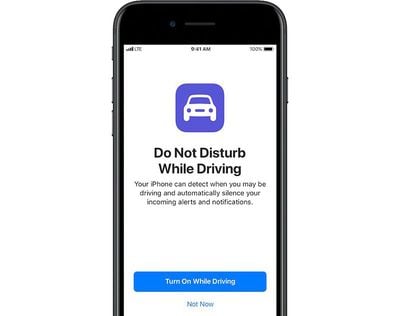
donotdisturbdriving
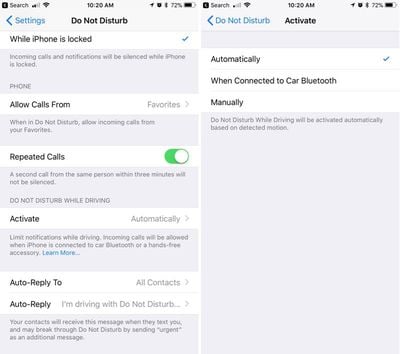
Do Not Disturb can be set to turn on manually, automatically when the iPhone detects a car's acceleration, or when an iPhone connects to a car's Bluetooth.

Enabling Do Not Disturb While Driving

  1. Open the Settings app.
  2. Tap Do Not Disturb.
  3. Scroll down to "Do Not Disturb While Driving." donotdisturbwhiledrivingsetup
  4. Tap on "Activate" to choose how you want Do Not Disturb While Driving to be turned on. If you don't want to use Do Not Disturb While Driving, set it to manual.
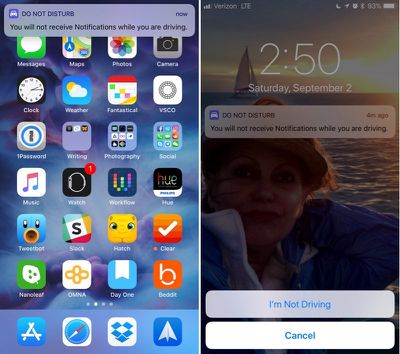
Whenever Do Not Disturb While Driving is activated, you'll see a bar at the top of the screen letting you know incoming notifications are being muted.

Do Not Disturb While Driving Control Center Toggle

If you don't want to have Do Not Disturb While Driving turn on automatically but still want to use it, there's a Control Center setting for activating it.

  1. Open the Settings app.
  2. Choose Control Center.
  3. Select Customize Controls. dndcontrolcenter
  4. Add Do Not Disturb While Driving, which has an image of a car.
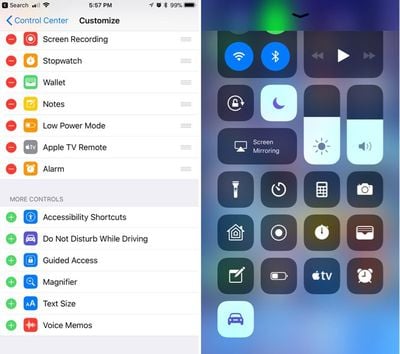
This adds the Do Not Disturb While Driving toggle to your Control Center. To turn it on or off, you just need to swipe to open the Control Center and tap it.

If You're a Passenger

When the automatic setting is enabled, Do Not Disturb While Driving will turn on whenever your iPhone detects the acceleration of a vehicle. This can be inconvenient if you're a passenger, so you'll need to turn it off through the Control Center or by tapping the persistent Do Not Disturb While Driving popup at the top of the display to let Apple know you're a passenger.
donotdisturbwhiledriving

Choosing Your Auto Reply Options

When you're driving, all of your incoming text messages are muted. You can choose an automatic text message that lets people know you're in the car and will text later, and you can customize who sees the message.
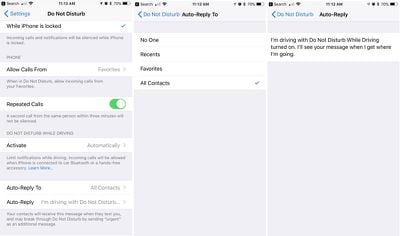
dndtextcustomization

  1. Open the Settings app.
  2. Choose Do Not Disturb.
  3. Scroll down to "Auto-Reply To" and tap it.
  4. You can choose for automatic texts to be sent to Recents, Favorites, All Contacts, or No one, if you would rather not have your phone send automatic replies.

Customizing Your Auto Reply

  1. Open the Settings app.
  2. Choose Do Not Disturb.
  3. Scroll down to "Auto-Reply" and tap it.

Apple sets a default message in this section, but you can change it to say whatever you want. This is the message people will receive when texting you when Do Not Disturb While Driving is enabled.

If there's an urgent issue and someone needs to get in contact with you immediately, they can break through Do Not Disturb While Driving by texting you "urgent." This will override your Do Not Disturb settings and will notify you of the text immediately.
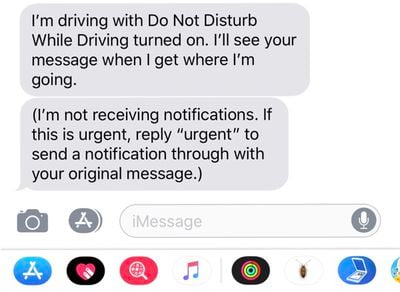
donotdisturbwhiledrivintext
An ideal setup is to set auto replies to your favorites, which likely translates to close friends and family. This will let them text you in an emergency situation, but will prevent other less urgent messages from being a distraction.

Phone Calls

If your iPhone is connected to your car's Bluetooth system, iOS is smart enough to know you have a hands-free calling method available. In this situation, calls will continue to come through even when Do Not Disturb While Driving is enabled. Texts and notifications from apps will continue to be muted, though.

If you're not connected to Bluetooth and have no hands-free accessory, calls will be blocked like text messages and notifications.

Parental Restrictions

For parents of teenagers, there's an option to enable a restriction that will prevent Do Not Disturb While Driving settings from being changed or toggled off, guaranteeing children are using the feature whenever they're in the car. Here's how to turn it on (iOS 12 or later):

  1. Open the Settings app.
  2. Choose Screen Time.
  3. Tap on Content & Privacy Restrictions.
  4. Tap on the Content & Privacy Restrictions toggle to turn on restrictions.
  5. Scroll down to Do Not Disturb While Driving and tap it.
  6. Choose Don't Allow.

On devices running an earlier version of iOS, there are different steps to follow to access device restrictions. Open the Settings app, choose General, scroll down to Restrictions and then tap it. Enter your passcode and then find the "Do Not Disturb While Driving" option and choose "Don't Allow Changes."


Top Rated Comments

soupcan Avatar
119 months ago
I have a way shorter version.

Step 1: put phone on silent.
Step 2: put phone in pocket and keep it there.
Step 2: ???
Step 3: profit.

And if you're the kind of person who can't keep his hands off of his phone and thinks it's more important than paying attention to the road then you shouldn't even have a drivers licence.
Score: 7 Votes (Like | Disagree)
Westside guy Avatar
119 months ago
This has happened to me twice now. You are not alone.
It makes me think of Microsoft Office back when they implemented Clippy.

"IT LOOKS LIKE YOU'RE DRIVING A CAR!" :confused:
Score: 4 Votes (Like | Disagree)
Peel Avatar
119 months ago
Do Not Disturb while Driving sounds good, but it's a bit infuriating. If I could decide which features to turn on it would be great, but as it is, it's all or nothing. I'm tired of getting in the car and saying "Hey Siri, open Waze", only to get a reply, "I'm sorry, I can't do that while you're driving." Well, if I can't open a navigation app while driving, that's pretty useless. I mean, when else would I want to open that app?

Score: 3 Votes (Like | Disagree)
sandman42 Avatar
118 months ago
I like the idea of this feature, but not the way that it now contradicts and completely invalidates using my phone for navigation once I’m underway, even hands-free. I access Siri hands-free, “give me directions to X”, and get the expected response “getting directions to X”, then... nothing happens. Why update navigation with lane guidance, etc, then do this? I hope they fix this with a setting. Seems like at the very least I should be able to get “eyes free” audio only directions.
Score: 2 Votes (Like | Disagree)
TheCannonator Avatar
119 months ago
I have a way shorter version.

Step 1: put phone on silent.
Step 2: put phone in pocket and keep it there.
Step 2: ???
Step 3: profit.

And if you're the kind of person who can't keep his hands off of his phone and thinks it's more important than paying attention to the road then you shouldn't even have a drivers licence.
Excuse me Mr. Perfect it lets people know you are driving so they don’t bother you.
Score: 2 Votes (Like | Disagree)
Westside guy Avatar
119 months ago
Brainless because it's something that various people have been asking for and will use?
I don't think "Do Not Disturb While Driving" is a bad idea. I don't necessarily even think enabling it by default is a bad idea.

I find current implementation, though, is rather... sub-optimal.
Score: 1 Votes (Like | Disagree)

Popular Stories

iPhone Duo Display Cracking

Apple Alerts Stores to iPhone Duo's Display Cracking Issue

Friday October 30, 2026 3:20 pm PDT by
In a memo shared with Apple Stores and Apple Authorized Service Providers this week, and later obtained by MacRumors, Apple provided technicians with guidance on how to diagnose and address the iPhone Duo's inner display cracking issue. If a customer reports the issue, Apple advised technicians to inspect the iPhone Duo and repair or replace it in accordance with their standard procedures....
iPad mini OLED feature 1

Apple Executive Comments on New iPad Mini Lacking 120Hz Display

Thursday October 29, 2026 1:47 pm PDT by
While the new iPad mini has an OLED display, the device does not support ProMotion, meaning the display's refresh rate is limited to 60Hz instead of 120Hz. ProMotion support would have allowed for the iPad mini's refresh rate to automatically adjust from 10Hz to 120Hz depending on the content being displayed, but evidently Apple has kept the feature exclusive to the iPad Pro among iPad...
Pinched iPad Mini

Apple Avoids Showing Pinched Fingers on iPad Mini Page in South Korea

Thursday October 29, 2026 11:52 am PDT by
In the U.S. and most other countries, Apple's website shows the new iPad mini being held by pinched fingers, but this is not the case in South Korea. The new iPad mini shown with pinched fingers on Apple's website in the U.S. On its South Korean website, Apple simply shows an image of the iPad mini on its own. The new iPad mini shown without pinched fingers on Apple's website in South Korea ...
Latest Stories
Apple's HomeView Ships With Six-Month-Old Software
2 hours ago
Three New iPads Rumored to Launch in First Half of 2027
2 hours ago
Apple Offers Steps to Fix Daylight Saving Time Bug on Apple Watch
6 hours ago
Apple Watch Ultra 4 Hits All-Time Low Price With Amazon's $99 Discount
1 day ago
Reminder: Apple's Big Discount on Beats 360 Ear Cushions Ends Today
1 day ago
Here's a New Tour of Apple's HomeView Software
1 day ago
Apple Reveals New iPad Mini's Battery Capacity
1 day ago
Top Stories: Apple's Big MacBook Pro, iPad mini and iMac Updates
1 day ago
'Pluribus' Season 2 Reportedly Starts Production Today
1 day ago
iPhone 18 Pro Sales Surge in China, Offsetting Decline in U.S. and Japan
1 day ago
HomeView Software 27.2: Wallpapers, Control Center, and More
2 days ago
Apple Alerts Stores to iPhone Duo's Display Cracking Issue
2 days ago
iOS 27.3 Will Enable These Apple Intelligence Features in China
2 days ago
Apple Says iOS 27.3 Beta Coming Next Week
2 days ago
Apple's Flash Storage Suppliers Are Finally 'Getting Their Revenge'
2 days ago
14 New Things Your iPhone Can Do in iOS 27.2
2 days ago
iPhone Duo Review: One Week Later
2 days ago
Samsung Mocks iPhone Duo Display Cracks in New Ad Campaign
2 days ago
The MacRumors Show: OLED MacBook Pro, iPad Mini 8, and More
2 days ago
MacBook Pro With Touch Display: 15 More Details Revealed
2 days ago
Russia Places Apple on State Surveillance Registry
2 days ago
Halloween Weekend Brings Discounts on Apple Accessories and Pre-Orders
2 days ago
Apple Has Released More Than 25 New Products in the Past Two Months
2 days ago
Local Code Launches as Free, Private AI Assistant Tool for Mac
2 days ago
Apple Acquires Ascend.io
2 days ago
HomePod Mini 2 Launches Today: All the New Features
2 days ago
AirTag 2 4-Pack Drops to New Low Price of $69.99
2 days ago
Rian Johnson's iPhone Camera App Goes Viral
2 days ago
Where Did All the iPhone Duos Go? Mostly to Apple's Stores
2 days ago
Apple's Touchscreen MacBook Pro Could Ship 1.5M Units in 2027
2 days ago

🔗 Related Apple News & Rumors

Stay updated with the latest Apple ecosystem news and verified rumors









































