

How to Edit Live Photos in iOS 11 - MacRumorsOpen MenuShow RoundupsShow Forums menuVisit ForumsOpen Sidebar
Skip to Content

How to Edit Live Photos in iOS 11

by

Apple originally debuted Live Photos in 2015, alongside the iPhone 6s and iPhone 6s Plus, marking it as a feature that enhances the smartphone's photography with pictures that move when a user performs a 3D Touch on them. With the launch of iOS 11, Live Photos can now be edited in a few useful ways, and this guide will help you make a new key photo (which shows up first in your Photo Album), as well as explain how to add new animation effects to a Live Photo.

To begin, taking a Live Photo hasn't changed with the new iPhone software: simply open your Camera app, tap the circular Live Photos icon at the top center of the screen, and take a picture.

Making a New Key Photo
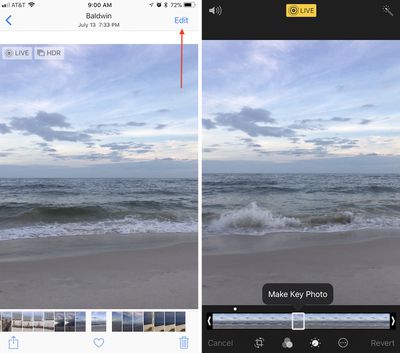
how to edit live photo 1

  1. Open Photos.
  2. Tap the "Albums" tab, then navigate to the Live Photos album to find your image.
  3. Tap "Edit" in the top right corner of the image you select.
  4. At the bottom of the screen, scrub through your Live Photo and find the exact spot you want for a new Key Photo.
  5. Tap "Make Key Photo."
  6. Tap "Done."

Changing a Live Photo Effect
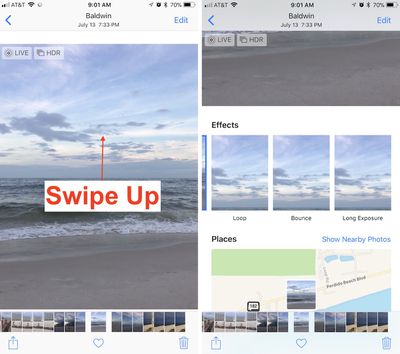
how to edit live photo 2

  1. Find the Live Photo you want to edit and select it.
  2. From the center of the screen, swipe up.
  3. Here you'll find three new Live Photo effects.
  4. Choose Loop, Bounce, or Long Exposure.
  5. Swipe down to see the effect in full screen.

Live Photos now have the full suite of editing options previously available to traditional still photos only, including: rotating, cropping, filters, and light and color balancing. You can also choose to mute the Live Photo (volume icon at the top left in edit mode), and automatically enhance it (wand icon at the top right in edit mode). Markup is one editing feature that does not support Live Photos, however.

After you choose a new Key Photo and find a new effect, you can replay your Live Photo like before by performing a 3D Touch action anywhere on the screen of an iPhone 6s device or later.


Related Forum: iOS 11

Top Rated Comments

zorinlynx Avatar
116 months ago
I've discovered that if you pick a new "Key photo" in a live photo, the quality is quite a bit lower than the original "actual photo".

It seems the live photo video is taken in 4K on the iPhone 7, but 4K video is still less quality than a full resolution still photo. So be careful, and only pick a different "key photo" if the actual photo you took is useless.
Score: 2 Votes (Like | Disagree)
116 months ago
When you export a Live Photo to, say, an email, it will export the JPEG of your selected Key Frame. Be advised that if you select any other frame except the original, you’ll get a 10 megapixel still of a video, which will be not as sharp as the original Key Frame. AirDrop and iMessage will send the full Live Image.
Score: 1 Votes (Like | Disagree)
116 months ago
That’s unfortunate. The 10 MP resolution indicates that the iPhone 8 still uses the pic + video for live images. Ah well.

Also, you can mute a live image: edit, and click the audio button in top left corner.

Score: 1 Votes (Like | Disagree)
zorinlynx Avatar
116 months ago
Isn’t only the picture itself taken as the photo while the rest is just video?
This would mean that choosing a new key photo would decrease the quality, wouldn’t it??
This is a good assumption to make, but I did wonder if Apple found a way to make the entire live photo full resolution, so I wanted to check for myself.

I confirmed that it's indeed not full resolution, like I expected. But Apple doesn't make this obvious so it's to everyone's benefit to be aware of the reduced quality when you change the key photo.
Score: 1 Votes (Like | Disagree)
116 months ago
None of the new effects are particularly useful. One of them should have been “export gif” since that’s what non-iOS 11 users can actually see. If you send a photo with the new effects to a non-iOS 11 user they get a short video clip. Lame.
Score: 1 Votes (Like | Disagree)

Popular Stories

Apple Event Logo

Apple Working on All-New Operating System

Wednesday July 29, 2026 11:39 am PDT by
Apple is developing an all-new operating system that is essentially a mix of tvOS, watchOS, and iOS, according to Bloomberg's Mark Gurman. In a report this week, he said the operating system will feature a grid of icons, widgets, and apps, along with customizable clock faces. The new software platform is intended for Apple's long-rumored smart home hub. With built-in facial recognition,...
imac video apple feature

Apple Made Its Second-Biggest Acquisition Ever This Year

Wednesday July 29, 2026 12:03 pm PDT by
Apple this year acquired Israeli startup Q.ai for close to $2 billion, according to the Financial Times. That would make this Apple's second-biggest acquisition ever, after it paid $3 billion for the popular headphone maker Beats in 2014. This is also the largest known Apple acquisition since the company purchased Intel's smartphone modem business and patents for $1 billion in 2019. Q.ai...
Dynamic Island iPhone 18 Pro Feature

iPhone 18 Pro: Twelve Changes Coming to Apple's Next Flagship

Thursday July 30, 2026 3:43 am PDT by
We're less than two months out from the launch of Apple's premium next-generation smartphone lineup, and while we're not expecting a dramatic change in terms of functionality, there are still several enhancements rumored to be coming to the iPhone 18 Pro and iPhone 18 Pro Max. One thing worth noting is that Apple is reportedly planning a major change to its iPhone release cycle this year,...

🔗 Related Apple News & Rumors

Stay updated with the latest Apple ecosystem news and verified rumors










































