How to Sign Up for iCloud Family Storage Plans in iOS 11 - MacRumorsOpen MenuShow RoundupsShow Forums menuVisit ForumsOpen Sidebar
Skip to Content

How to Sign Up for iCloud Family Storage Plans in iOS 11

by

Apple's Family Sharing feature allows you to share music, movies, apps, photos, and more with family members, and in iOS 11, Family Sharing extends to Apple's iCloud Storage plans.

When you purchase a 200GB or 2TB iCloud Storage plan, all members of your family can share the storage space. Depending on how many family members you have, family plans offer more storage at a better price than individual plans.

For example, a 50GB storage plan is priced at $0.99 per person. For two people, the $2.99 200GB plan offers each person an additional 50GB of storage for only $1 more.

How to Upgrade to a Family iCloud Storage Plan

  1. Open the Settings app.
  2. Tap on your Apple ID profile at the top of the app.
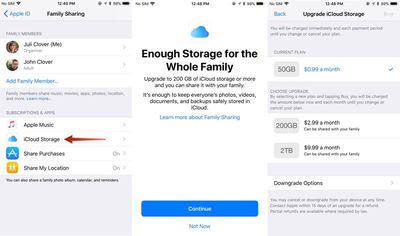
  3. Choose "Family Sharing," the sixth option in the list.icloudfamilysharing
  4. Tap on "iCloud Storage" to bring up a notice about the new Family Sharing options.
  5. Click "Continue" to choose a plan.
  6. Pick a 200GB or 2TB plan.

You can also access the plan settings through the standard iCloud Storage menu in the Settings app, accessible by going to iCloud > Manage Storage after tapping on your profile.

How to Stop Sharing iCloud Storage With Family

You can sign up for a 2TB or 200GB storage plan and keep family members from accessing your storage space. Here's how:

  1. Open the Settings app.
  2. Tap on your Apple ID profile.
  3. Choose "Family Sharing."
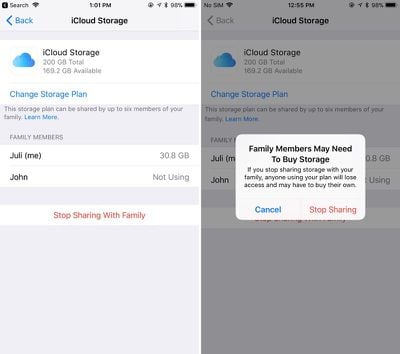
  4. Choose "iCloud Storage."familystoragestopsharing
  5. Tap on "Stop Sharing With Family."

How to Downgrade iCloud Storage

If you want to go back to a cheaper iCloud Storage option, downgrading is as simple as choosing a new plan. New rates won't kick in until the next billing period.

  1. Open the Settings app.
  2. Tap on your Apple ID profile.
  3. Choose "iCloud."
  4. Tap on "Manage Storage."
  5. Choose "Change" under the iCloud Storage option.
  6. Select a 5GB or 50GB plan to downgrade.

It's important to note that there's no way to allocate how much storage each person gets when using one of Apple's new iCloud Storage plans for families, so it's not always an even split. If a family member is hogging too much space, that's a problem that will need to be worked out offline. You can see how much storage each family member is using by going to profile > Family Sharing > iCloud Storage.
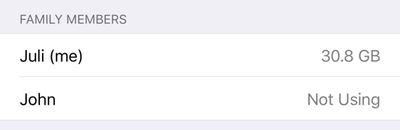
familystoragespaceused
When you choose a 200GB or 2TB storage plan and opt in to Family Sharing, family members who are on the free 5GB plan will be upgraded automatically and will begin using the family storage plan.

Family members who already have a paid plan will need to opt in to the family storage plan to transfer over from their own plans. If they want to have separate storage, your family members can continue to pay for their own plans and choose not to opt into the family plan.

To let your family know that you've signed up for a family iCloud plan, Apple offers an automatic iMessage alert that can be sent out to family members that lets them easily switch over to the family plan.


Tag: iCloud

Top Rated Comments

Blackstick Avatar
119 months ago
Great. When can I share the damn Photos library with my wife?
Score: 11 Votes (Like | Disagree)
119 months ago
This is a great question. I hope so because the shared folders are not full resolution. I want to share photo library with my wife but with current iCliud set up it can't be done. Basically the way it works now is one of us has he main photo library that is synced to the family iMac and one has another iCloud account where we have to airdrop the pics we want into the main one.


This is why my wife and I still use the same iCloud account when setting up our iPhones. I just make sure I turn some things off that conflict between the two (or that we don't want - iCloud Drive, iMessages and FaceTime for each others number etc), and just live with it. But in an ideal world, we should be able to have our own accounts under family sharing, and just sync the same default photo albums. I like how I can just open up my Photos app and see what photos my wife has taken of my kids today when they were out, and vice versa.
Score: 4 Votes (Like | Disagree)
load97 Avatar
119 months ago
+1, need! As it stands, we have to manually copy photos in to a shared album. It's silly.
It’s embarrassing for Apple.
Score: 3 Votes (Like | Disagree)
Anonymous Freak Avatar
119 months ago
Great. When can I share the damn Photos library with my wife?
+1, need! As it stands, we have to manually copy photos in to a shared album. It's silly.
Score: 3 Votes (Like | Disagree)
Eduardo1971 Avatar
119 months ago
Thank you for the reminder MR!!!

With all these iOS 11 goodies I totally forgot about this...I’m adding my family to this!!
Score: 3 Votes (Like | Disagree)
119 months ago
Wish you could use family sharing and still have each Apple ID on a separate credit card.
Score: 2 Votes (Like | Disagree)

Popular Stories

General iCloud App Feature

Apple Quietly Boosts Email Feature for iCloud+ Subscribers

Tuesday October 6, 2026 3:27 am PDT by
Yesterday we reported that Apple tripled the number of iCloud Mail aliases users can create, from three to nine. But it turns out that's not the only email-related limit Apple has raised. The company has also bumped the number of email addresses you can use per iCloud Custom Domain, from three to 10. If you subscribe to iCloud+, you can use a domain name you already own for your iCloud Mail...
General iCloud App Feature

Apple Quietly Triples iCloud Mail Alias Limit to Nine

Monday October 5, 2026 5:15 am PDT by
Apple appears to have quietly tripled the number of iCloud Mail aliases users can create, increasing the limit from three to nine. The increase was first noticed last week by a Reddit user, and picked up shortly after by a member of the MacRumors forums. MacRumors can confirm the change is live at iCloud.com. The increased limit has not been mentioned by Apple, so it could conceivably be a...
iPhone Duo Display Cracking

Apple Alerts Stores to iPhone Duo's Display Cracking Issue

Friday October 30, 2026 3:20 pm PDT by
In a memo shared with Apple Stores and Apple Authorized Service Providers this week, and later obtained by MacRumors, Apple provided technicians with guidance on how to diagnose and address the iPhone Duo's inner display cracking issue. If a customer reports the issue, Apple advised technicians to inspect the iPhone Duo and repair or replace it in accordance with their standard procedures....
Latest Stories
Apple Watch Ultra 4 Hits All-Time Low Price With Amazon's $99 Discount
11 hours ago
Reminder: Apple's Big Discount on Beats 360 Ear Cushions Ends Today
11 hours ago
Here's a New Tour of Apple's HomeView Software
12 hours ago
Apple Reveals New iPad Mini's Battery Capacity
13 hours ago
Top Stories: Apple's Big MacBook Pro, iPad mini and iMac Updates
14 hours ago
'Pluribus' Season 2 Reportedly Starts Production Today
21 hours ago
iPhone 18 Pro Sales Surge in China, Offsetting Decline in U.S. and Japan
21 hours ago
HomeView Software 27.2: Wallpapers, Control Center, and More
1 day ago
Apple Alerts Stores to iPhone Duo's Display Cracking Issue
1 day ago
iOS 27.3 Will Enable These Apple Intelligence Features in China
1 day ago
Apple Says iOS 27.3 Beta Coming Next Week
1 day ago
Apple's Flash Storage Suppliers Are Finally 'Getting Their Revenge'
1 day ago
14 New Things Your iPhone Can Do in iOS 27.2
1 day ago
iPhone Duo Review: One Week Later
1 day ago
Samsung Mocks iPhone Duo Display Cracks in New Ad Campaign
1 day ago
The MacRumors Show: OLED MacBook Pro, iPad Mini 8, and More
1 day ago
MacBook Pro With Touch Display: 15 More Details Revealed
1 day ago
Russia Places Apple on State Surveillance Registry
2 days ago
Halloween Weekend Brings Discounts on Apple Accessories and Pre-Orders
2 days ago
Apple Has Released More Than 25 New Products in the Past Two Months
2 days ago
Local Code Launches as Free, Private AI Assistant Tool for Mac
2 days ago
Apple Acquires Ascend.io
2 days ago
HomePod Mini 2 Launches Today: All the New Features
2 days ago
AirTag 2 4-Pack Drops to New Low Price of $69.99
2 days ago
Rian Johnson's iPhone Camera App Goes Viral
2 days ago
Where Did All the iPhone Duos Go? Mostly to Apple's Stores
2 days ago
Apple's Touchscreen MacBook Pro Could Ship 1.5M Units in 2027
2 days ago
New Apple TV 4K and iPad Mini: RAM Amounts Revealed
2 days ago
Apple Executive Comments on New iPad Mini Lacking 120Hz Display
2 days ago
Here's a Hands-On Look at HomePod Mini 2's New Two-Tone Colors
2 days ago

🔗 Related Apple News & Rumors

Stay updated with the latest Apple ecosystem news and verified rumors