

How to Hide Text Previews for Every App Notification on iOS 11's Lock Screen - MacRumorsOpen MenuShow RoundupsShow Forums menuVisit ForumsOpen Sidebar
Skip to Content

How to Hide Text Previews for Every App Notification on iOS 11's Lock Screen

by

iOS 11 has introduced a simple blanket solution for those who want to hide text previews for all of their apps at one time, bringing about a quick remedy for anyone concerned about privacy on iPhone and iPad. In previous iterations of iOS, you could only toggle the "Show Preview" notification setting on or off for select apps, and the feature was largely exclusive to a few of Apple's own first-party apps, like Messages.

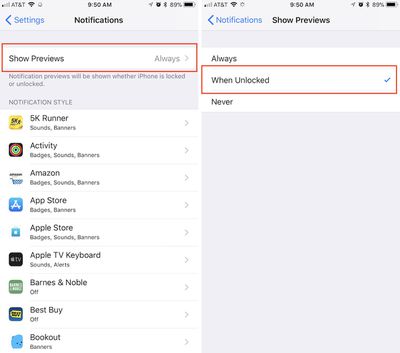
With iOS 11, that option has extended to individual third-party apps, and Apple has now introduced an overarching "Show Previews" toggle for all apps installed on your iOS device.

Hiding Text Previews for All Apps on the iOS Lock Screen
how to show preview ios 11

  1. Open the Settings app.
  2. Tap "Notifications."
  3. Tap "Show Previews."
  4. Tap "When Unlocked."

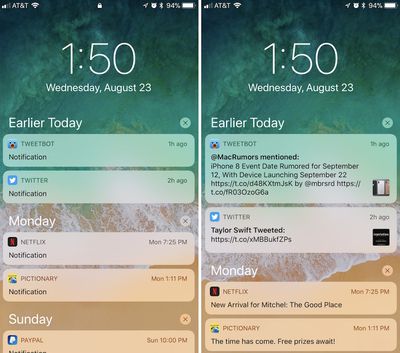
With this setting turned on, every app that you have notifications enabled for will appear on the Lock Screen, but without the actual content of the notification displayed. You can quickly make that content appear with a simple press (but not tap) of your finger on Home Button to activate Touch ID, unlocking your device and confirming it's you who wants to read the various messages.

If you choose "Never" in the same area of Show Preview settings, these notification previews won't show notification content even when the iPhone or iPad is unlocked.
how to show preview ios 11 2

Preview notifications hidden (left), and then shown after the iPhone is unlocked (right)

The same options are also available for each individual app, allowing for more granular control over your notification privacy settings in iOS 11. If you don't want the same setting for all of your apps, visit Settings > Notifications > scroll to the desired app > and then scroll to the bottom of the app's notification page to find Show Preview settings for that specific app.


Related Forum: iOS 11

Top Rated Comments

117 months ago
I would rather having an option to remove notifications history from popping up on a locked home screen.

Score: 2 Votes (Like | Disagree)
Scottsoapbox Avatar
117 months ago
Still waiting for a All On / All Off toggle for every app setting in settings. 265 GB devices hold way to many apps to be doing things an app at a time in a list. At least let us select that we want most X (notifications, whatever) on or off and then we can change the few exceptions individually.
Score: 1 Votes (Like | Disagree)

Popular Stories

iOS 27 Next to iPhone

Here's When iOS 27 Rolls Out Today in Every Time Zone [Update: It's Out]

Sunday September 13, 2026 3:00 am PDT by
Update 10:04 a.m.: iOS 27 is rolling out now, though it may take a bit for all users to see it, so keep checking! Apple is about to release iOS 27, which will finally deliver more advanced Siri AI capabilities as well as a variety of other refinements, improvements, and new features to iPhones. It's Apple's biggest software update of the year, and Apple announced at Wednesday's iPhone event...
deep black iphone 18 pro

Apple Says iPhone 18 Pro Max Sold in U.S. Differs in One Way

Saturday September 12, 2026 3:27 pm PDT by
As noted by Nicolas Lellouche, who writes for the French tech website Numerama, Apple has updated its tech specs pages for the iPhone 18 Pro and iPhone 18 Pro Max to clarify which models are equipped with its new C2 cellular modem and where. Apple now says the iPhone 18 Pro has a C2 modem worldwide, while the iPhone 18 Pro Max uses the chip in every country except for the U.S. According...
iphone duo

IMAX Reacts to iPhone Duo's 1:1.4 Aspect Ratio Displays

Friday September 11, 2026 4:42 am PDT by
Production theater company IMAX has responded in a mixed way to Apple's embrace of a 1:1.4 aspect ratio on the iPhone Duo's inner and outer displays. The boxier ratio happens to be very close to the classic "full-frame" IMAX 1.43:1 aspect ratio, which comes from the geometry of the company's original 15-perforation/70mm film system. In response to an X post from someone wondering if we'll see...

🔗 Related Apple News & Rumors

Stay updated with the latest Apple ecosystem news and verified rumors











































