How to Screen Record Your iPhone or iPad - MacRumorsOpen MenuShow RoundupsShow Forums menuVisit ForumsOpen Sidebar
Skip to Content

How to Screen Record Your iPhone or iPad

by

iOS comes with a handy new Control Center function that allows you to record what you're doing on your screen. It's great if you want to capture gameplay, walk someone through a tutorial in an app, demonstrate a bug, and more, and it's available on both iPhones and iPads.


Enabling Screen Recording Button

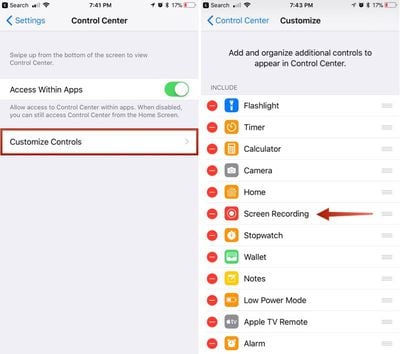
If you don't have the screen recording icon in Control Center, you can add it in the Settings app.

  1. Open the Settings app.
  2. Choose Control Center.
  3. Select "Customize Controls." ios11enablingscreenrecording
  4. Tap the + button next to "Screen Recording" to add it to the "Include" section.

How to Record Your Screen

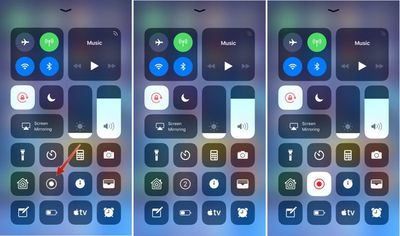
  1. Bring up the Control Center.
  2. Tap the icon for screen recording. It's two nested circles. ios11screenrecording
  3. Your iPhone or iPad will start recording video of your screen automatically following a three second countdown.
While screen recording is turned on, a red bar is plastered across the top of the display so it's clear when you're recording and when you're not.
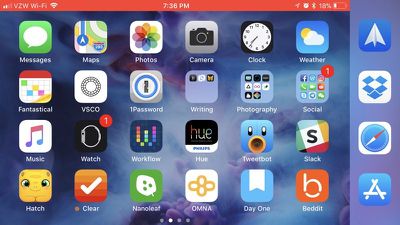
ios11screenrecordingredbanner

Ending a Recording

To stop recording the screen, you can go back to Control Center and toggle the screen recording icon, or your can tap the red bar at the top of the screen and confirm you want to end the recording. The video you made is then saved to the Photos app.
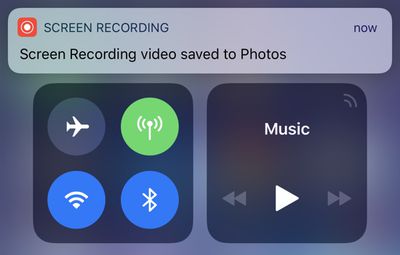
screenrecordingsavedios11

Screen Recording Options

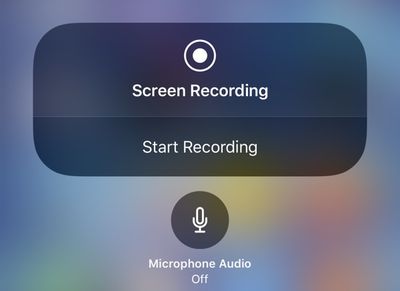
There are a few options that are available when making a screen recording, which can be accessed directly in the Control Center. To bring up these options, simply 3D Touch on the screen recording icon.
ios11screenrecording3dtouch
From this menu, you can start a screen recording and toggle microphone audio on or off. These are the only options that are available for the feature -- it's fairly basic.


Related Forum: iOS 11

Top Rated Comments

trusso Avatar
114 months ago
I get that exact same option on my iPhone 6+ by just tapping and holding on the screen recording icon.

Really haven't felt I've been missing out on anything over the past several years by not having 3D touch on my iPhone.
You're not. I upgraded to a 6S last year for the larger internal storage, and I've forgotten 3D touch was even a thing. I never use it.
Score: 2 Votes (Like | Disagree)
rob.james.arias Avatar
114 months ago
Aka “How to record those Snaps”
Score: 2 Votes (Like | Disagree)
kdarling Avatar
113 months ago
Starting a Recording
[LIST=1]
* Bring up the Control Center.
* Tap the icon for screen recording. It's two nested circles.

Dear UI vetters at Apple (if you even exist any more):

Please add labels to all your icons, so that people who don't memorize them, and/or older people like my Mom, can figure out what the heck each icon does.

Thank you. Oh, and don't let Ive design any part of an UI any more, please.
Score: 1 Votes (Like | Disagree)
Glassed Silver Avatar
114 months ago
I get that exact same option on my iPhone 6+ by just tapping and holding on the screen recording icon.

Really haven't felt I've been missing out on anything over the past several years by not having 3D touch on my iPhone.
Contextual previews (linked webpages or maps for example) are a Godsent.

I used to be pretty indifferent about them, thinking it might be a cool feature, but ever since I got my 6S Plus I can honestly say it made iOS a lot more convenient to me.

My iPad Air feels outright awkward without it.

Glassed Silver:win
Score: 1 Votes (Like | Disagree)
aircanman Avatar
114 months ago
I’d like to see an option where it highlights where on the screen you press. This would make it easier for creating tutorial videos.
Score: 1 Votes (Like | Disagree)
ArtOfWarfare Avatar
114 months ago
Accessing Screen Recording Options

There are a few options that are available when making a screen recording, which can be accessed directly in the Control Center. To bring up these options, simply 3D Touch on the screen recording icon.

record iphone ipad screen ios 11 image

From this menu, you can start a screen recording and toggle microphone audio on or off. These are the only options that are available for the feature -- it's fairly basic.

I get that exact same option on my iPhone 6+ by just tapping and holding on the screen recording icon.

Really haven't felt I've been missing out on anything over the past several years by not having 3D touch on my iPhone.
Score: 1 Votes (Like | Disagree)

Popular Stories

HomePod mini and Apple TV Sage

New Apple TV and HomePod Mini Are 'Nearly Ready' to Launch, New Siri Remote Also Rumored

Sunday May 31, 2026 8:47 am PDT by
New models of the Apple TV 4K and HomePod mini are "nearly ready to go," according to the latest word from Bloomberg's Mark Gurman. Subscribe to the MacRumors YouTube channel for more videos. Both devices have been ready "for months," but Apple is holding off on launching them until the more personalized version of Siri is available, he said. "I am told the hardware for the next Apple TV...
Apple Foldable Thumb

First 'Confirmed' iPhone Ultra Color Allegedly Revealed in Leaked Image

Monday June 1, 2026 4:39 am PDT by
Apple is expected to launch its first foldable iPhone later this year. Rumors suggest the "iPhone Ultra" will come in two color options, and a leaker shared an image today that allegedly shows one of them. Posted on Weibo by the Chinese leaker known as Ice Universe, the image purportedly offers a first glimpse of Apple's foldable in white. The device is believed to have entered early mass...
Meta Ray Ban Glasses

Apple Glasses Reportedly Launching in 'Late 2027' With These Features

Sunday May 31, 2026 9:21 am PDT by
Apple is now aiming to release its first smart glasses in "late 2027," according to the latest word from Bloomberg's Mark Gurman. Meta Ray-Bans He previously said that Apple planned to begin shipping the glasses by early 2027, but he said the product has faced development delays. The glasses will feature "oval-shaped cameras, unique colors, and multiple frame styles," according to Gurman....

🔗 Related Apple News & Rumors

Stay updated with the latest Apple ecosystem news and verified rumors