

How to Scan Documents in the Notes App on iPhone - MacRumorsOpen MenuShow RoundupsShow Forums menuVisit ForumsOpen Sidebar
Skip to Content

How to Scan Documents in the Notes App on iPhone

by

In iOS and iPadOS, Apple includes a feature in Notes that allows you to quickly scan all kinds of documents so you can keep track of everything from receipts to recipes and photos.
iOS 17 General Notes Feature
The Document Scanner detects the edges of a document, aligns things properly, and removes all glare and tilt so you get a clean scan every time. Apple's document scanning tools are well engineered and impressive, with excellent performance on everything from photos to documents.

The feature is available on both iPhone and iPad. Here's how to use it:

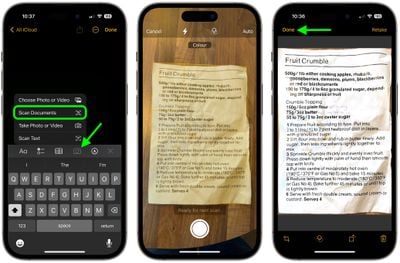
  1. Open the Notes app and create a new note.
  2. Tap the Camera icon, then choose Scan Documents.
  3. Once the document scanning interface is open, you can optionally tap the three circles at the top to choose color, grayscale, black and white, or photo for your scan. The default option is color.
  4. Tap on the flash icon if you need to adjust the flash options. The default is auto, which will cause the flash to go off if you're in a room with low light.
  5. Focus the camera on your document, making sure the yellow box is lined up with the edges of your document.
  6. When it's aligned, press on the camera button to snap a photo. The Notes app will automatically correct for any tilting. If you don't press the camera button and the Auto shutter option is on, after a few moments the document will be automatically scanned.
  7. If the scan is to your liking, tap Done. If you want to try again, choose Retake.
notes

The Document Scanner is set up to take multiple scans in a row, so once you tap "Keep Scan," it returns to the scanning interface. To get back to Notes after you've scanned all of your documents, you'll need to tap on "Save."

Your scanned document is inserted into the current note, where it can be edited. To edit, simply tap on the scan. Editing tools include adding an additional scan, cropping, changing the color, changing the orientation, and opening up the Share sheet to send it to Messages, Mail, social networks, and other apps.


Tag: Notes

Top Rated Comments

hank moody Avatar
116 months ago
I love it but it LACKS “save as pdf”.
I am still using Scanbot because i need this.
Score: 10 Votes (Like | Disagree)
AstroRob Avatar
116 months ago
I love it but it LACKS “save as pdf”.
I am still using Scanbot because i need this.
Actually if you hit the share option when you click on the scanned doc, one of the option is to make PDF, which I assume also lets you combine multiple pages from a single scan session.
Score: 5 Votes (Like | Disagree)
gwhizkids Avatar
116 months ago
It does a great job, especially at an angle. I wish, though, that this were a standalone capability. Don't want to create (and then delete) a note, just to get a scanned document. Relatively minor nit, but a nit, nonetheless.
Score: 4 Votes (Like | Disagree)
Weaselboy Avatar
116 months ago
Really? Scanner Pro is still way better. the scan itself is darker and easier to read, it scans text (OCR) automatically so it is easily searchable and it saves as .pdf in any location you want.
I agree. I just used Notes to do a couple tests and Scanner Pro gets a PDF scanned and in my ~/Documents folder with fewer steps.

I think using Notes for this will be okay for the occasional user who does not have something like Scanner Pro, but Scanner Pro seems more streamlined for this purpose.
Score: 3 Votes (Like | Disagree)
iapplelove Avatar
116 months ago
Forgive me cause I’m slow lol but what’s the difference between this and taking a photo?
Score: 3 Votes (Like | Disagree)
116 months ago
I thought this was only on iPads for some reason. Great news.

Goodbye, Scanner Pro!
Really? Scanner Pro is still way better. the scan itself is darker and easier to read, it scans text (OCR) automatically so it is easily searchable and it saves as .pdf in any location you want.

This Notes version is ok if you don't have a better alternative but if you already have Scanner Pro, I wouldn't give it up. It's not even close to being half as good.
Score: 2 Votes (Like | Disagree)

Popular Stories

Apple Event Logo

Apple Working on All-New Operating System

Wednesday July 29, 2026 11:39 am PDT by
Apple is developing an all-new operating system that is essentially a mix of tvOS, watchOS, and iOS, according to Bloomberg's Mark Gurman. In a report this week, he said the operating system will feature a grid of icons, widgets, and apps, along with customizable clock faces. The new software platform is intended for Apple's long-rumored smart home hub. With built-in facial recognition,...
imac video apple feature

Apple Made Its Second-Biggest Acquisition Ever This Year

Wednesday July 29, 2026 12:03 pm PDT by
Apple this year acquired Israeli startup Q.ai for close to $2 billion, according to the Financial Times. That would make this Apple's second-biggest acquisition ever, after it paid $3 billion for the popular headphone maker Beats in 2014. This is also the largest known Apple acquisition since the company purchased Intel's smartphone modem business and patents for $1 billion in 2019. Q.ai...
Dynamic Island iPhone 18 Pro Feature

iPhone 18 Pro: Twelve Changes Coming to Apple's Next Flagship

Thursday July 30, 2026 3:43 am PDT by
We're less than two months out from the launch of Apple's premium next-generation smartphone lineup, and while we're not expecting a dramatic change in terms of functionality, there are still several enhancements rumored to be coming to the iPhone 18 Pro and iPhone 18 Pro Max. One thing worth noting is that Apple is reportedly planning a major change to its iPhone release cycle this year,...

🔗 Related Apple News & Rumors

Stay updated with the latest Apple ecosystem news and verified rumors









































