iOS 11 brings new functionality to Siri, including a translation feature that allows Siri to translate words and phrases spoken in English to a handful of other languages. Translation is super simple to use, and while the translations aren't always perfect, they get the gist of what you're attempting to say across to someone who speaks another language.


Got a tip for us?Let us know
Using Siri Translate
- Activate Siri, either by holding down the Home button or using a "Hey Siri" command.
- Tell Siri the phrase you want to translate and the language you want it in. For example: "Siri, how do I say where's the bathroom in Spanish?"
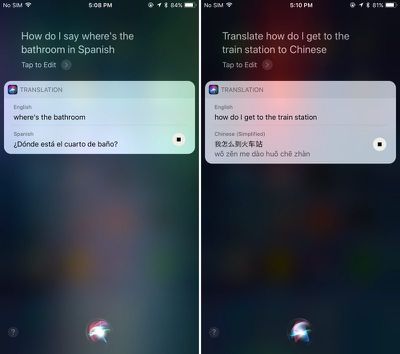
- Siri will respond with the appropriate translation, both in text form and vocally. The vocal component can be replayed by pressing the play button located at the bottom of the translation.
- There are multiple ways to phrase your translation requests. Siri will respond to "Translate X to X language" or "How do I say X in X language?"
Available Languages
Siri can translate English to Mandarin, French, German, Italian, and Spanish. There's no two-way translation available yet - it's only English to the above listed languages. Apple has said it plans to add additional languages to the Siri translation feature following the release of iOS 11.
Apple appears to be using an in-house translation engine for Siri, as the translations do not match up with translations provided by popular services like Google Translate or Bing Translate. Also of note, while Siri can translate from English to several other languages, the translation features do not work with British, Canadian, or Australian English settings.
Because Siri speaks translations aloud, the translation feature can come in handy when traveling and trying to get simple communications across. It's a simple addition, but one that may go a long way towards making Siri more useful.
Tag: Siri Guide
Related Forum: iOS 11
Popular Stories

New Apple TV 4K Announced With A19 Chip, Updated Siri Remote, More
Apple today announced the fourth-generation Apple TV 4K, with key features including an A19 chip, Siri AI support, an updated Siri Remote that has Find My support with Precision Finding, built in far-field microphones, support for surround sound with four HomePods in front and rear pairs, and more.
The A19 chip in the new Apple TV 4K delivers up to 50% faster CPU performance and up to twice...

Apple Announces $149 HomePod Mini 2 With Siri AI, 'Sound Glow', and Four-Speaker Surround Sound
Apple today announced a new HomePod mini equipped with Siri AI, new colors, and improved audio experiences. The new HomePod mini has an S10 chip that supports advanced computational audio, and Apple says it optimizes dynamic range, loudness, and acoustic performance in real-time.
A Sound Glow feature turns the HomePod mini's top into a "visual canvas" that glows and animates in sync with...

New Apple TV 4K and Siri Remote Have These 14 New Features
The new Apple TV 4K and updated Siri Remote unveiled today have quite a few new features, as outlined in our all-in-one summary below.
Here are 11 changes coming with the new Apple TV:
A19 chip, for up to 50% faster CPU performance and up to twice as fast graphics performance compared to the previous model with the A15 chip.
8GB of RAM is very likely, up from 4GB of RAM in the previous ...














































Top Rated Comments
Similar to Maps, they'll continue to be far behind the features.
Should've struck a deal with Google to implement Google Translate into iOS, as I've never come across a language I couldn't translate - and I've been to a lot of places.
More powerful than all other machine translators. Still not always perfect, but incredibly close.