How to Save Space Using Built-In iOS Storage Features - MacRumorsOpen MenuShow RoundupsShow Forums menuVisit ForumsOpen Sidebar
Skip to Content

How to Save Space Using Built-In iOS Storage Features

by

Starting with iOS 11, Apple began offering a new feature that provides suggestions on how you can save space on your iOS device. These built-in space-saving suggestions, which can be found in the Settings app, can help you free up space on your iPhone when storage space is running low.

Toggling on Space Saving Suggestions

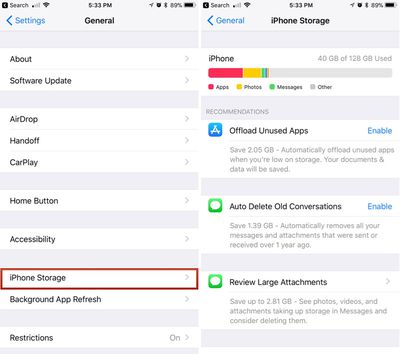
  1. Open the Settings app.
  2. Scroll down and tap on "General."
  3. Choose "iPhone Storage."ios11iphonestorage
  4. Tap "Enable" on any of the suggestions Apple provides to turn them on.

Offload Unused Apps

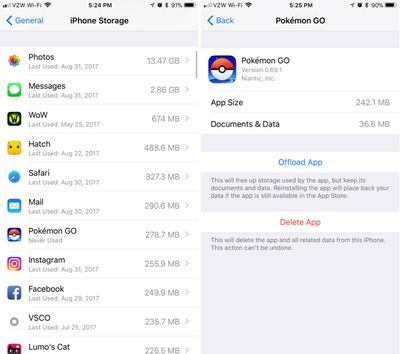
One of Apple's suggestions is to automatically delete unused apps when the storage space on your device is low. If you enable this feature, Apple will delete apps you don't use often, while saving the documents and data so you can download them again and pick right back up where you were if necessary.
ios11offloadapps
You can also offload individual apps by selecting them from the list of apps located just below all of Apple's suggestions.

Auto Delete Old Conversations

With "Auto Delete Old Conversations" enabled, Apple will automatically delete all messages and attachments that were sent over a year ago. This can save significant space, but be aware that once gone, there's no getting those messages back.

Review Large Attachments

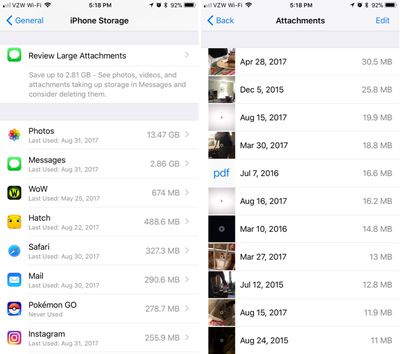
The "Review Large Attachments" feature lets you see a list of the largest files on your device, located in Photos, Mail, and Messages. A tap will let you view a file up close, and a swipe to the left on an item in the file list will bring up an option to delete it. You can mass delete files by tapping on the "Edit" button in the upper right corner of the device.
ios11storageattachments
Along with these three options for storing space, the Storage section of the Settings app also displays all of the apps you have installed, with the app using the most storage space at the top. It also lets you know how long ago the app was last used, making it easy to cull items that aren't used often.

Depending on what's installed on your device, you may or may not see all of these storage options, but if you're getting low on space, they should appear.


Related Forum: iOS 11

Top Rated Comments

ArtOfWarfare Avatar
119 months ago
Offloading your apps sounds risky to me. It ends with "if the app is still available in the App Store" - not sure about you guys, but when MacRumors tells me something will likely be remove from the App Store, I jump on it.

IE, I have Floppy Cloud on my iPhone, the app that has a secret NES emulator in it - just put an NES ROM in Dropbox and the app will load up and run the game. I also have a "flashlight app" on my iPhone that actually enables tethering without paying your carrier.

Score: 3 Votes (Like | Disagree)
HalGumbert Avatar
119 months ago
Is there any way to 'select all' rather than tapping each large attachment?
Score: 2 Votes (Like | Disagree)
M.PaulCezanne Avatar
119 months ago
Welcome features. Thanks for the tips!

Score: 2 Votes (Like | Disagree)
119 months ago
Should this only delete the attachment in the message, and not from the photo library?
Yes, this is only to clear up space associated with each app, so getting rid of the image/video/pdf attachments in Messages will not remove them from the photo library.
Score: 1 Votes (Like | Disagree)
119 months ago
While I was in the public beta, I saw the "Recommendations" section under Settings->General->Iphone Storage. But now that I have the final version of iOS 11, I don't - and my wife (who was never in the beta) doesn't see it either?!

Anyway, both of us have 16gb iPhone 6 and our category picture never looks like all these web sites swooning over the new chart - ours is mostly "Other" - our "System" category takes up 8.5gb!! And none of the web sites detailing how to 'free up space like a pro' says a peep about how to reduce that 'System' category. I know for a fact that base iOS 11 doesn't take up 8.5gb - there must be caches, logs, whatever that could be cleared. Anyone have any ideas on what we could try (short of factory reset)?

A couple things I already do:
- Disable "iCloud Photo Library" for a few minutes and then enable it again - that sometimes frees up a lot of storage (I'm guessing because some caches get cleared and, obviously, some low-grade images are no longer kept on the phone).
- Prune all old conversations in iMessage (especially those with photos). One of the storage recommendations allowed you to do pruning there (including deleting attachments) but like I said, we don't see the recommendations anymore.

Are there any other ways to affect the "System" category?

Any suggestions are much appreciated,
Tom
Score: 1 Votes (Like | Disagree)
macduke Avatar
119 months ago
It's also worth noting that iMessages in the cloud will be coming back (beta feature) with an update to iOS 11 at some point. Though I'd be fine with an option to keep messages for three months. One month is too short in case I need to reference something my wife sent me in search, but a year is too long.

Offloading your apps sounds risky to me. It ends with "if the app is still available in the App Store" - not sure about you guys, but when MacRumors tells me something will likely be remove from the App Store, I jump on it.

IE, I have Floppy Cloud on my iPhone, the app that has a secret NES emulator in it - just put an NES ROM in Dropbox and the app will load up and run the game. I also have a "flashlight app" on my iPhone that actually enables tethering without paying your carrier.
You can make copies of these apps in iTunes. I think. Though didn't they recently remove the App Store from iTunes? I just realized I haven't synced my iPhone to iTunes in years so I have no idea how it works any more, lol.

Apple doesn't force the removal from your phone if the app is banned?
The concern is that once the app is "removed" from your device using this feature (not using the app in a long time), it won't automatically come back if you tap on it because it's not in the app store.
Score: 1 Votes (Like | Disagree)

Popular Stories

iPhone Duo Display Cracking

Apple Alerts Stores to iPhone Duo's Display Cracking Issue

Friday October 30, 2026 3:20 pm PDT by
In a memo shared with Apple Stores and Apple Authorized Service Providers this week, and later obtained by MacRumors, Apple provided technicians with guidance on how to diagnose and address the iPhone Duo's inner display cracking issue. If a customer reports the issue, Apple advised technicians to inspect the iPhone Duo and repair or replace it in accordance with their standard procedures....
iPad mini OLED feature 1

Apple Executive Comments on New iPad Mini Lacking 120Hz Display

Thursday October 29, 2026 1:47 pm PDT by
While the new iPad mini has an OLED display, the device does not support ProMotion, meaning the display's refresh rate is limited to 60Hz instead of 120Hz. ProMotion support would have allowed for the iPad mini's refresh rate to automatically adjust from 10Hz to 120Hz depending on the content being displayed, but evidently Apple has kept the feature exclusive to the iPad Pro among iPad...
Pinched iPad Mini

Apple Avoids Showing Pinched Fingers on iPad Mini Page in South Korea

Thursday October 29, 2026 11:52 am PDT by
In the U.S. and most other countries, Apple's website shows the new iPad mini being held by pinched fingers, but this is not the case in South Korea. The new iPad mini shown with pinched fingers on Apple's website in the U.S. On its South Korean website, Apple simply shows an image of the iPad mini on its own. The new iPad mini shown without pinched fingers on Apple's website in South Korea ...
Latest Stories
Apple Offers Steps to Fix Daylight Saving Time Bug on Apple Watch
2 hours ago
Apple Watch Ultra 4 Hits All-Time Low Price With Amazon's $99 Discount
21 hours ago
Reminder: Apple's Big Discount on Beats 360 Ear Cushions Ends Today
21 hours ago
Here's a New Tour of Apple's HomeView Software
21 hours ago
Apple Reveals New iPad Mini's Battery Capacity
22 hours ago
Top Stories: Apple's Big MacBook Pro, iPad mini and iMac Updates
1 day ago
'Pluribus' Season 2 Reportedly Starts Production Today
1 day ago
iPhone 18 Pro Sales Surge in China, Offsetting Decline in U.S. and Japan
1 day ago
HomeView Software 27.2: Wallpapers, Control Center, and More
2 days ago
Apple Alerts Stores to iPhone Duo's Display Cracking Issue
2 days ago
iOS 27.3 Will Enable These Apple Intelligence Features in China
2 days ago
Apple Says iOS 27.3 Beta Coming Next Week
2 days ago
Apple's Flash Storage Suppliers Are Finally 'Getting Their Revenge'
2 days ago
14 New Things Your iPhone Can Do in iOS 27.2
2 days ago
iPhone Duo Review: One Week Later
2 days ago
Samsung Mocks iPhone Duo Display Cracks in New Ad Campaign
2 days ago
The MacRumors Show: OLED MacBook Pro, iPad Mini 8, and More
2 days ago
MacBook Pro With Touch Display: 15 More Details Revealed
2 days ago
Russia Places Apple on State Surveillance Registry
2 days ago
Halloween Weekend Brings Discounts on Apple Accessories and Pre-Orders
2 days ago
Apple Has Released More Than 25 New Products in the Past Two Months
2 days ago
Local Code Launches as Free, Private AI Assistant Tool for Mac
2 days ago
Apple Acquires Ascend.io
2 days ago
HomePod Mini 2 Launches Today: All the New Features
2 days ago
AirTag 2 4-Pack Drops to New Low Price of $69.99
2 days ago
Rian Johnson's iPhone Camera App Goes Viral
2 days ago
Where Did All the iPhone Duos Go? Mostly to Apple's Stores
2 days ago
Apple's Touchscreen MacBook Pro Could Ship 1.5M Units in 2027
2 days ago
New Apple TV 4K and iPad Mini: RAM Amounts Revealed
3 days ago
Apple Executive Comments on New iPad Mini Lacking 120Hz Display
3 days ago

🔗 Related Apple News & Rumors

Stay updated with the latest Apple ecosystem news and verified rumors