

How to Make an Apple Music Profile to Connect With Friends in iOS 11 - MacRumorsOpen MenuShow RoundupsShow Forums menuVisit ForumsOpen Sidebar
Skip to Content

How to Make an Apple Music Profile to Connect With Friends in iOS 11

by

Although Apple has fumbled with social network features within its music apps in the past, the company is trying again with an all-new social sharing ability in iOS 11. There's no exact name for the feature, but Apple describes it as a way for you to discover music that your friends are listening to through sharing playlists, artists, and albums on your own personal Apple Music profile.

If you already have an Apple Music account with a paid subscription, or if you're taking advantage of the service's free three-month trial period, follow these steps to enable the social sharing features within Apple's streaming music service. Note that this guide is specifically tailored for iOS devices, but the process is similar on macOS.

Creating a Profile on Apple Music
how to apple music friends 1

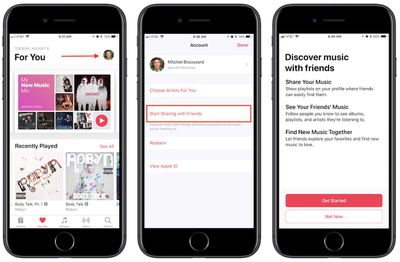
  1. Open Apple Music. (Note: opening Apple Music for the first time after installing iOS 11 should also give you a direct link to "Get Started" with friend sharing, so jump to Step 5 if you tap this button.)
  2. Tap the "For You" tab.
  3. Tap your profile picture in the top right corner.
  4. Choose "Start Sharing with Friends" and then "Get Started."
  5. Upload a profile photo, type in your name, and pick a username so other Apple Music users can find you. Tap "Next" when done.
  6. Choose "Everyone" or "People You Choose" to determine who can see your listening history.
  7. Choose the playlists to share on your profile, or "Hide all" to show none.
  8. Pick contacts to share music with.
  9. Toggle on/off "Friends" and "Artists and Shows" to choose what kind of push notifications you want. Tap "Done."

If you can't find the friend you're looking for in the recommended contacts section, navigate to Apple Music's "Search" tab. With iOS 11, this area now functions as a profile and user playlist search tool as well. Start typing in their name and you might see an "in people" recommendation, or simply tap the "Search" button and you'll see results for Songs, Albums, Playlists, Music Videos, Connect, Artists, and now People and Shared Playlists at the bottom.

With your own Apple Music profile set up, you can begin listening to music as normal, and the more you do the more your favorite albums, artists, and songs will show up in the "Friends Are Listening To" section of your followers' "For You" tabs. On your own "For You" tab, you can tap "See All" and browse a list of recent albums and playlists listened to by your friends, and then tap to add them to your own library.

If your friends allow it, this will even include their own personally created playlists. To discover and save the playlists of a specific person, follow these steps. Note that this guide assumes the friend in question has their activity shared to "Everyone," or that they have chosen you to share with.

Finding Friends' Shared Playlists on Apple Music
how to apple music friends 3

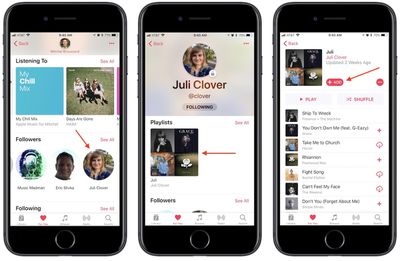
  1. Navigate to your Apple Music profile.
  2. Scroll down to "Following," then tap the friend you're looking for, or tap "See All" for a vertical list.
  3. Scroll through their "Playlists" and "Listening To" to find a collection you want to save.
  4. Tap the collection you want, then "+Add" to place it in your library.

From then on, you'll find friends' playlists taking precedence atop the playlists section of your library, alongside any Apple curated collections. The name of the playlist will be there, along with the name of your friend. Once added, it'll function in much the same way as Apple's own playlists, updating in your library when changes are made by your friend.

You can revisit your profile any time by tapping your profile picture in the top right of "For You," and here you'll see your shared playlists, content you've listened to recently, followers, and following. Tap the "Edit" button to customize items like your profile picture, name, username, follower permissions, and reorganize shared playlists.

If you ever change your mind about sharing a playlist (which also makes it searchable to anyone using Apple Music), tap on the playlist in your library, tap "Edit" in the top right corner, then toggle off "Show on My Profile and in Search." You can follow these same steps for adding a new playlist onto your profile whenever you create a new collection of songs.

Related Forum: iOS 11

Top Rated Comments

ipedro Avatar
119 months ago
Of the few attempts Apple made into social media, they seem to have learned. There’s no use trying to build an Apple branded social media platform to compete with the too entrenched dominance of Facebook. Instead, individual apps can have social features.

iMessage is their most social app and it’s implementing more and more of what we find on platforms like Snapchat. Photos has album sharing and friends can even like photos. Now, Apple Music has a social feature I think many people can get behind. I’d love to know what my friends are listening to. Odds are that because we’re friends, we have similar tastes and that’ll help me discover music I wouldn’t have otherwise found on my own.

Eventually, Apple can build an app that brings all of this together into a sort of feed where you’d be able to see what shared albums you’re a part of, what your friends are listening to, and articles they’ve favorited in Safari.

This is social media, done right.
Score: 3 Votes (Like | Disagree)
M.PaulCezanne Avatar
119 months ago
Ping!
Score: 3 Votes (Like | Disagree)
OtherJesus Avatar
119 months ago
I don't think this is an attempt at building a social network. Just a great way to share music with friends. I think if Apple Music was a thing when Ping came out it would have made much more sense.
Score: 2 Votes (Like | Disagree)
randy98mtu Avatar
119 months ago
That worked. My connection at work isn’t always the best, so maybe that’s why it didn’t work. Thanks!
Score: 1 Votes (Like | Disagree)
earthTOmitchel Avatar
119 months ago
Another interesting thing to note is before I found your fix, I had my girlfriend send me a request via iMessage to share/follow her. I thought clicking that invite would kickstart it for me. But all it did was open the Music app and give a blank error page, with no explanation the what caused the error or how to resolve it. Hopefully Apple makes that error page more helpful in a future update for others. I'm sure they are under the delusion that everyone loved Connect and anyone who would like to share with friends must have of course wanted to follow the handful of artists actually sharing content! Alas, no. Connect was useless and I had no problem turning it off. Never thought that would imply I don't want to share music with friends.
Yeah.. I kicked around the idea for a PSA blog post but it still appears like a small amount of people are facing the problem. I just know how frustrated it made me so trying to share as many place as I can online.

It makes little sense on Apple's part. Connect =/= music profiles, like you said. I want to see recc's from my friends; I don't want to see 3-month-old posts from Little Mix about a now-outdated single drop.
Score: 1 Votes (Like | Disagree)
whyamihere Avatar
119 months ago
You guys might be facing the same problem I was. Did you previously turn off the Connect features of Apple Music on earlier versions of iOS? I did, and because of that the new social profiles were hidden. Try checking: go to Settings app > General > Restrictions > make sure "Music Profiles and Posts" are toggled on.
This was my issue exactly. I had previously signed out/in, and went to "Music" in settings. Had never thought to look in Restrictions. Thank you!


Score: 1 Votes (Like | Disagree)

Popular Stories

Apple Music iPod Page Not Found

Apple Music Has a Hidden iPod You Can Play With

Friday October 23, 2026 7:11 am PDT by
Apple Music has a 404 page easter egg on the web: a functional iPod that appears when you load a page that does not exist, such as music.apple.com/macrumors. "Page Not Found," says Apple. "Give this a spin instead." Apple is clever with this. If you navigate to music.apple.com/ipod instead, the page says "Looking for something?" instead of "Page Not Found." The easter egg is only...

Apple Music New Branding

Apple Music's New Look Officially Announced

Wednesday October 21, 2026 9:06 am PDT by
Following the introduction of a new Apple Music logo and app icon earlier this month, Apple today officially introduced Apple Music's new brand identity. In a YouTube video shared today, Apple said the new Apple Music visuals were "made by sound." More specifically, Apple said it played a sound through a container of water, resulting in the liquid moving at the frequency of the notes. Apple...
apple music new logo red

Apple Music Is Getting a New Logo

Tuesday October 6, 2026 4:06 am PDT by
Apple appears to be rolling out a new logo for Apple Music in its upcoming set of software updates. The logo has been spotted in both macOS 27.2 beta 3 and iOS 27.2 beta 3, and it's identical to the one that Apple used in its Apple Music Hall announcement last month. When Apple used the logo in the venue's press materials and on its new official website, it wasn't clear if this was a one-off ...
Latest Stories
Apple Watch Ultra 4 Hits All-Time Low Price With Amazon's $99 Discount
14 hours ago
Reminder: Apple's Big Discount on Beats 360 Ear Cushions Ends Today
14 hours ago
Here's a New Tour of Apple's HomeView Software
14 hours ago
Apple Reveals New iPad Mini's Battery Capacity
15 hours ago
Top Stories: Apple's Big MacBook Pro, iPad mini and iMac Updates
16 hours ago
'Pluribus' Season 2 Reportedly Starts Production Today
23 hours ago
iPhone 18 Pro Sales Surge in China, Offsetting Decline in U.S. and Japan
1 day ago
HomeView Software 27.2: Wallpapers, Control Center, and More
1 day ago
Apple Alerts Stores to iPhone Duo's Display Cracking Issue
1 day ago
iOS 27.3 Will Enable These Apple Intelligence Features in China
1 day ago
Apple Says iOS 27.3 Beta Coming Next Week
1 day ago
Apple's Flash Storage Suppliers Are Finally 'Getting Their Revenge'
1 day ago
14 New Things Your iPhone Can Do in iOS 27.2
1 day ago
iPhone Duo Review: One Week Later
1 day ago
Samsung Mocks iPhone Duo Display Cracks in New Ad Campaign
2 days ago
The MacRumors Show: OLED MacBook Pro, iPad Mini 8, and More
2 days ago
MacBook Pro With Touch Display: 15 More Details Revealed
2 days ago
Russia Places Apple on State Surveillance Registry
2 days ago
Halloween Weekend Brings Discounts on Apple Accessories and Pre-Orders
2 days ago
Apple Has Released More Than 25 New Products in the Past Two Months
2 days ago
Local Code Launches as Free, Private AI Assistant Tool for Mac
2 days ago
Apple Acquires Ascend.io
2 days ago
HomePod Mini 2 Launches Today: All the New Features
2 days ago
AirTag 2 4-Pack Drops to New Low Price of $69.99
2 days ago
Rian Johnson's iPhone Camera App Goes Viral
2 days ago
Where Did All the iPhone Duos Go? Mostly to Apple's Stores
2 days ago
Apple's Touchscreen MacBook Pro Could Ship 1.5M Units in 2027
2 days ago
New Apple TV 4K and iPad Mini: RAM Amounts Revealed
2 days ago
Apple Executive Comments on New iPad Mini Lacking 120Hz Display
2 days ago
Here's a Hands-On Look at HomePod Mini 2's New Two-Tone Colors
2 days ago

🔗 Related Apple News & Rumors

Stay updated with the latest Apple ecosystem news and verified rumors









































