

Bluetooth and Wi-Fi Aren't Fully Disabled When Toggled Off in Control Center on iOS 11 - MacRumorsOpen MenuShow RoundupsShow Forums menuVisit ForumsOpen Sidebar
Skip to Content

Bluetooth and Wi-Fi Aren't Fully Disabled When Toggled Off in Control Center on iOS 11

Apple has confirmed that Bluetooth and Wi-Fi are not fully disabled when toggled off in Control Center on iOS 11.
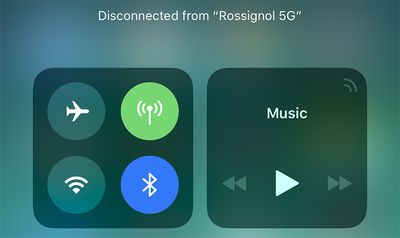
bluetooth wifi control center ios 11
Even when toggled off in Control Center on an iPhone, iPad, or iPod touch running iOS 11 and later, a new support document says Bluetooth and Wi-Fi will continue to be available for AirDrop, AirPlay, Apple Pencil, Apple Watch, Location Services, and Continuity features like Handoff and Instant Hotspot.

Toggling off Bluetooth or Wi-Fi in Control Center only disconnects accessories now, rather than disabling connectivity entirely.

If Bluetooth is turned off, the iOS device can't be connected to any Bluetooth accessories until one of these conditions is met:

  • You turn on Bluetooth in Control Center.
  • You connect to a Bluetooth accessory in Settings > Bluetooth.
  • It's 5 a.m. local time.
  • You restart your device.

While Wi-Fi is disabled, auto-join for any nearby Wi-Fi networks will also be disabled until one of these conditions is met:

  • You turn on Wi-Fi in Control Center.
  • You connect to a Wi-Fi network in Settings > Wi-Fi.
  • You walk or drive to a new location.
  • It's 5 a.m. local time.
  • You restart your device.

Apple made this change in the iOS 11 beta, and it gained more attention after the software was publicly released yesterday.

iOS 11 users can still completely disable Wi-Fi and Bluetooth for all networks and devices by toggling them off in the Settings app.

Apple says users should try to keep Wi-Fi and Bluetooth turned on for the best experience on an iOS device.

(Thanks, FlunkedFlank!)

Related Forum: iOS 11

Popular Stories

iOS 27 Next to iPhone

Here's When iOS 27 Rolls Out Today in Every Time Zone [Update: It's Out]

Sunday September 13, 2026 3:00 am PDT by
Update 10:04 a.m.: iOS 27 is rolling out now, though it may take a bit for all users to see it, so keep checking! Apple is about to release iOS 27, which will finally deliver more advanced Siri AI capabilities as well as a variety of other refinements, improvements, and new features to iPhones. It's Apple's biggest software update of the year, and Apple announced at Wednesday's iPhone event...
iOS 27 Icon iPhone

iOS 27 Available Today With These 8 New Features

Monday September 14, 2026 9:00 am PDT by
Update: Apple has released iOS 27. During its iPhone 18 Pro and iPhone Duo event last week, Apple announced that iOS 27 will be released widely on Monday, September 14. iOS 27 should be available around 10 a.m. Pacific Time / 1 p.m. Eastern Time today via the Settings app, under General → Software Update. Below, we have highlighted eight new features and changes coming with iOS...
deep black iphone 18 pro

Apple Says iPhone 18 Pro Max Sold in U.S. Differs in One Way

Saturday September 12, 2026 3:27 pm PDT by
As noted by Nicolas Lellouche, who writes for the French tech website Numerama, Apple has updated its tech specs pages for the iPhone 18 Pro and iPhone 18 Pro Max to clarify which models are equipped with its new C2 cellular modem and where. Apple now says the iPhone 18 Pro has a C2 modem worldwide, while the iPhone 18 Pro Max uses the chip in every country except for the U.S. According...

Top Rated Comments

djeeyore25 Avatar
117 months ago
This feature is annoying.
Score: 95 Votes (Like | Disagree)

Moonjumper Avatar
117 months ago
The original iPhone famously came without a manual as everything was so obvious. That time is over.
Score: 91 Votes (Like | Disagree)
Mlrollin91 Avatar
117 months ago
Where did this 5am thing come from? How did they decided on 5am?
Score: 68 Votes (Like | Disagree)
ghostface147 Avatar
117 months ago
This annoys me. Add a 3D touch option to turn it off. Thanks.
Score: 42 Votes (Like | Disagree)
117 months ago
it's all about simplicity, right? :rolleyes:
Score: 37 Votes (Like | Disagree)
117 months ago
Can you press and hold one of the shortcuts to open the full settings page in the Settings app yet?
Nope... that's the annoying part.
I'd really want the previous behavior. This "feature" is completely useless for a "pro" user and I though it was a bug for 8 betas.

Also: why not to put a flag into settings to restore the complete switch off instead of this. Apple, wtf are you doing?!
Score: 36 Votes (Like | Disagree)

🔗 Related Apple News & Rumors

Stay updated with the latest Apple ecosystem news and verified rumors












































