Apple made waves last year when it completely redesigned how the lock screen functions on iOS 10 by removing the iPhone's well-known "Slide to Unlock" instruction from the screen. The improvements allowed for a more seamless unlocking experience on iPhones that supported Raise to Wake and Touch ID, and with iOS 11 that process isn't changing (although there are still ways to get around it thanks to Accessibility options).
The main change in iOS 11's lock screen is how the new software deals with notifications and the methods you'll have to go through in finding a push notification you might have missed.
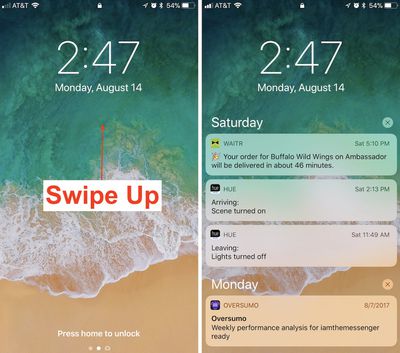
Awaken your iPhone by using Raise to Wake or tapping the lock button.
Swipe up from the middle of the screen to find a list of notifications, and continue scrolling for older notifications.
On any one notification, swipe left-to-right to open it directly.
Or, swipe right-to-left to "view" or "clear" it.
Accessing the New Cover Sheet
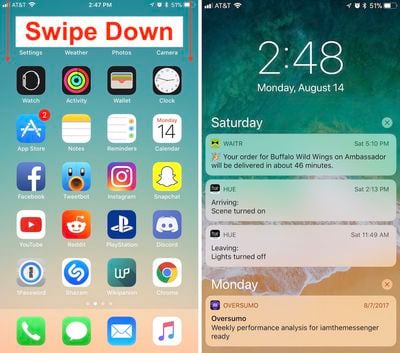
Unlock your iPhone.
Swipe down from the top edge of the screen to bring up the all-new Cover Sheet.
You can interact with notifications as before, and 3D Touch the "x" to clear them all.
Swipe left-to-right (avoiding notifications) to enter the Today section and find your widgets.
Back on the notification screen, swipe right-to-left to enter the Camera.
Swipe up from the very bottom edge of the screen or press the home button to dismiss the Cover Sheet.
With Cover Sheet, the "Notification Center" of iOS 10 has been replaced with a screen that looks visually just like your lock screen, and functions essentially the same way. Notifications are displayed in reverse chronological order, starting with the latest unseen notifications, continuing with "Earlier Today" if you have any missed notifications from the past 24 hours, and then extending into previous days.
Those who purchase an iPhone X later in the year should also note that the redesigned iPhone will house Cover Sheet in its own unique area. When the iPhone X is unlocked, instead of swiping down from the top edge of the smartphone, you'll have to swipe down from the top left ear to bring up your notifications.
The ease, discoverability, and standardization of iOS is, or was, one of the main points I’d bring up when asked about the difference between iOS and Android. This isn’t helping.
The fact that we need an article explaining how to access something that is supposed to be so simple speaks volumes of today’s iOS.
“When I look for good design, I look for something which is easy to use, approachable, friendly, you can use it without a manual, it’s fun.”
- Scott Forstall
Please bring that guy back. I don’t even want to hear anyone bring up skeumorphism, either, that is irrelevant. I didn’t hear anyone complaining about using their iOS devices and how bad, lacking detail, laggy, and inconsistent things were from iOS 1-6 (apart from some lacking features) to the widespread extent we have today.
Multitasking on iPad is the most confusing thing ever. I dont think anyone i know will even be aware of its existence to be honest. So much swiping and flipping around
The fact that we need an article explaining how to access something that is supposed to be so simple speaks volumes of today’s iOS.
“When I look for good design, I look for something which is easy to use; approachable; friendly; you can use it without a manual; it’s fun.”
- Scott Forstall
Please bring that guy back. I don’t even want to hear anyone bring up skeumorphism, either, that is irrelevant. I didn’t hear anyone complaining about using their iOS devices and how bad, lacking detail, laggy, and inconsistent things were from iOS 1-6 (apart from some lacking features) compared to the widespread extent we have today.
Friday October 30, 2026 3:20 pm PDT by Joe Rossignol
In a memo shared with Apple Stores and Apple Authorized Service Providers this week, and later obtained by MacRumors, Apple provided technicians with guidance on how to diagnose and address the iPhone Duo's inner display cracking issue.
If a customer reports the issue, Apple advised technicians to inspect the iPhone Duo and repair or replace it in accordance with their standard procedures....
Thursday October 29, 2026 1:47 pm PDT by Joe Rossignol
While the new iPad mini has an OLED display, the device does not support ProMotion, meaning the display's refresh rate is limited to 60Hz instead of 120Hz.
ProMotion support would have allowed for the iPad mini's refresh rate to automatically adjust from 10Hz to 120Hz depending on the content being displayed, but evidently Apple has kept the feature exclusive to the iPad Pro among iPad...
Thursday October 29, 2026 11:52 am PDT by Joe Rossignol
In the U.S. and most other countries, Apple's website shows the new iPad mini being held by pinched fingers, but this is not the case in South Korea.
The new iPad mini shown with pinched fingers on Apple's website in the U.S.
On its South Korean website, Apple simply shows an image of the iPad mini on its own.
The new iPad mini shown without pinched fingers on Apple's website in South Korea ...




















































Top Rated Comments
Ok. Now you've got your iPhone X a month or 5 later. Do the opposite. Hmm...
“When I look for good design, I look for something which is easy to use; approachable; friendly; you can use it without a manual; it’s fun.”
- Scott Forstall
Please bring that guy back. I don’t even want to hear anyone bring up skeumorphism, either, that is irrelevant. I didn’t hear anyone complaining about using their iOS devices and how bad, lacking detail, laggy, and inconsistent things were from iOS 1-6 (apart from some lacking features) compared to the widespread extent we have today.