iOS 15 Siri Guide: On Device Offline Recognition and Updates - MacRumorsOpen MenuShow RoundupsShow Forums menuVisit ForumsOpen Sidebar
Skip to Content

iOS 15 Siri Guide: On Device Offline Recognition and Updates

There are some major improvements to Siri in iOS 15, with Apple introducing features that iPhone users have long asked for. On devices with an A12 chip or later, ‌Siri‌ can do on-device processing and there's support for offline requests.
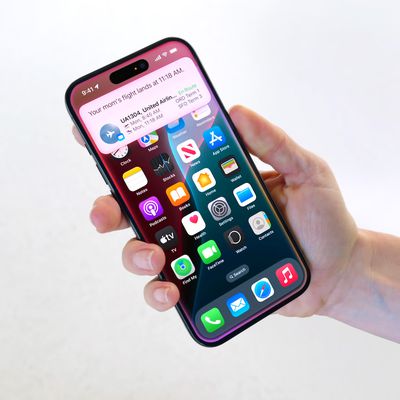
iOS 15 Siri Feature
This guide highlights all of the new ‌Siri‌ features that are available in iOS (and iPadOS) 15.

On-Device Speech Processing and Personalization

Starting in iOS 15, speech processing and personalization are done on-device. This makes ‌Siri‌ faster at processing requests, but also more secure. Most audio requests made of ‌Siri‌ are kept entirely on the iPhone and are no longer uploaded to Apple's servers for processing.

‌Siri‌'s speech recognition and understanding of commands improves as a device is used, with ‌Siri‌ learning the contacts most interacted with, new words typed, and topics preferred, with all of this information kept on device and private.

On-device speech processing and personalization is enabled through the Apple Neural Engine and it is available on iPhones and iPads that have an A12 Bionic chip or later.

On-device processing is available in German (Germany), English (Australia, Canada, India, UK, U.S.), Spanish (Spain, Mexico, U.S.), French (France), Japanese (Japan), Mandarin Chinese (China mainland), and Cantonese (Hong Kong).

Offline Support

With on-device processing now available, there are a wide range of ‌Siri‌ requests that can be handled offline. ‌Siri‌ can create (and disable) timers and alarms, launch apps, control audio playback, and access Settings options.

Apple says ‌Siri‌ can also process Messages, sharing, and Phone requests.

Sharing via Siri

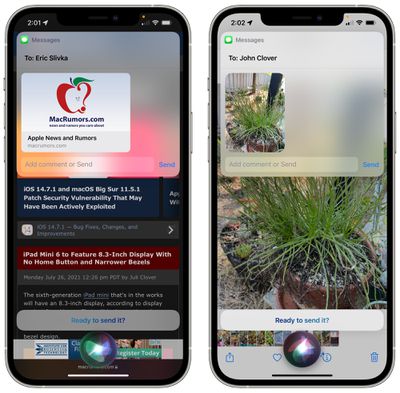
When you come across something that you want to share like a photo, web page, Apple Music song, or podcast, you can ask ‌Siri‌ to send it to a friend or family member and ‌Siri‌ will do so.

siri sharing ios 15
If it's something that can't be shared, like a Messages thread, ‌Siri‌ will make a screenshot and send that. All you have to do is say "Send this to [person]" and ‌Siri‌ will confirm the request and then send it along.
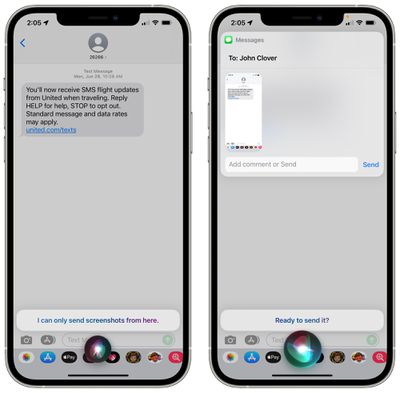
siri send screenshots 1
This feature works with ‌Apple Music‌, Apple Podcasts, Apple News, Maps, web pages, photos, Messages, and more.

Improved Context Between Requests

‌Siri‌ in iOS 15 can better maintain context between voice requests. So if you ask something like "How late is the Taco Bell open?" and then "How long does it take to get there?" ‌Siri‌ will understand that "there" is the Taco Bell from the previous request.
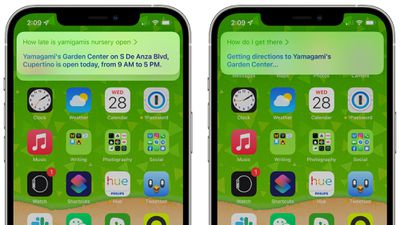
siri contextual requests
This tends to work only when there's a single option, because in a situation with multiple Taco Bells, ‌Siri‌ needs clarification. For that reason, the contextual improvements are limited.

Contacts

‌Siri‌ also understands that if there's a contact on the screen, that's the person that you want to talk to.

So if you have the contacts app open to a specific person, are chatting with someone in Messages, get a Message notification, or miss a call, you can say something like "Message them I'm on my way" and ‌Siri‌ will know to send it to the relevant contact that you've just interacted with or have open.
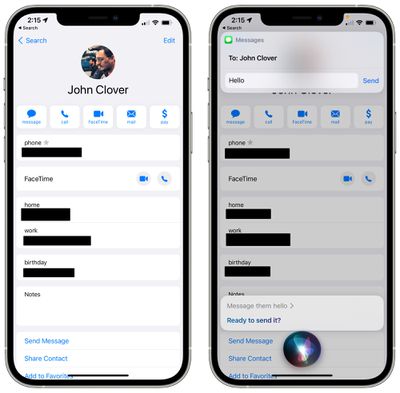
ios 15 contextual messaging

HomeKit Improvements

‌Siri‌ can now be used to control a HomeKit device at a specific time. So if you want your lights to turn off right when at 7, you can say something like "Hey ‌Siri‌, turn off the bedroom lights at 7.p.m." This command also works for geolocation, so you can say things like "Hey ‌Siri‌, turn off the air conditioning when I leave."
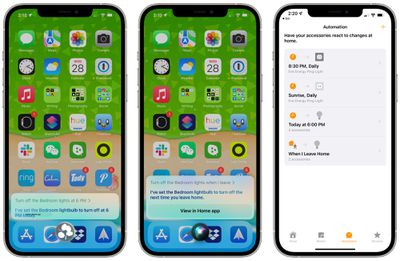
siri ios 15 timed homekit commands
When you ask ‌Siri‌ to control a ‌HomeKit‌ product this way, it creates an automation in the Home app under the "Automation" section. If you want to delete an Automation ‌Siri‌ has created, you can do so in the Home app.

‌HomeKit‌ developers can also add ‌Siri‌ support to their products in iOS 15, but using ‌Siri‌ commands with third-party devices does require the user to have a HomePod to route requests through. With ‌Siri‌ integration, customers will be able to use their ‌HomeKit‌ products for ‌Siri‌ commands like setting reminders, controlling devices, broadcasting messages, and more.

Announce Notifications

‌Siri‌ has been able to announce calls and incoming messages when using AirPods (or Beats headphones) for some time now, but in iOS 15, that feature is expanding to all notifications.
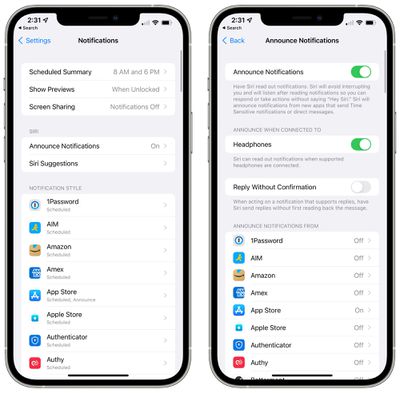
siri announce notifications ios 15
‌Siri‌ can automatically announce Time Sensitive notifications when AirPods are connected if you toggle the feature on in the Settings app (in either the ‌Siri‌ or Notifications sections), and there are also options to have ‌Siri‌ announce notifications on an app-by-app basis if you want to hear notifications from a particular app but those notifications aren't Time Sensitive.

Announce Messages in CarPlay

There's now a feature to have ‌Siri‌ announce your incoming messages when your iPhone is connected to a CarPlay setup.

There's an option to turn announcements on or off when a message is read, and ‌Siri‌ will remember your preference. This feature can also be toggled on or off using the Settings app.

Announce Reminders With AirPods

In addition to notifications, ‌Siri‌ can also announced reminders that come up when wearing AirPods or compatible Beats headphones.
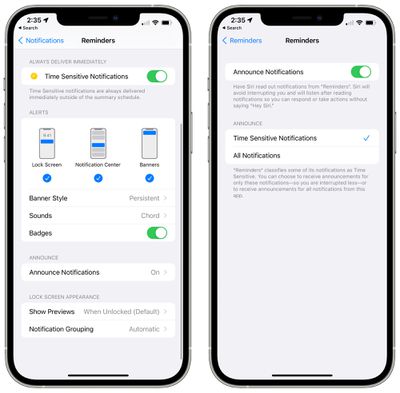
siri announce reminders ios 15

Add Siri Suggestions to Safari Start Page

With Start Page customization in iOS 15, there is an option to add a section for ‌Siri‌ Suggestions for websites you might want to visit or content you might want to view.

Language Improvements

Neural text-to-speech voices have expanded to Swedish, Danish, Norwegian, and Finnish in iOS 15.

Apple has also added mixed English and Indic language support. ‌Siri‌ can process commands in a mix of Indian English and native languages, with support for Hindi, Telugu, Kannada, Marathi, Tamil, Bengali, Gujarati, Malayalam, and Punjabi.

Siri for Developers

Apple is tweaking its SiriKit interface and is eliminating some of the ‌Siri‌ commands that developers were able to use with third-party apps.

Starting with iOS 15, customers will no longer be able to use ‌Siri‌ in third-party apps to do things like book a ride with Uber, make a bill payment, or create new task lists in to-do apps. Many of these ‌Siri‌ functions may be replaced by Shortcut options that can be activated with ‌Siri‌ voice commands.

Guide Feedback

Have questions about ‌Siri‌ in iOS 15, know of a feature we left out, or want to offer feedback on this guide? Send us an email here.

Related Forum: iOS 15

Popular Stories

iOS 18 Siri Personal Context

Siri AI Settlement Website Now Live: Apple to Pay Some iPhone Owners

Sunday September 20, 2026 7:24 pm PDT by
In May, Apple agreed to pay $250 million to settle a U.S. class action lawsuit over Siri AI's delayed launch, and the settlement website is now live. Apple will pay an estimated $25 per eligible iPhone to eligible customers, who can submit a claim via the settlement website between September 21 and December 21 of this year. The exact payment may be higher or lower than $25 depending on the...
Apple TV 4K 4th Generation feature4

New Apple TV 4K Announced With A19 Chip, Updated Siri Remote, More

Tuesday October 13, 2026 6:08 am PDT by
Apple today announced the fourth-generation Apple TV 4K, with key features including an A19 chip, Siri AI support, an updated Siri Remote that has Find My support with Precision Finding, built in far-field microphones, support for surround sound with four HomePods in front and rear pairs, and more. The A19 chip in the new Apple TV 4K delivers up to 50% faster CPU performance and up to twice...

homepod mini 2 feature6

Apple Announces $149 HomePod Mini 2 With Siri AI, 'Sound Glow', and Four-Speaker Surround Sound

Tuesday October 13, 2026 6:11 am PDT by
Apple today announced a new HomePod mini equipped with Siri AI, new colors, and improved audio experiences. The new HomePod mini has an S10 chip that supports advanced computational audio, and Apple says it optimizes dynamic range, loudness, and acoustic performance in real-time. A Sound Glow feature turns the HomePod mini's top into a "visual canvas" that glows and animates in sync with...


Top Rated Comments

68 months ago
There's one suggestion I have made before and would love to see - seems easy. If I'm sending a text via Siri to a contact, and I mention that persons name in the text, it would be great if Siri relied on the spelling of the name from the contact. For example, if I'm texting someone named "Erik" and I want to text (via Siri), "Hey Erik, did you see that reveal on last night's show?"... Siri will spell out the text as "Hey Eric, did you see that reveal on last night's show?" Would be great since in this example I'm texting a contact named "Erik" if Siri had the logic to take the spelling from the contact.
Score: 15 Votes (Like | Disagree)
68 months ago

The other day I happened to watch the keynote when it was introduced back then.


It was actually really fun and surprising to watch, to see all it was able to do back then already, and how it... hasn't really evolved in a decade.
Wow, I think you're right. In fact, it's dumber than the original version of Siri.

I think they took out the wolfram alpha api. In the demo, Scott mentioned that you can ask it how many days until your birthday and when I tried that just now, it only tells me when my birthday is but not the number of days until my birthday.
Score: 15 Votes (Like | Disagree)
PsykX Avatar
68 months ago

For better or for worse, it will be a decade this year since Siri first launched on the iPhone.
The other day I happened to watch the keynote when it was introduced back then.


It was actually really fun and surprising to watch, to see all it was able to do back then already, and how it... hasn't really evolved in a decade.
Score: 15 Votes (Like | Disagree)
68 months ago
The weakest product/service in apples lineup by far.
Score: 12 Votes (Like | Disagree)
68 months ago
Honestly, this is one of the most exciting features in iOS 15. Offline Siri, improved context, and especially the "announce notifications" feature.
Score: 8 Votes (Like | Disagree)
contacos Avatar
68 months ago
Useless for me since Siri is still not able to handle more than one language at a time. You should hear my incoming messages in Spanish or English when my iPhone is set to German. It’s hilarious
Score: 6 Votes (Like | Disagree)
Latest Stories
Touchscreen MacBook Pro Could Launch on November 6
1 hour ago
New Withings Users Must Pay $99/Year for Apple Health Syncing
1 hour ago
Meta and Apple Bring Muse Spark Open AI Model to Mac Studio
3 hours ago
iPad Mini 8: Apple Has Tested Both 60Hz and 120Hz ProMotion Displays
3 hours ago
Apple TV 4K 2022 vs. 2026 Buyer's Guide: All Differences Compared
4 hours ago
Apple CEO John Ternus on Early Foldables: 'Kind of Cheap and Crappy'
5 hours ago
Greg Joswiak Says Apple Isn't Focused on Making AI for 'Lunatic Fringe'
6 hours ago
Amazon Offers $120 Discount on AirPods Max 2, $50 Off AirPods Pro 3
6 hours ago
Apple CEO John Ternus Featured on Cover of TIME Magazine: 'New Era'
7 hours ago
Apple Announces Deadline to 'Get Ready' to Pre-Order the iPhone Duo
7 hours ago
MKBHD is 'Not Convinced' About Apple's New HomeView, Here's Why
8 hours ago
Apple's Wall-Mounted HomeView Ships Without a Power Adapter
8 hours ago
Rare Apple-1 With Steve Jobs Letter Sells for $1.15 Million
9 hours ago
Apple Now Inviting Media to October 28 'Launch Experience'
9 hours ago
iPhone Duo's A20 Pro Chip Benchmarked Ahead of Launch
20 hours ago
10 HomeView Features You Might Have Missed
21 hours ago
Apple Becomes Second Company to Close Above $5 Trillion
22 hours ago
Which Apple Home Devices Get Siri AI, and When
23 hours ago
Apple's Long-Delayed HomeView Was Already Being Tested in 2024
1 day ago
Apple Intelligence Coming to China in December With iOS 27.3
1 day ago
Apple Invites App Updated With Two New Features
1 day ago
OpenAI Says Ex-Employee Showed Its Device Plans to Apple
1 day ago
Discover the Best Cases and Screen Protectors for Your New iPhone Duo
1 day ago
Apple Store Near Los Angeles Closed Due to 'Events Beyond Our Control'
1 day ago
No, HomePod Mini 1 Won't Support Siri AI as CNET Reported
1 day ago
iPhone Duo Compromises: Everything You Have to Give Up
1 day ago
Apple HomeView Has These 15 Apps, Some CarPlay Apps and Widgets Also Supported
1 day ago
iPhone Duo: Apple Charging $49 for New Cover Layer, $229 for Battery
1 day ago
iPhone Duo: Skipping AppleCare+ Could Be $1,499 Mistake
1 day ago
Ready for HomeView? Don't Miss These Smart Home Accessory Deals
1 day ago

🔗 Related Apple News & Rumors

Stay updated with the latest Apple ecosystem news and verified rumors