iOS 15: How to Have Siri Announce Your Notifications - MacRumorsOpen MenuShow RoundupsShow Forums menuVisit ForumsOpen Sidebar
Skip to Content

iOS 15: How to Have Siri Announce Your Notifications

by

In iOS 15, Siri comes with a new Announce Notifications feature that allows you to have notifications read out to you when you're wearing connected AirPods or Beats headphones.
iOS 15 Siri Feature
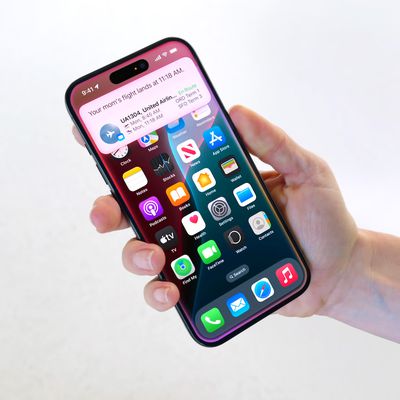
‌Siri‌ has been able to announce messages for some time now, but in iOS 15, the feature has been expanded to all notifications. When enabled, ‌‌Siri‌‌ will automatically announce Time Sensitive notifications from apps when ‌AirPods/Beats‌ are connected.

You can also opt to have ‌Siri‌ announce notifications on a per-app basis if you want to hear notifications from specific apps that aren't time sensitive.

Here's how to get ‌Siri‌ to announce notifications in iOS 15.

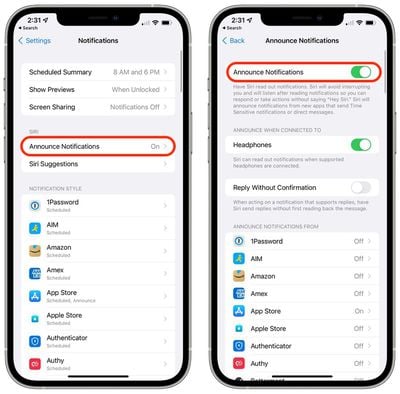
  1. Launch the Settings app.
  2. Tap Notifications.
  3. Under "‌Siri‌," select Announce Notifications.
  4. Toggle the switch next to Announce Notifications to the green ON position.
  5. To get ‌Siri‌ to announce all notifications from a specific app, simply select the app in question in the list under "Announce Notifications From" and toggle on its Announce Notifications switch.
    settings

Note that if a notification supports actions, ‌Siri‌ will listen for your response after reading the notification, so you don't have to say "Hey ‌Siri‌" to follow it up.

Related Forum: iOS 15

Popular Stories

apple intelligence black

Apple Briefly Posts China Guide for Connecting Siri to Qwen AI

Monday August 10, 2026 5:21 am PDT by
Apple briefly published a support guide in China explaining how Mac users can connect Alibaba's Qwen AI to Siri and Writing Tools, before pulling it entirely less than a day later. Reuters first spotted the Chinese-language guide on Apple's support site on August 8, which explained how eligible Mac users in mainland China could connect Qwen, Alibaba's family of generative AI models, to Siri...

ios 27 siri voice

Latest iOS 27 Beta Expands Siri AI Voice Customization

Monday August 10, 2026 11:57 am PDT by
With the fifth beta of iOS 27, Apple has expanded the voice customization options for Siri AI. Pace and Expressivity can now be adjusted for more of the available voice options instead of just the two American voices. There are seven American voice options and four British voices to choose from, all of which can be customized with different Pace and Expressivity settings. Pace changes...
ios 27 b5 icons

iOS 27 Beta 5 Brings New Icons for Siri, Safari, Settings and More

Monday August 10, 2026 12:18 pm PDT by
In the fifth beta of iOS 27, Apple is continuing to make design tweaks. There are updated Liquid Glass icons for Safari, the Siri app, Settings, Remote, App Store, and Preview. The Safari icon is a brighter blue with more detailed compass lines and arrows, while the Siri icon looks more like the actual Siri bubble that's displayed when Siri is activated. The App Store app icon is more...

🔗 Related Apple News & Rumors

Stay updated with the latest Apple ecosystem news and verified rumors