

This article explains how to delete your Siri audio interaction history and opt out of sharing audio recordings with Apple on iPhone, iPad, and iPod touch.
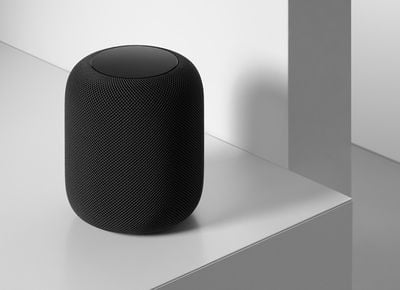
In 2019, it was discovered that Apple hired contractors to listen to a small percentage of anonymized Siri recordings to evaluate the virtual assistant's responses with the purpose of improving accuracy and reliability.
The Guardian revealed that Apple employees working on Siri often heard confidential details while listening to the audio recordings. Apple was subsequently criticized for not making it clear to customers that some of their Siri recordings were being used to improve the service.
Soon after the report, Apple suspended its Siri grading practices and promised users that it would introduce tools in a forthcoming update that would allow them to opt out of sharing their audio recordings.
With the release of iOS 13.2 in October 2019, those new tools arrived on iPhone and iPad, allowing users to delete their Siri and Dictation history and opt out of sharing audio recordings. Apple also subsequently made the same tools available on its HomePod smart speakers.
It's important to note that HomePod's Siri settings are independent from your iOS device's Siri settings, so if you want to opt out of Siri Audio Sharing and delete your Siri audio history completely, you'll have to disable them separately.
The following steps show you how to access these settings on HomePod. Or learn how to disable them on iPhone, iPad, and iPod touch.
How to Opt Out of Siri Audio Sharing on HomePod
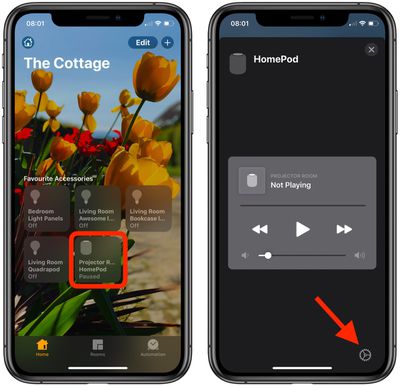
- Launch the Home app on your iPhone, iPad, or iPod touch.
- Tap the HomePod card on the main Home screen.

- Tap the cog icon in the bottom-right corner of the HomePod card to take you to the device's settings.
- Tap Analytics & Improvements.
- If you don't want to let Apple review your recordings, toggle off the switch next to Improve Siri & Dictation.
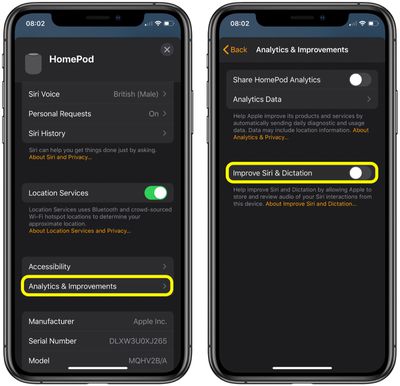
Note that you can tap the link under the toggle for more information relating to Apple's Siri analytics policy.
How to Delete Your Siri Audio History on HomePod
- Launch the Home app on your iPhone, iPad, or iPod touch.
- Tap the HomePod card on the main Home screen.
- Tap the cog icon in the bottom-right corner of the HomePod card to take you to the device's settings.
- Tap Siri History.
- Tap Delete Siri History.
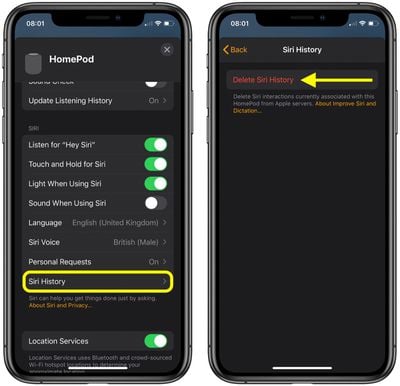
Apple will inform you that your request was received and that your Siri and dictation history will be deleted. That's all there is to it.
In addition to these new Siri and Dictation-related privacy features, Apple also says it is making further changes to its human grading process that will minimize the amount of data that reviewers have access to.


















































Top Rated Comments