

How to Use 'Hey Siri' Hands-Free on a Mac - MacRumorsOpen MenuShow RoundupsShow Forums menuVisit ForumsOpen Sidebar
Skip to Content

How to Use 'Hey Siri' Hands-Free on a Mac

by

The latest version of Apple's "Hey Siri" feature works hands-free without being plugged into power, and it can be found in several recently announced Apple mobile products, including the fifth-generation iPad mini, third-generation iPad Air, and second-generation AirPods.
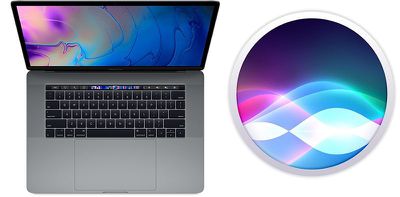
macbook pro hey siri
What's perhaps less well-known is that many of Apple's new Macs also support "Hey ‌Siri‌" hands-free, meaning that users no longer have to click the menu bar icon or press a keyboard shortcut before they can start talking to the digital assistant.

What follows is a list of Macs that support "Hey ‌Siri‌" hands-free, and below that you can find instructions on how to enable it on your machine. Note that future Mac models that include Apple's T2 security chip are likely to support the feature, too.

  • MacBook Pro (15-inch, 2018)
  • ‌MacBook Pro‌ (13-inch, 2018, Four Thunderbolt 3 ports)
  • MacBook Air (Retina, 13-inch, 2018)
  • iMac Pro

How to Enable "Hey Siri" hands-free on a Mac

  1. Click the Apple () symbol in the top left corner of your Mac's screen and select System Preferences....
  2. Click the Siri icon in the preference pane.

  3. Tick the checkbox next to Listen for "Hey Siri". macheysiri
  4. Click Continue to follow the ‌Siri‌ setup process, repeating verbally the commands shown on the screen.
  5. Click Done and then close the preference pane.
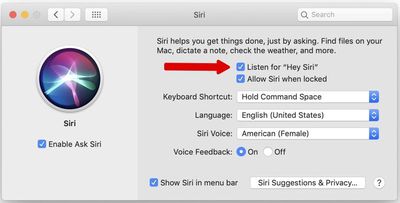
Now that you've enabled the feature, simply say "Hey ‌Siri‌" to invoke the digital assistant and ask a question or give a command. If you're familiar with the ‌Siri‌ function on iPhone or iPad, you should find most of the same general commands work on Mac, too. For more information on how the feature can be useful on the desktop, check out our dedicated guide to using Siri commands in macOS.


Top Rated Comments

4jasontv Avatar
97 months ago
Oh please no. I don’t need Cortana waking up, activating Siri and than having a conversation until I throw one at the other.

Score: 4 Votes (Like | Disagree)
NBAasDOGG Avatar
97 months ago
I usually use the Command + Space to activate Siri, but since our courageous keyboards doesn’t work anymore, Apple decided to release hands-free Siri on the Mac!
Score: 3 Votes (Like | Disagree)
Icaras Avatar
97 months ago
Still can’t believe the new iMac doesn’t have the T2 chip :mad:
Score: 3 Votes (Like | Disagree)
97 months ago
What about the Mac mini?
Doesn't show on my Mac mini with a microphone attached which is annoying as it has the T2 chip.
Score: 2 Votes (Like | Disagree)
Plutonius Avatar
97 months ago
No of course not. But I also want Face ID and “Hey Siri” so I’ll take the trade off.
You don't need the T2 to have "hey Siri" on your Mac ('https://forums.macrumors.com/threads/how-to-use-hey-siri-hands-free-on-a-mac.2178813/#post-27306909') and I'm not sure that it's worth having Face ID if your Mac is going to suffer T2 crashes.

I can also see why Face ID would be on demand in an iPhone / iPad but I'm not sure why on a computer ?
Score: 1 Votes (Like | Disagree)
Plutonius Avatar
97 months ago
Does Hey Siri only work with the internal microphone input?
It is not mentioned but people can set up their older Macs or Macs with an external microphone (Sierra or newer) to take Siri voice activation.

It is a little bit more complicated and the directions are here ('https://www.macworld.com/article/3096187/how-to-make-siri-activate-when-you-say-hey-siri-to-your-mac-running-macos-sierra.html') (no T2 chip needed :) ).

Still can’t believe the new iMac doesn’t have the T2 chip :mad:
The new iMac lucked out not getting the T2 chip.

Do new iMac owners want T2 bridgeOS errors ?
Score: 1 Votes (Like | Disagree)

Popular Stories

macOS iOS 27 Siri App Feature

Apple's Siri AI Can Be Swapped Out for Claude, ChatGPT, Code Shows

Monday September 14, 2026 4:37 am PDT by
Code sleuth "pdfu" has uncovered iOS 27 and macOS Golden Gate private frameworks that show Apple has designed its new Siri architecture to work with third-party AI models at what appears to be a surprisingly deep level. One mechanism called Model Delegation allows Claude to appear as a Siri extension in the same way as the existing built-in ChatGPT extension. In pdfu's video, shared on X,...
iOS 27 Out Now Thumb

Apple Releases iOS 27 and iPadOS 27 With Siri AI and Liquid Glass Update

Monday September 14, 2026 10:04 am PDT by
Apple today released iOS 27 and iPadOS 27, the newest operating system updates for the iPhone and iPad. The software is available for free on all compatible devices, and can be downloaded over the air by going to Settings > General > Software Update. It can take several minutes for the updates to propagate to all users due to high demand on launch day. iOS 27 can be installed on all...
apple watch series 12 siri recap

Apple Explains What Happens to Conversations Siri Recap Hears

Thursday September 10, 2026 4:38 pm PDT by
The Apple Watch Series 12 and Ultra 4 have new Audio Intelligence features that include Sound Recognition, Music Recognition, Live Rewind, and Siri Recap. When these features are activated, the new Apple Watches are always listening to what's going on around the wearer. With Siri Recap, the Apple Watch listens to your conversations throughout the day and takes notes. It uses Apple...

🔗 Related Apple News & Rumors

Stay updated with the latest Apple ecosystem news and verified rumors











































