Most Useful Siri Commands on macOS - MacRumorsOpen MenuShow RoundupsShow Forums menuVisit ForumsOpen Sidebar
Skip to Content

Most Useful Siri Commands on macOS

by

Starting with macOS Sierra in 2016, Apple introduced support for Siri on the Mac, allowing you to access the personal assistant across all of your Apple devices for the first time.

Siri on Mac can actually do quite a few useful things that aren't available on iOS devices, and because the technology is still rather new on Apple's desktop and laptop machines, we thought we'd highlight some of the most useful Siri commands on the Mac.


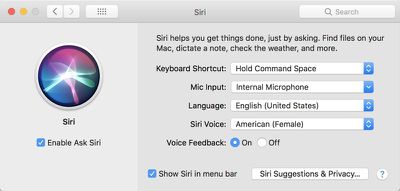
Siri on Mac can be accessed from the menu bar, the dedicated Siri app that can be added to the dock, or through a keyboard shortcut like Command + Space. You can manage your Siri preferences and options by opening up System Preferences and choosing "Siri" from the options at the bottom of the window.
asksirimac
One of the simplest and most useful ways to use Siri is to open apps without accessing the dock or finding the app in the applications folder. You can ask Siri to "open the Calendar app" or "open Evernote."

Open works with any app on your Mac, and it also works with websites and files. Some sample commands:

  • Open MacRumors.com
  • Open Google.com
  • Open the Applications Folder
  • Open the iCloud Drive folder

Siri's "Show Me" command on macOS works hand in hand with the series of open commands. You can ask Siri to show you all kinds of files stored on your Mac, which makes it easier to search for specific content. You can also ask for files within apps like Photos. Some sample commands:

  • Show me my most recent files
  • Show me files from June 2017
  • Show me photos from April 2017
  • Show me photos from last week
  • Show me files from today
  • Show me privacy settings
  • Show me network settings

Siri is also interactive and can be used to turn settings on your Mac on and off, just like on iOS devices. Siri can turn on Night Shift, activate Bluetooth, turn off Wi-Fi, and more. Some sample commands:

  • Turn off Wi-Fi
  • Turn on Bluetooth
  • Activate the screensaver
  • Turn up the volume
  • Turn down the brightness
  • Go to sleep
  • Change my wallpaper

Another useful way to use Siri on the Mac is to get information about the Mac itself. You can ask Siri questions about the hardware installed on your Mac. Some sample commands:

  • How fast is my Mac?
  • What processor does my Mac have?
  • Tell me about my Mac
  • What is my Mac's serial number?
  • How much RAM does my Mac have?
  • How much storage do I have?

Siri can, of course, answer simple queries and provide information, just like you can do on iOS. Commands like "What time is it?" and "What's the weather?" are available, as are more complicated requests like "Find me a good restaurant nearby" or "Get me directions to the mall."

Do you use Siri for Mac? What are the most useful commands you've found? Let us know if we've missed any in the comments below.


Top Rated Comments

avanpelt Avatar
111 months ago
I genuinely feel bad for the MR writers who have to write these articles touting 'useful' things that Siri can do. I used Siri on my Mac for about two minutes when it was first introduced. Haven't activated it a single time since then. In my opinion, Siri is even less helpful on the Mac than it is on iOS devices. I have a full-size keyboard and a mouse connected to my Mac. Usually, I can do just about anything Siri could do on a Mac just as fast or faster if I do it myself.
Score: 27 Votes (Like | Disagree)
CLS727 Avatar
111 months ago
most useful command for macOS is:

settings > siri > disable

The ONLY device I actually use voice commands on is the new Apple TV (easier than typing in search terms with that little remote)
Score: 13 Votes (Like | Disagree)
Apple Knowledge Navigator Avatar
111 months ago
The best command is “Turn off Siri”
Score: 9 Votes (Like | Disagree)
CmdrLaForge Avatar
111 months ago
I have deactivated Siri on all my Apple devices. I cannot find it useful at all.
Score: 8 Votes (Like | Disagree)
SBlue1 Avatar
111 months ago
The one and only use it is capable of doing on my iPhone is missing entirely on the Mac: setting a timer. :(
Score: 6 Votes (Like | Disagree)
111 months ago
Open works with any app on your Mac, and it also works with websites and files. Some sample commands:
* Open MacRumors.com
* Open Google.com
* Open the Applications Folder
* Open the iCloud Drive folder
Obviously this is all a boon for anyone with accessibility issues, but if you've got a full-sized keyboard under your fingers Siri gets a whole lot less useful than it is on iOS.

I can hit ⌘-space and open those URLs in Alfred or even Spotlight faster than you can say them and wait for them to be recognized (especially assuming Siri's less than stellar recognition rate). Hell, Alfred lets you just type a word and start a custom search immediately on any site you have it set up with.

Also, in the Finder ⌘⇧A opens the Applications folder and ⌘⇧I opens the iCloud Drive folder -- both way faster and less irritating than trying to say all that and hope it's recognized.

I guess they don't consider dictation part of Siri, but it can be pretty useful. It's gotten a lot better than it used to be. Again, on a full size keyboard it always seems a little more cumbersome than just typing but I suppose if you're a slow typist or just don't feel like it or have carpel tunnel or something then it's nice to have. (I just dictated this last paragraph and didn't make any manual correctons. Not bad!)
Score: 6 Votes (Like | Disagree)

Popular Stories

Apple TV 4K 4th Generation Top View5

New Apple TV 4K Announced With A19 Chip, Updated Siri Remote, More

Tuesday October 13, 2026 6:08 am PDT by
Apple today announced the fourth-generation Apple TV 4K, with key features including an A19 chip, Siri AI support, an updated Siri Remote that has Find My support with Precision Finding, built in far-field microphones, support for surround sound with four HomePods in front and rear pairs, and more. The A19 chip in the new Apple TV 4K delivers up to 50% faster CPU performance and up to twice...
homepod mini 2 feature6

Apple Announces $149 HomePod Mini 2 With Siri AI, 'Sound Glow', and Four-Speaker Surround Sound

Tuesday October 13, 2026 6:11 am PDT by
Apple today announced a new HomePod mini equipped with Siri AI, new colors, and improved audio experiences. The new HomePod mini has an S10 chip that supports advanced computational audio, and Apple says it optimizes dynamic range, loudness, and acoustic performance in real-time. A Sound Glow feature turns the HomePod mini's top into a "visual canvas" that glows and animates in sync with...
New Apple TV 4K and Siri Remote Have These 14 New Features Feature

New Apple TV 4K and Siri Remote Have These 14 New Features

Tuesday October 13, 2026 10:26 am PDT by
The new Apple TV 4K and updated Siri Remote unveiled today have quite a few new features, as outlined in our all-in-one summary below. Here are 11 changes coming with the new Apple TV: A19 chip, for up to 50% faster CPU performance and up to twice as fast graphics performance compared to the previous model with the A15 chip. 8GB of RAM is very likely, up from 4GB of RAM in the previous ...


Latest Stories
Apple Reveals New iPad Mini's Battery Capacity
2 minutes ago
Top Stories: Apple's Big MacBook Pro, iPad mini and iMac Updates
1 hour ago
'Pluribus' Season 2 Reportedly Starts Production Today
8 hours ago
iPhone 18 Pro Sales Surge in China, Offsetting Decline in U.S. and Japan
9 hours ago
HomeView Software 27.2: Wallpapers, Control Center, and More
15 hours ago
Apple Alerts Stores to iPhone Duo's Display Cracking Issue
16 hours ago
iOS 27.3 Will Enable These Apple Intelligence Features in China
17 hours ago
Apple Says iOS 27.3 Beta Coming Next Week
17 hours ago
Apple's Flash Storage Suppliers Are Finally 'Getting Their Revenge'
18 hours ago
14 New Things Your iPhone Can Do in iOS 27.2
19 hours ago
iPhone Duo Review: One Week Later
20 hours ago
Samsung Mocks iPhone Duo Display Cracks in New Ad Campaign
21 hours ago
The MacRumors Show: OLED MacBook Pro, iPad Mini 8, and More
22 hours ago
MacBook Pro With Touch Display: 15 More Details Revealed
22 hours ago
Russia Places Apple on State Surveillance Registry
23 hours ago
Halloween Weekend Brings Discounts on Apple Accessories and Pre-Orders
1 day ago
Apple Has Released More Than 25 New Products in the Past Two Months
1 day ago
Local Code Launches as Free, Private AI Assistant Tool for Mac
1 day ago
Apple Acquires Ascend.io
1 day ago
HomePod Mini 2 Launches Today: All the New Features
1 day ago
AirTag 2 4-Pack Drops to New Low Price of $69.99
1 day ago
Rian Johnson's iPhone Camera App Goes Viral
1 day ago
Where Did All the iPhone Duos Go? Mostly to Apple's Stores
1 day ago
Apple's Touchscreen MacBook Pro Could Ship 1.5M Units in 2027
1 day ago
New Apple TV 4K and iPad Mini: RAM Amounts Revealed
2 days ago
Apple Executive Comments on New iPad Mini Lacking 120Hz Display
2 days ago
Here's a Hands-On Look at HomePod Mini 2's New Two-Tone Colors
2 days ago
Apple Lowers App Store Fees in Taiwan Starting October 31
2 days ago
HomeView Pre-Order Returns to $289.99 on Amazon
2 days ago
Apple Avoids Showing Pinched Fingers on iPad Mini Page in South Korea
2 days ago

🔗 Related Apple News & Rumors

Stay updated with the latest Apple ecosystem news and verified rumors












































