iOS 15: How to Share Whatever's On Your Screen Using Siri - MacRumorsOpen MenuShow RoundupsShow Forums menuVisit ForumsOpen Sidebar
Skip to Content

iOS 15: How to Share Whatever's On Your Screen Using Siri

by

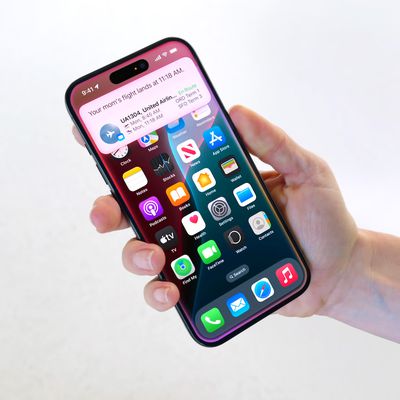
In iOS 15, Apple has significantly improved Siri by adding some much-anticipated features like on-device processing and support for offline requests, while also making the voice assistant more context-aware.

iOS 15 Siri Feature
One result of ‌Siri‌'s increased contextual awareness is its ability to help you share whatever's on your iPhone screen with someone else via a Message, be it a website in Safari, a song in Apple Music, a photo, or just the local weather forecast.

To share something at any time, say "Hey ‌Siri‌," then "Share this with [person]." ‌Siri‌ will spring into action and confirm your request by asking "Are you ready to send it?" At that point, you can either say yes/no, or you can add a comment to the message using the input field and then hit Send.
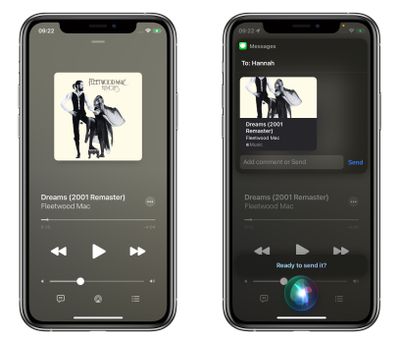
siri
If it's something that can't be shared directly, like the weather forecast, ‌‌Siri‌‌ will take a screenshot and send that instead. All you have to do is say "Share this with [person]," and ‌‌Siri‌‌ will take the screenshot, then confirm the request with you in the same way.
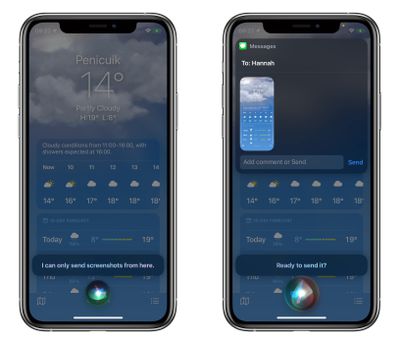
siri
The feature works with ‌‌Apple Music‌‌, Apple Podcasts, Apple News, Maps, Safari web pages, photos, Messages, and more. When iOS 15 is released in September, expect third-party apps to gain support for sharing via ‌Siri‌, too.

Related Forum: iOS 15

Top Rated Comments

CarlJ Avatar
66 months ago

Sharing songs with Siri has been available for a long time. I use it a lot when I’m in the car, using CarPlay. I’ll say “hey Siri, send this song to Carl” and she’ll literally message them a link to the song

That’s odd, I haven’t gotten any of those links.
Score: 6 Votes (Like | Disagree)

Popular Stories

apple intelligence black

Apple Briefly Posts China Guide for Connecting Siri to Qwen AI

Monday August 10, 2026 5:21 am PDT by
Apple briefly published a support guide in China explaining how Mac users can connect Alibaba's Qwen AI to Siri and Writing Tools, before pulling it entirely less than a day later. Reuters first spotted the Chinese-language guide on Apple's support site on August 8, which explained how eligible Mac users in mainland China could connect Qwen, Alibaba's family of generative AI models, to Siri...
ios 27 siri voice

Latest iOS 27 Beta Expands Siri AI Voice Customization

Monday August 10, 2026 11:57 am PDT by
With the fifth beta of iOS 27, Apple has expanded the voice customization options for Siri AI. Pace and Expressivity can now be adjusted for more of the available voice options instead of just the two American voices. There are seven American voice options and four British voices to choose from, all of which can be customized with different Pace and Expressivity settings. Pace changes...
ios 27 b5 icons

iOS 27 Beta 5 Brings New Icons for Siri, Safari, Settings and More

Monday August 10, 2026 12:18 pm PDT by
In the fifth beta of iOS 27, Apple is continuing to make design tweaks. There are updated Liquid Glass icons for Safari, the Siri app, Settings, Remote, App Store, and Preview. The Safari icon is a brighter blue with more detailed compass lines and arrows, while the Siri icon looks more like the actual Siri bubble that's displayed when Siri is activated. The App Store app icon is more...

🔗 Related Apple News & Rumors

Stay updated with the latest Apple ecosystem news and verified rumors