

iOS 14.5: How to Set a Preferred Music Streaming Service With Siri - MacRumorsOpen MenuShow RoundupsShow Forums menuVisit ForumsOpen Sidebar
Skip to Content

iOS 14.5: How to Set a Preferred Music Streaming Service With Siri

by

With the release of iOS 14.5, Apple introduced a feature that lets users select a specific music service to use with Siri, with the options including third-party services like Spotify in addition to Apple Music.
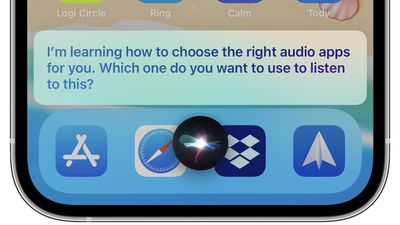
siri choose audio apps
When this feature first came to light in beta versions of iOS 14.5, many early reports interpreted it as Apple allowing users to select a default streaming service, similar to the way it allows email apps other than Apple's native Mail client to be selected as the system default.

However, Apple has since clarified that there isn't actually any option to choose a music service that will be selected on every occasion. More accurately, the feature in question uses ‌Siri‌ intelligence to learn from your listening habits and improve the music selection process over time.

In fact, by occasionally asking which service to use, ‌Siri‌ learns your preferences for all types of audio content rather than just music. For example, it will let you open podcasts in Apple Podcasts or a third-party podcasts app, and let you choose a specific audiobook app if you listen to audiobooks. Here's how it works.

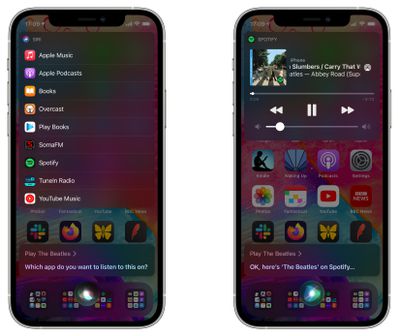
  1. Ask ‌Siri‌ to play an artist, song, or album with a request like "Hey ‌Siri‌, play The Beatles."
  2. ‌Siri‌ will display a list of all music apps you have installed and will ask "Which app would you like to use?"
  3. Choose your preferred music app from the list.
    siri

  4. If asked, confirm that ‌Siri‌ can access data from your music app.
  5. From there, ‌Siri‌ will play the music in your app of choice. If you chose Spotify, for example, the music content will play in Spotify.
In past versions of iOS, it's been possible to play music from other services by clarifying which service you want ‌‌Siri‌‌ to use, such as "Hey ‌‌Siri‌‌, play music on Spotify," but the change implemented in iOS 14.5 makes it more likely that ‌‌Siri‌‌ will remember your music app of choice, so a simple command like "Hey ‌‌Siri‌‌ play music" will use your favorite app rather than defaulting to ‌‌Apple Music‌‌.

Top Rated Comments

Einkoro Avatar
69 months ago
“Sorry, something’s gone wrong. Please try again.”

Seems to work about as well as the rest of Siri.
Score: 12 Votes (Like | Disagree)
69 months ago
We still need a 'I own my music, stop looking at services' option....
Score: 6 Votes (Like | Disagree)
69 months ago

Why not just do this by default, but add a submenu for which one to play which type of content by default?

I don’t really understand the point either. If I want to listen to music I’ll say play music and the chosen default app would ideally be used. If I want to listen to a podcast I’d say play podcasts and again the default podcast app would be used. Or the only thing I use a lot of is audiobooks and I’d obviously ask Siri to play my audiobook.

They’re overthinking this one.
They clearly don’t want to you to set a default player for all your music. So they came up with this. We all know it will never work because Siri and learning are not two words that should ever be used in the same sentence.


Score: 4 Votes (Like | Disagree)
69 months ago
I feel like being able to manually choose default apps would be way more helpful
Score: 4 Votes (Like | Disagree)
chriscl Avatar
69 months ago
It just feels like Apple has begrudgingly added this option.

Why can there not be a simple option to select the default Music service to be used every single time ?

I use Spotify, I don't use any other service. I just want Spotify as the default for all music playback. How Hard can it be?

(and don’t get me started on the lack of native Spotify support on HomePod - but that’s down to Spotify, not Apple).
Score: 3 Votes (Like | Disagree)
Cory S Avatar
69 months ago
Why not just do this by default, but add a submenu for which one to play which type of content by default?

I don’t really understand the point either. If I want to listen to music I’ll say play music and the chosen default app would ideally be used. If I want to listen to a podcast I’d say play podcasts and again the default podcast app would be used. Or the only thing I use a lot of is audiobooks and I’d obviously ask Siri to play my audiobook.

They’re overthinking this one.
Score: 3 Votes (Like | Disagree)

Popular Stories

watchos 27

Siri AI Comes to Apple Watch in watchOS 27 Beta 3

Monday July 6, 2026 1:24 pm PDT by
With watchOS 27 beta 3, Apple added support for Siri AI and the Siri app, so Apple Watch users can now use the features right from their wrist. Apple said Siri AI would be coming to the watch back when watchOS 27 was first introduced, but the feature wasn't live until now. The Dynamic App Grid that pops up when the Digital Crown is pressed displays the Siri app in the center, and the...
iphone 16 teal

'Siri AI' Lawsuit Update: Apple to Pay Owners of These iPhone Models

Thursday July 9, 2026 7:08 am PDT by
In May, Apple agreed to pay $250 million to settle a U.S. class action lawsuit over Siri AI's delayed launch, and eligible iPhone users could receive up to a $95 payout. This week, the California court overseeing the case held a hearing regarding preliminary approval of the settlement, but the judge has not yet issued a ruling. It will likely be at least a few more months before eligible...
macOS iOS 27 Siri App Feature

Apple's Secret Siri Interface Buried in macOS 27 Beta: How to Enable

Monday July 20, 2026 4:09 am PDT by
Apple appears to be testing a hidden popover interface for Siri AI in the macOS 27 Golden Gate beta that surfaces Writing Tools and contextual actions whenever the user selects some text. Spotted by a member of Reddit's r/MacOSBeta community, the floating icon appears at the top-left of the selected text, expanding when the pointer hovers over it to a compact popover of the tools and...

🔗 Related Apple News & Rumors

Stay updated with the latest Apple ecosystem news and verified rumors












































