

iOS 14.5 is now available, and a key new feature is the ability to unlock an iPhone with Face ID while wearing a mask, so long as you are wearing an Apple Watch. Read on to learn how this feature works.

Apple introduced its Face ID facial recognition system in November 2017 with the launch of the iPhone X, offering users an even simpler way to unlock their smartphone than traditional fingerprint recognition.
Following the now-mainstream usage of face masks, however, Apple's biometric feature has been handicapped, leaving many users having to enter their passcode to unlock their device when in public spaces.
Fortunately, Apple has responded to this change in our everyday lives by introducing a new feature that allows iPhone users wearing an Apple Watch to unlock their smartphone via Face ID through a partial face scan, when they're wearing a mask.
The process is similar to how it works when unlocking a Mac with an Apple Watch. When the unlock happens, the user receives a haptic buzz and a notification on the Apple Watch informing them that the unlocking procedure has been successful. However, bear in mind that you can only use your Apple Watch to unlock your iPhone while wearing a mask – it can't be used for authenticating Apple Pay or App Store purchases.
Before you can take advantage of the new feature, you'll need to make sure that you're running iOS 14.5 on your iPhone and watchOS 7.4 on your Apple Watch. You can update your iPhone by going to Settings -> General -> Software Update. To update your Apple Watch after installing iOS 14.5, launch the Watch app on your iPhone, tap the My Watch tab at the bottom of the screen, then select General -> Software Update.
What You'll Need
- iPhone X or later with Face ID
- Apple Watch Series 3 or later
- iOS 14.5 or later installed on iPhone
- watchOS 7.4 or later installed on Apple Watch
How to Set Up Unlock iPhone With Apple Watch
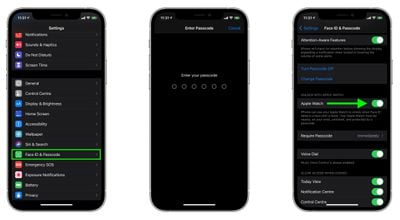
- Launch the Settings app on your iPhone.
- Select Face ID & Passcode.
- Enter your iPhone's passcode.
- Scroll down to the section labeled "Unlock With Apple Watch" and toggle the switch next to Apple Watch to the green ON position. (If the option is greyed out, you need to update the version of watchOS on your Apple Watch.)

How to Unlock Your iPhone With Apple Watch
To use your Apple Watch to unlock your iPhone, your watch needs to be nearby, on your wrist, unlocked, and protected by a passcode. If you haven't set up a passcode yet, launch the Watch app on your iPhone, select Passcode -> Turn Passcode On, then enter the passcode you want to use (you'll have to do so twice to confirm.)
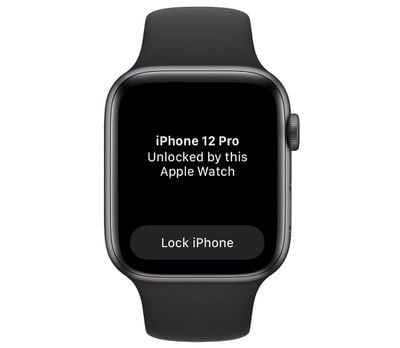
The first time you attempt to unlock your iPhone with Apple Watch when wearing a mask, your iPhone will ask you to enter your passcode. Once you've done that, all subsequent attempts to unlock your iPhone when wearing a mask will be swift and seamless, with each successful unlock accompanied by a short haptic buzz on your wrist. You'll need to re-enter your passcode if you remove your watch and the first time you set it up each day.


















































Top Rated Comments
Before this I would have to either remove my armored gloves and punch in the code, or remove my helmet and balaclava. This is MUCH better.