iOS 14.5: How to Share Apple Music Lyrics and Song Clips - MacRumorsOpen MenuShow RoundupsShow Forums menuVisit ForumsOpen Sidebar
Skip to Content

iOS 14.5: How to Share Apple Music Lyrics and Song Clips

by

With the release of iOS 14.5, Apple added a new Apple Music feature that lets subscribers of the streaming service share lyrics as text as well as audio clips containing the sung lyrics. Read on to learn how it works.
iMessage
‌Apple Music‌ features real-time lyrics for many songs that you can sing along to while the track plays or use to skip to specific parts of a song. In iOS 14.5 and later installed on your iPhone or iPad, you can now share song lyrics with a friend or with a wider circle of people over social media, including Instagram Stories.

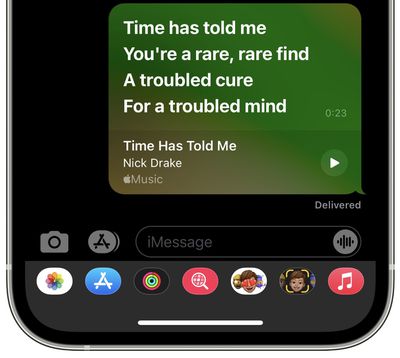
In some cases, the feature also lets you share song clips. For example, if you opt to share over iMessage, an ‌‌Apple Music‌‌ card will appear in the conversation that allows the recipient to play that specific part of the song in Messages via a play button. The following steps guide you through the process of sharing lyrics in ‌Apple Music‌.

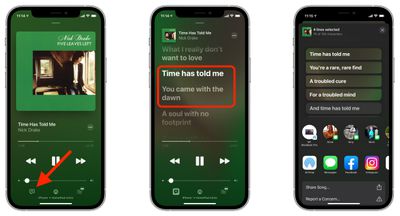
  1. In the ‌Apple Music‌ app, select a song to play and expand the currently playing menu to the whole screen.
  2. Tap the lyrics button in the bottom-left corner of the screen. If it's greyed out, ‌Apple Music‌ doesn't have lyrics for the currently playing song and you won't be able to share.
  3. With the real-time lyrics showing on screen, press and hold on any of the words.
  4. The actions menu will appear, where you can tap on the individual lines of lyrics that you want to share. To de-select a highlighted lyric, simply tap it again. Note Apple applies a character limit, which means on average that you can share between four and six lines depending on the song.

  5. Choose a sharing method from the two rows of options, such as iMessage or Instagram. You can also choose to share a clip of the song using the Share Song... action.
    Apple Music

For more helpful articles detailing all the new features in iOS 14.5, be sure to check our dedicated guide.


Related Forum: iOS 14

Top Rated Comments

70 months ago
(Re the last sentence of step 3 above.)
After choosing Lyrics, if you click 'Share Song', in my experience that will share the entire song, not a clip.
Score: 1 Votes (Like | Disagree)
70 months ago
If only Apple offered a way to correct or flag the many lyrics they have that are just laughably terribly incorrect.
Score: 1 Votes (Like | Disagree)
70 months ago
Good choice of song.
Score: 1 Votes (Like | Disagree)
TheYayAreaLiving 🎗️ Avatar
70 months ago
Handful feature. Loving iOS 14.5 so far.


Score: 1 Votes (Like | Disagree)

Popular Stories

apple music

Apple Music to Label AI-Generated Songs

Thursday August 20, 2026 4:41 pm PDT by
Apple sent emails to its music industry partners about the upcoming launch of a Made With AI label that Apple will apply to AI-generated content (via The Hollywood Reporter). Content tagged as being "materially generated using AI" will have a label visible to all Apple Music users. In March, Apple announced Transparency Tags, a system that lets music creators disclose when AI has been...
Apple iCloud Plus expansion hero

iCloud+ Now Includes Apple TV, Apple Arcade, and Curated Apple Music Stations in Over 100 Countries

Tuesday September 15, 2026 1:43 am PDT by
Apple today announced a new subscription initiative that turns paid iCloud+ subscriptions into a broader services bundle in more than 100 countries. In select countries, Apple says every paid iCloud+ plan, including the cheapest 50GB tier, now includes Apple TV and Apple Arcade "at no additional cost," while family sharing extends the storage, TV and Arcade access to up to five people....
iOS 27 Next to iPhone

Here's When iOS 27 Rolls Out Today in Every Time Zone [Update: It's Out]

Sunday September 13, 2026 3:00 am PDT by
Update 10:04 a.m.: iOS 27 is rolling out now, though it may take a bit for all users to see it, so keep checking! Apple is about to release iOS 27, which will finally deliver more advanced Siri AI capabilities as well as a variety of other refinements, improvements, and new features to iPhones. It's Apple's biggest software update of the year, and Apple announced at Wednesday's iPhone event...

🔗 Related Apple News & Rumors

Stay updated with the latest Apple ecosystem news and verified rumors