How to Set a Keyboard Shortcut to Activate Siri on Mac - MacRumorsOpen MenuShow RoundupsShow Forums menuVisit ForumsOpen Sidebar
Skip to Content

How to Set a Keyboard Shortcut to Activate Siri on Mac

by

Since macOS Sierra, Apple has included Siri on the Mac, enabling desktop users to ask the virtual assistant general queries and give it spoken commands.

macbook pro hey siri
‌Siri‌ for Mac can do most of the same things ‌Siri‌ can do on iOS. It can give you sports scores, tell you about the weather, schedule an event in your calendar, remind you what you need to get done today or even find movie times. It can also help you with common desktop tasks, like searching for images or changing your Mac's display settings.

‌Siri‌ on Mac can be invoked by clicking the ‌Siri‌ icon in the menu bar at the top of the screen. If it's easier, you can also use a keyboard shortcut so that your fingers don't need to leave the keys. You can customize the keyboard shortcut assigned to ‌Siri‌ in the following way.

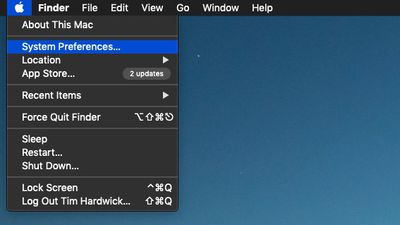
  1. Click the Apple () symbol in the menu bar at the top-left corner of the screen and select System Preferences....
    apple menu system preferences

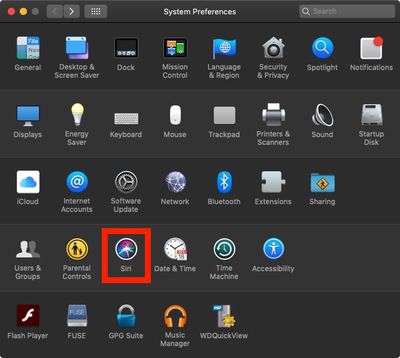
  2. Click the Siri icon in the preferences panel.
    siri system preferences

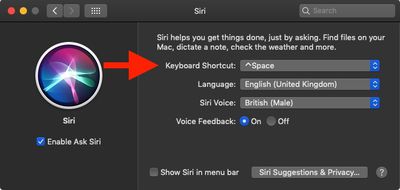
  3. Click the Keyboard Shortcut dropdown menu. The default options are Hold Command Space, Hold Option Space, and Press (fn) Function Space. You can also define your own custom shortcut by clicking Customize... and then pressing the keys you wish to use.
    siri preference pane keyboard shortcut

Be sure to check out the other options for ‌Siri‌ in the System Preferences pane, including language, voice, voice feedback, and mic input. For more information on how to use ‌Siri‌ in macOS, click here.

Popular Stories

watchos 27

Siri AI Comes to Apple Watch in watchOS 27 Beta 3

Monday July 6, 2026 1:24 pm PDT by
With watchOS 27 beta 3, Apple added support for Siri AI and the Siri app, so Apple Watch users can now use the features right from their wrist. Apple said Siri AI would be coming to the watch back when watchOS 27 was first introduced, but the feature wasn't live until now. The Dynamic App Grid that pops up when the Digital Crown is pressed displays the Siri app in the center, and the...

iphone 16 teal

'Siri AI' Lawsuit Update: Apple to Pay Owners of These iPhone Models

Thursday July 9, 2026 7:08 am PDT by
In May, Apple agreed to pay $250 million to settle a U.S. class action lawsuit over Siri AI's delayed launch, and eligible iPhone users could receive up to a $95 payout. This week, the California court overseeing the case held a hearing regarding preliminary approval of the settlement, but the judge has not yet issued a ruling. It will likely be at least a few more months before eligible...
macOS iOS 27 Siri App Feature

Apple's Secret Siri Interface Buried in macOS 27 Beta: How to Enable

Monday July 20, 2026 4:09 am PDT by
Apple appears to be testing a hidden popover interface for Siri AI in the macOS 27 Golden Gate beta that surfaces Writing Tools and contextual actions whenever the user selects some text. Spotted by a member of Reddit's r/MacOSBeta community, the floating icon appears at the top-left of the selected text, expanding when the pointer hovers over it to a compact popover of the tools and...

🔗 Related Apple News & Rumors

Stay updated with the latest Apple ecosystem news and verified rumors