

How to Use Siri in macOS - MacRumorsOpen MenuShow RoundupsShow Forums menuVisit ForumsOpen Sidebar
Skip to Content

How to Use Siri in macOS

by

Since macOS Sierra, Apple has included its well-known personal assistant, Siri, for the Mac. Siri for Mac differs from iOS' version of Siri in several ways, taking advantage of the larger real estate of a Mac's display and the Finder file system. Users can also easily transfer or pin Siri's search results to the Notification Center or documents they're working on. To help you get started with Siri for Mac, we've put together a guide outlining what it's capable of.

Activating Siri

macsiri1
There are four ways to activate Siri in macOS. Two of the methods are visually obvious while the third is not. The availability of the fourth handsfree method depends on the model of Mac.

  • The Dock icon sitting in between the Finder and Launchpad logos.
  • The Menu Bar toggle in between the Spotlight search and Notification Center icons.
  • The keyboard command. Hold the Command and Space buttons for approximately two seconds.
  • Saying simply "Hey Siri" handsfree to invoke the assistant.

Siri can be enabled two ways. While you're installing macOS, there'll be a prompt asking you whether you'd like to enable Siri. Additionally, Siri can be enabled and disabled in the Siri section of System Preferences. There are several other options for Siri in System Preferences, including language, voice, voice feedback, mic input and customized keyboard shortcuts.

What Siri for Mac Can Do

macsiri2
Siri for Mac can do most of the same things Siri for iOS can do. It can give you sports scores or tell you about the weather. Schedule an event on your calendar, remind you what you need to get done today or find movie times. Here's a full list of the things that carry over to the Mac.

  • Launching and searching for apps.
  • FaceTime and Messages
  • Sports scores, team schedules, league standings, and player and team information.
  • Photo search.
  • Maps and navigation.
  • Twitter and Facebook posting, plus Twitter search.
  • Movie information, showtimes, movie theater locations, movie reviews and award trivia.
  • Apple Music, radio and music identification.
  • iTunes, iBooks and Podcasts.
  • Reminders, calendar stocks, weather, contacts, clock, Find My Friends, email and notes.
  • Web search and Q&A, like unit measurements, facts and figures, and simple math.
  • Settings / System Preferences

Siri has two new abilities that are built specifically to take advantage of the Mac:

  • Finder
  • About this Mac

Siri's Mac-Specific Abilities

Unlike Siri for iOS, Siri for Mac's dialogue box only takes up a portion of the screen. This allowed Apple to build Siri to be better utilized for multitasking. For example, Siri can be used to send a message to a friend while you're writing an email or working on a document. It can also find restaurant reservations for you while you're in the middle of a conversation with a friend.

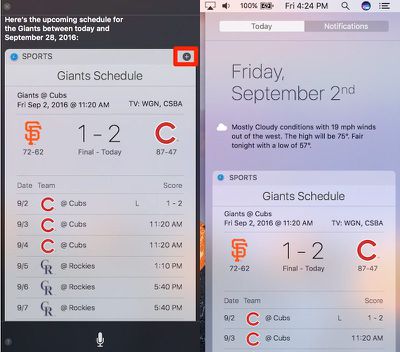
Because Siri is built for multitasking on a Mac, some of its results are more interactive, allowing you to combine them with other apps. These are some of the things you can do with Siri's results in macOS Sierra.
HowtoSiri

  • Pin photo results or sports team schedules to the Notification Center by clicking the + icon.
  • Drag files from Siri's Finder search to the desktop.
  • Drag and drop search results from photo searches into emails, messages, documents and the desktop.
  • Drag and drop map locations into emails, messages and documents.

Siri's Settings category is referred to as System Preferences to better match macOS' verbiage, but Siri can also do some things on a Mac that it can't do on an iPhone. These are new settings abilities Siri has gained:

  • Putting your computer to sleep.
  • Changing your desktop wallpaper.
  • Changing your display settings.

Finally, there are some specific hardware requests that Siri can fulfill. In addition to asking Siri to turn up your volume or turn off your Bluetooth, Siri can tell you about your Mac.

macsiri7

  • How fast your Mac is.
  • How much memory your Mac has.
  • What your Mac's serial number is.
  • How much free space your Mac's hard drive has.
  • How much iCloud storage you have.
  • What version of macOS you're running.

All of Siri's Mac abilities can be used at any time. Siri will pause any audio or video you might have been playing when you activated it. This includes audio and video in your web browser, like SoundCloud tracks or YouTube videos.

Siri's dialogue box will also stay on your screen no matter where you are, whether on the desktop or in a full-screen app. It'll also stay in place as you navigate to different spaces. Siri can be deactivated by clicking the small "x" in the top right corner of its dialogue box.

Related Forum: macOS Sierra

Top Rated Comments

S.B.G Avatar
131 months ago
I don't understand why we can't just speak to the Mac for Siri to be activated. We can do this with Windows 10 by saying "Hey Cortanta" and not pressing any buttons or clicking anything.

Score: 7 Votes (Like | Disagree)
131 months ago
I don't understand why we can't just speak to the Mac for Siri to be activated. We can do this with Windows 10 by saying "Hey Cortanta" and not pressing any buttons or clicking anything.
YOU CAN!

I posted instructions a long time ago: https://forums.macrumors.com/threads/how-to-enable-hey-siri-activation-on-a-mac-with-sierra.1983003/
Score: 3 Votes (Like | Disagree)
tardegrade Avatar
131 months ago
I'm impressed with the OS update but honestly Siri is just as hopeless on my Mac as it is on my iPhone. I gets roughly a third of requests right and then rarely interprets those requests correctly.

I've got a Moto G Android phone as well and comparing Siri to OK Google, which gets almost everything right first time and actually provides the desired results as well, is just a night and day difference.

It's shocking how far behind Apple are in this respect. Must try harder.
Score: 3 Votes (Like | Disagree)
131 months ago
Makes sense. Pressing a button to activate a voice activated assistant.
BTW what's the emoji for sarcasm?
Score: 2 Votes (Like | Disagree)
131 months ago
Needs keyboard input imo. You can't talk to Siri on a Mac always.
Score: 2 Votes (Like | Disagree)
The Templar Avatar
131 months ago
I played around with Siri last night. For some reason I cannot get her to launch applications. I have tried saying both "open" and "launch" with the name of the application, but every time she says "cannot find an application with that name, do you wish to search for it in the app store?" this is true for all apps, Apple's and third party apps. Has anyone else experienced this?

Article Link: How to Use Siri in macOS Sierra ('https://www.macrumors.com/how-to/macos-siri/')
I have the same problem, she tells me I don't have the app of that name and I should search the App Store! Other than set appointments and uselessly read out the Nikkei performance she seems incapable of anything useful. She won't search anything, can't find a file and is basically useless - she cannot interpret as well as the iPhone and won't place a FaceTime call, because I don't have the app according to her! Flawed is an understatement - useless is more like it.
Score: 1 Votes (Like | Disagree)

Popular Stories

iOS 18 Siri Personal Context

Siri AI Settlement Website Now Live: Apple to Pay Some iPhone Owners

Sunday September 20, 2026 7:24 pm PDT by
In May, Apple agreed to pay $250 million to settle a U.S. class action lawsuit over Siri AI's delayed launch, and the settlement website is now live. Apple will pay an estimated $25 per eligible iPhone to eligible customers, who can submit a claim via the settlement website between September 21 and December 21 of this year. The exact payment may be higher or lower than $25 depending on the...
macOS iOS 27 Siri App Feature

Reminder: iOS 27's All-New Siri AI Has a Waitlist, Here's How to Sign Up

Tuesday September 15, 2026 8:54 am PDT by
Apple this week released iOS 27 following around three months of beta testing. If you just installed the software update on your iPhone, you might be wondering where the new-and-improved Siri AI and dedicated Siri app are. In case you missed it, you must join Apple's waitlist in order to gain access to these new features. Keep in mind that while iOS 27 is compatible with the iPhone 11 and...
macOS iOS 27 Siri App Feature

Apple's Siri AI Can Be Swapped Out for Claude, ChatGPT, Code Shows

Monday September 14, 2026 4:37 am PDT by
Code sleuth "pdfu" has uncovered iOS 27 and macOS Golden Gate private frameworks that show Apple has designed its new Siri architecture to work with third-party AI models at what appears to be a surprisingly deep level. One mechanism called Model Delegation allows Claude to appear as a Siri extension in the same way as the existing built-in ChatGPT extension. In pdfu's video, shared on X,...
Latest Stories
AT&T Acknowledges iPhone 18 Pro Max Issues: 'Update Immediately'
10 hours ago
New 'AirFly Drive' Accessory Turns Wired CarPlay Into Wireless CarPlay
15 hours ago
Apple Shares Photos Shot on iPhone Duo
17 hours ago
Apple Says iPhone Duo Has Replaceable 'Cover Layer'
18 hours ago
Apple's Smart Home Camera Will Apparently Have 'No Video Recording'
20 hours ago
Apple TV Just Updated Its Selection of 'Bonus' Movies
21 hours ago
iPhone 18 Pro Colors Buyer's Guide: Which Should You Choose?
21 hours ago
Early Prime Big Deal Days: Best Discounts on Accessories, TVs, and More at Amazon
22 hours ago
MacBook Pro With OLED Touch Screen Rumored to Launch in October or November
23 hours ago
Apple's All-New Home Hub Rumored to Launch in These Four Colors
1 day ago
iPhone 18 Pro Aperture Control Goes Fully Manual in Halide 3.2
1 day ago
Apple Stores Receive 'Do Not Open' Boxes Ahead of Smart Home Products Launch
1 day ago
iPhone 18 Pro Sales Jump in China Ahead of iPhone Duo Launch
1 day ago
Apple TV Still Down for Some Users Following Apple Services Outage
1 day ago
Microsoft 365 Work Accounts May Stop Syncing in Apple Mail
2 hours ago
Apple's Smart Home Hub: Everything We Know So Far
2 days ago
Apple's Home Hub Borrows From the iPhone Duo's StandBy Mode
2 days ago
Apple Invites App Updated With Three New Features
2 days ago
Apple Event on October 13?
2 days ago
Apple Watch SE 3 vs. Series 12 Buyer's Guide: Which Should You Buy?
2 days ago
iPad Mini 8 to Offer These 10 New Features
2 days ago
DoorDash Unveils AI Food Ordering Through Apple's Messages App
2 days ago
Amazon Takes Up to $150 Off Select M5 MacBook Air Models
2 days ago
Apple Still Plans to Release a New Full-Sized HomePod
2 days ago
Apple Working to Expand HomeKit
2 days ago
Apple Smart Home Hub to Feature iMac G4-Style Design
2 days ago
Three New Apple Smart Home Products Coming on October 13
2 days ago
Apple Pay Now Available in India With Axis Bank Cards
3 days ago
OpenAI Launches Always-On 'Dots' Agents to Rival Meta's Muse
3 days ago
AirPods 5 Teardown: Batteries Removable, Case Still Tough
3 days ago

🔗 Related Apple News & Rumors

Stay updated with the latest Apple ecosystem news and verified rumors





































