How To Play Music on HomePod When Activating HomeKit Scenes Using Siri Shortcuts - MacRumorsOpen MenuShow RoundupsShow Forums menuVisit ForumsOpen Sidebar
Skip to Content

How To Play Music on HomePod When Activating HomeKit Scenes Using Siri Shortcuts

by

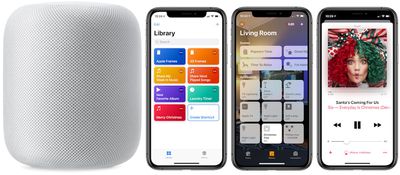
Although HomePod is available in Apple's Home app, the company's smart home speaker as of yet can't be integrated into HomeKit scenes and automations. With such a feature, users would be able to activate their favorite ‌HomeKit‌ scenes, alongside a specific Apple Music playlist, album, or song from their ‌HomePod‌.

how to homepod shorcuts pic
Reddit user Running_In_Space on r/HomeKit explained recently that this is actually possible today, thanks to a helpful (and super simple to create) Siri Shortcut. With the Shortcut, you can tie any Home scene together with any ‌Apple Music‌ playlist. While the Shortcut is limited to playlists, you can choose from your own playlists or those created by ‌Apple Music‌.

In the example below, we created a holiday themed ‌Siri‌ Shortcut that turns on Christmas tree lights (connected to an iDevices Switch) and shuffles a holiday playlist any time we say, "Hey ‌Siri‌, Merry Christmas." Also remember that you'll need an ‌Apple Music‌ subscription, HomeKit-enabled lights or other devices of some kind, and the updated ‌Siri‌ Shortcuts iOS app.

How to Create the Siri Shortcut

  1. Open the iOS "Shortcuts" app
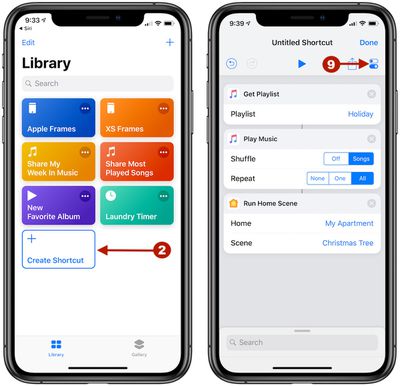
  2. Tap "Create Shortcut"
  3. homepod how to shortcut 5

  4. In the search bar, type "Get Playlist" and add it into your Shortcut
  5. Next to Playlist, tap "Choose" and pick your desired playlist
  6. Search for "Play Music" and add it (here you can also edit settings for shuffling and/or repeating the playlist)
  7. Search for "Run Home Scene" and add it
  8. Next to Home, tap "Choose" and select your home
  9. Next to Scene, tap "Choose" and select your desired scene
  10. Before you tap "Done," select the toggle icon under the Done button at the top right corner of the screen
  11. siri shortcuts homepod how to 2

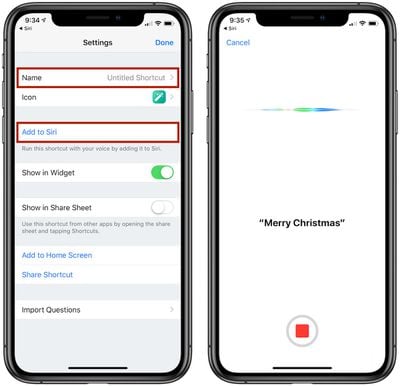
  12. Name the Shortcut, and tap "Add to ‌Siri‌" to record your preferred trigger phrase
  13. Tap "Done" until you're back on the Library screen of the app

Now you will be able to say, "Hey ‌Siri‌, [Trigger Phrase]" to your ‌HomePod‌ and have the selected Home scene activate along with the chosen ‌Apple Music‌ playlist, connected via AirPlay on your iPhone. ‌Siri‌ typically responds with, "Okay, running your shortcut," and it can take a bit longer than a normal scene activation in ‌HomeKit‌ due to the multiple actions.

There are numerous versions of this ‌Siri‌ Shortcut that could be created, like having a nighttime scene in ‌HomeKit‌ tied to a mellow ‌Apple Music‌ playlist that's triggered when you say, "Hey ‌Siri‌, goodnight." We tried testing out Home scenes that are activated via geofences, but in the few times we tried we could not get ‌HomePod‌ to turn on and play the specified ‌Apple Music‌ playlist when the arriving home scene in ‌HomeKit‌ was activated.

It's also worth noting that the desired ‌Apple Music‌ playlist will play on whatever device you are talking to ‌Siri‌ with, so in our example if we said, "Hey ‌Siri‌, Merry Christmas" and ‌HomePod‌ picked it up, then the holiday playlist played on ‌HomePod‌. If we said the same phrase to our iPhone, the playlist would play there instead. In both scenarios, the Christmas tree lights were still activated regardless of the Apple device used.

Apple introduced ‌Siri‌ Shortcuts as an update to its Workflow iOS app back in September, and although creating Shortcuts can be an arduous task in some cases, there are a few super useful actions that have been shared over the past few months. Do you use ‌Siri‌ Shortcuts and have a favorite one to share? Give us the details in the comments below or Tweet us @MacRumors to let us know your most-used Shortcuts.

Related Roundup: HomePod
Buyer's Guide: HomePod (Caution)

Top Rated Comments

102 months ago
Very cool hack, but way too many compromises.

Set up myself and ran into a number of issues. With trial and error I finally got it right. Ultimately it’s party trick that’s cool, but flawed mostly because of where the music comes from depending on which device picks up the request.

+1 for the guy who said in the comments Apple needs to allow HomePod in HomeKit automation scenes
Score: 3 Votes (Like | Disagree)
102 months ago
I really thought they would have 'fixed' this by now It's not tough Apple. Just put the homepod icon in the 'Scene' menu. I'd be perfectly happy just having it turn 'on' like any other device and have it continue playing where I 'paused' it. duhhh.
Score: 2 Votes (Like | Disagree)
ryannealcordwell Avatar
99 months ago
Very cool hack, but way too many compromises.

Set up myself and ran into a number of issues. With trial and error I finally got it right. Ultimately it’s party trick that’s cool, but flawed mostly because of where the music comes from depending on which device picks up the request.

+1 for the guy who said in the comments Apple needs to allow HomePod in HomeKit automation scenes
Likewise!

This seems like one of those blatantly obvious launch-features Apple would’ve worn on their sleeve, but we somehow won’t end up seeing for another long span of time.
Score: 1 Votes (Like | Disagree)
102 months ago
Although HomePod is available in Apple's Home app, the company's smart home speaker as of yet can't be integrated into HomeKit scenes and automations. With such a feature, users would be able to activate their favorite HomeKit scenes, alongside a specific Apple Music playlist, album, or song from their HomePod.
homepod homekit siri shortcuts image

Reddit user Running_In_Space ('https://www.reddit.com/r/HomeKit/comments/a18ngb/play_music_on_homepod_via_scene/eanom8p/') on r/HomeKit ('https://www.reddit.com/r/HomeKit/comments/a18ngb/play_music_on_homepod_via_scene/') explained recently that this is actually possible today, thanks to a helpful (and super simple to create) Siri Shortcut. With the Shortcut, you can tie any Home scene together with any Apple Music playlist. While the Shortcut is limited to playlists, you can choose from your own playlists or those created by Apple Music.

In the example below, we created a holiday themed Siri Shortcut that turns on Christmas tree lights (connected to an iDevices Switch) and shuffles a holiday playlist any time we say, "Hey Siri, Merry Christmas." Also remember that you'll need an Apple Music subscription, HomeKit-enabled lights or other devices of some kind, and the updated Siri Shortcuts iOS app.

How to Create the Siri Shortcut

[LIST=1]
* Open the iOS "Shortcuts" app


* Tap "Create Shortcut"

homepod homekit siri shortcuts image


* In the search bar, type "Get Playlist" and add it into your Shortcut


* Next to Playlist, tap "Choose" and pick your desired playlist


* Search for "Play Music" and add it (here you can also edit settings for shuffling and/or repeating the playlist)


* Search for "Run Home Scene" and add it


* Next to Home, tap "Choose" and select your home


* Next to Scene, tap "Choose" and select your desired scene


* Before you tap "Done," select the toggle icon under the Done button at the top right corner of the screen

homepod homekit siri shortcuts image


* Name the Shortcut, and tap "Add to Siri" to record your preferred trigger phrase

* Tap "Done" until you're back on the Library screen of the app
Now you will be able to say, "Hey Siri, " to your HomePod and have the selected Home scene activate along with the chosen Apple Music playlist, connected via AirPlay on your iPhone. Siri typically responds with, "Okay, running your shortcut," and it can take a bit longer than a normal scene activation in HomeKit due to the multiple actions.

There are numerous versions of this Siri Shortcut that could be created, like having a nighttime scene in HomeKit tied to a mellow Apple Music playlist that's triggered when you say, "Hey Siri, goodnight." We tried testing out Home scenes that are activated via geofences, but in the few times we tried we could not get HomePod to turn on and play the specified Apple Music playlist when the arriving home scene in HomeKit was activated.

It's also worth noting that the desired Apple Music playlist will play on whatever device you are talking to Siri with, so in our example if we said, "Hey Siri, Merry Christmas" and HomePod picked it up, then the holiday playlist played on HomePod. If we said the same phrase to our iPhone, the playlist would play there instead. In both scenarios, the Christmas tree lights were still activated regardless of the Apple device used.

Apple introduced ('https://www.macrumors.com/2018/09/17/apple-releases-ios-12-shortcuts-app-for-all-users/') Siri Shortcuts as an update to its Workflow iOS app back in September, and although creating Shortcuts can be an arduous task in some cases, there are a few super useful actions that have been shared over the past few months. Do you use Siri Shortcuts and have a favorite one to share? Give us the details in the comments below or Tweet us @MacRumors ('https://twitter.com/MacRumors') to let us know your most-used Shortcuts.

Article Link: How To Play Music on HomePod When Activating HomeKit Scenes Using Siri Shortcuts ('https://www.macrumors.com/how-to/homepod-homekit-siri-shortcuts/')
Do I
Although HomePod is available in Apple's Home app, the company's smart home speaker as of yet can't be integrated into HomeKit scenes and automations. With such a feature, users would be able to activate their favorite HomeKit scenes, alongside a specific Apple Music playlist, album, or song from their HomePod.

homepod homekit siri shortcuts image

Reddit user Running_In_Space ('https://www.reddit.com/r/HomeKit/comments/a18ngb/play_music_on_homepod_via_scene/eanom8p/') on r/HomeKit ('https://www.reddit.com/r/HomeKit/comments/a18ngb/play_music_on_homepod_via_scene/') explained recently that this is actually possible today, thanks to a helpful (and super simple to create) Siri Shortcut. With the Shortcut, you can tie any Home scene together with any Apple Music playlist. While the Shortcut is limited to playlists, you can choose from your own playlists or those created by Apple Music.

In the example below, we created a holiday themed Siri Shortcut that turns on Christmas tree lights (connected to an iDevices Switch) and shuffles a holiday playlist any time we say, "Hey Siri, Merry Christmas." Also remember that you'll need an Apple Music subscription, HomeKit-enabled lights or other devices of some kind, and the updated Siri Shortcuts iOS app.

How to Create the Siri Shortcut

[LIST=1]
* Open the iOS "Shortcuts" app


* Tap "Create Shortcut"

homepod homekit siri shortcuts image


* In the search bar, type "Get Playlist" and add it into your Shortcut


* Next to Playlist, tap "Choose" and pick your desired playlist


* Search for "Play Music" and add it (here you can also edit settings for shuffling and/or repeating the playlist)


* Search for "Run Home Scene" and add it


* Next to Home, tap "Choose" and select your home


* Next to Scene, tap "Choose" and select your desired scene


* Before you tap "Done," select the toggle icon under the Done button at the top right corner of the screen

homepod homekit siri shortcuts image


* Name the Shortcut, and tap "Add to Siri" to record your preferred trigger phrase

* Tap "Done" until you're back on the Library screen of the app
Now you will be able to say, "Hey Siri, " to your HomePod and have the selected Home scene activate along with the chosen Apple Music playlist, connected via AirPlay on your iPhone. Siri typically responds with, "Okay, running your shortcut," and it can take a bit longer than a normal scene activation in HomeKit due to the multiple actions.

There are numerous versions of this Siri Shortcut that could be created, like having a nighttime scene in HomeKit tied to a mellow Apple Music playlist that's triggered when you say, "Hey Siri, goodnight." We tried testing out Home scenes that are activated via geofences, but in the few times we tried we could not get HomePod to turn on and play the specified Apple Music playlist when the arriving home scene in HomeKit was activated.

It's also worth noting that the desired Apple Music playlist will play on whatever device you are talking to Siri with, so in our example if we said, "Hey Siri, Merry Christmas" and HomePod picked it up, then the holiday playlist played on HomePod. If we said the same phrase to our iPhone, the playlist would play there instead. In both scenarios, the Christmas tree lights were still activated regardless of the Apple device used.

Apple introduced ('https://www.macrumors.com/2018/09/17/apple-releases-ios-12-shortcuts-app-for-all-users/') Siri Shortcuts as an update to its Workflow iOS app back in September, and although creating Shortcuts can be an arduous task in some cases, there are a few super useful actions that have been shared over the past few months. Do you use Siri Shortcuts and have a favorite one to share? Give us the details in the comments below or Tweet us @MacRumors ('https://twitter.com/MacRumors') to let us know your most-used Shortcuts.

Article Link: How To Play Music on HomePod When Activating HomeKit Scenes Using Siri Shortcuts ('https://www.macrumors.com/how-to/homepod-homekit-siri-shortcuts/')
Do I have to select an accessory to get it to play the playlist? I set up the shortcuts but the HomePod doesn’t respond. Do I have to tell it the specific ‘scene’ if so, I can’t create a scene without selecting an accessory. I don’t want to have to turn lights on just for music.
Score: 1 Votes (Like | Disagree)
travoose Avatar
102 months ago
This is neat. This is exactly how I have mine setup. However, the problem still is that you can't execute this without an iPhone to get the music from...which you would think since the HomePod has access to your entire Apple Music collection and it can execute running the HomeKit scenes along with playing a separate playlist individually, that there should be no problem in creating a Siri Shortcut that allows you to do both at the same time with one voice command. This is where Apple has dropped the ball.
Score: 1 Votes (Like | Disagree)
swapmanager Avatar
102 months ago
This is the new age of doing simple things in complicated way.
A small software update can make you re-learn to do same things differently.... again.
Score: 1 Votes (Like | Disagree)

Popular Stories

Apple iCloud Plus expansion hero

iCloud+ Now Includes Apple TV, Apple Arcade, and Curated Apple Music Stations in Over 100 Countries

Tuesday September 15, 2026 1:43 am PDT by
Apple today announced a new subscription initiative that turns paid iCloud+ subscriptions into a broader services bundle in more than 100 countries. In select countries, Apple says every paid iCloud+ plan, including the cheapest 50GB tier, now includes Apple TV and Apple Arcade "at no additional cost," while family sharing extends the storage, TV and Arcade access to up to five people....


iOS 18 Siri Personal Context

Siri AI Settlement Website Now Live: Apple to Pay Some iPhone Owners

Sunday September 20, 2026 7:24 pm PDT by
In May, Apple agreed to pay $250 million to settle a U.S. class action lawsuit over Siri AI's delayed launch, and the settlement website is now live. Apple will pay an estimated $25 per eligible iPhone to eligible customers, who can submit a claim via the settlement website between September 21 and December 21 of this year. The exact payment may be higher or lower than $25 depending on the...
macOS iOS 27 Siri App Feature

Reminder: iOS 27's All-New Siri AI Has a Waitlist, Here's How to Sign Up

Tuesday September 15, 2026 8:54 am PDT by
Apple this week released iOS 27 following around three months of beta testing. If you just installed the software update on your iPhone, you might be wondering where the new-and-improved Siri AI and dedicated Siri app are. In case you missed it, you must join Apple's waitlist in order to gain access to these new features. Keep in mind that while iOS 27 is compatible with the iPhone 11 and...
Latest Stories
AT&T Acknowledges iPhone 18 Pro Max Issues: 'Update Immediately'
5 hours ago
New 'AirFly Drive' Accessory Turns Wired CarPlay Into Wireless CarPlay
10 hours ago
Apple Shares Photos Shot on iPhone Duo
12 hours ago
Apple Says iPhone Duo Has Replaceable 'Cover Layer'
13 hours ago
Apple's Smart Home Camera Will Apparently Have 'No Video Recording'
15 hours ago
Apple TV Just Updated Its Selection of 'Bonus' Movies
16 hours ago
iPhone 18 Pro Colors Buyer's Guide: Which Should You Choose?
17 hours ago
Early Prime Big Deal Days: Best Discounts on Accessories, TVs, and More at Amazon
17 hours ago
MacBook Pro With OLED Touch Screen Rumored to Launch in October or November
18 hours ago
Apple's All-New Home Hub Rumored to Launch in These Four Colors
19 hours ago
iPhone 18 Pro Aperture Control Goes Fully Manual in Halide 3.2
20 hours ago
Apple Stores Receive 'Do Not Open' Boxes Ahead of Smart Home Products Launch
21 hours ago
iPhone 18 Pro Sales Jump in China Ahead of iPhone Duo Launch
21 hours ago
Apple TV Still Down for Some Users Following Apple Services Outage
22 hours ago
PSA: Apple Mail on Mac May Stop Syncing Microsoft 365 Accounts Today
22 hours ago
Apple's Smart Home Hub: Everything We Know So Far
1 day ago
Apple's Home Hub Borrows From the iPhone Duo's StandBy Mode
1 day ago
Apple Invites App Updated With Three New Features
2 days ago
Apple Event on October 13?
2 days ago
Apple Watch SE 3 vs. Series 12 Buyer's Guide: Which Should You Buy?
2 days ago
iPad Mini 8 to Offer These 10 New Features
2 days ago
DoorDash Unveils AI Food Ordering Through Apple's Messages App
2 days ago
Amazon Takes Up to $150 Off Select M5 MacBook Air Models
2 days ago
Apple Still Plans to Release a New Full-Sized HomePod
2 days ago
Apple Working to Expand HomeKit
2 days ago
Apple Smart Home Hub to Feature iMac G4-Style Design
2 days ago
Three New Apple Smart Home Products Coming on October 13
2 days ago
Apple Pay Now Available in India With Axis Bank Cards
2 days ago
OpenAI Launches Always-On 'Dots' Agents to Rival Meta's Muse
2 days ago
AirPods 5 Teardown: Batteries Removable, Case Still Tough
2 days ago

🔗 Related Apple News & Rumors

Stay updated with the latest Apple ecosystem news and verified rumors