How to Transfer Your Spotify Playlists to Apple Music - MacRumorsOpen MenuShow RoundupsShow Forums menuVisit ForumsOpen Sidebar
Skip to Content

How to Transfer Your Spotify Playlists to Apple Music

by

If you switch from Spotify to Apple Music, you can transfer your playlists from one streaming service to the other using one of several third-party apps available on the App Store.
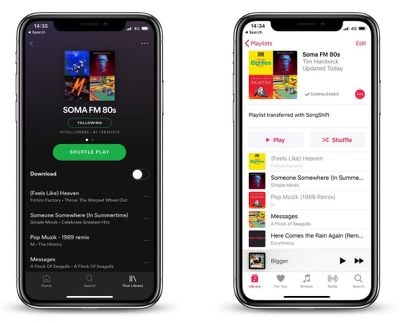
transfer spotify playlists to apple music
In this article, we're going to use one such app called SongShift to do exactly that, as it's easy to set up and you can test it for free before paying the $3.99 in-app purchase that lets you batch process more than five playlists.

  1. Launch the SongShift app on your iPhone.
  2. Tap Get Started.
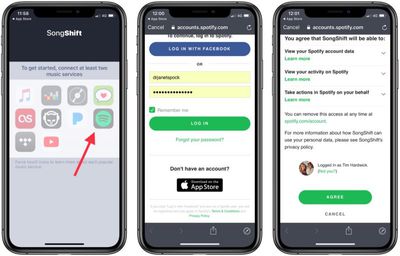
  3. Tap the Spotify icon (you can Force touch icons to identify them).
    transfer spotify playlist to apple music 1

  4. Enter your Spotify username and password and then tap Log in.
  5. Tap Agree at the bottom of the next screen to grant the app access to your Spotify library.

  6. Next, tap the ‌Apple Music‌ icon and then tap Authorize to grant the app access to your ‌Apple Music‌ library and set a token.
  7. Tap OK to confirm.
  8. Tap Continue.
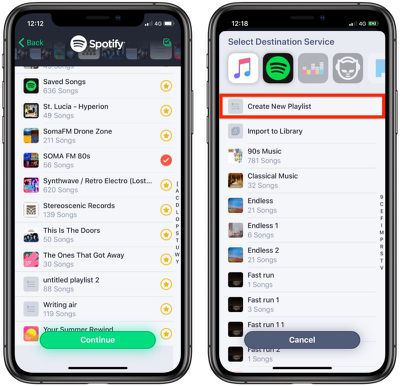
  9. Next, tap the Spotify icon and select a playlist to transfer, then tap Continue.
    transfer spotify playlist to apple music 3

  10. Tap Destination and then select the ‌Apple Music‌ icon.
  11. Tap Create New Playlist.
  12. In the Configuration screen, tap Destination and enter a custom name for the playlist as you'd like it to appear in your ‌Apple Music‌ library, then tap OK.

  13. Tap Process and wait while the transfer or "shift" completes.
The "shift" process may take some time and depends on how many songs are in your playlist, but you can start queuing multiple transfers and even close app and they will continue in the background. You can also allow SongShift to notify you when a transfer is complete.

Note: You can keep tabs on a playlist transfer by checking the colored dots next it. Green means processing is complete, blue means songs are pending processing, purple means currently processing, and orange means a song failed to match.


Popular Stories

General Spotify Feature

Spotify Adds Running Mode to iOS App With Tempo-Matched Music

Thursday July 30, 2026 8:49 am PDT by
Spotify today announced a new Running Mode that turns playlists into structured running sessions built around workout type, tempo, and listening habits. It's launching on iOS first. Located in the app's Fitness Hub, the feature lets runners choose from 25 presets that can be tweaked to fit workout type (interval, steady, or pyramid, for example), with options for duration, beats per minute,...
apple music

Apple Music Now Costs $11.99 as Apple Increases Subscription Prices

Friday July 17, 2026 11:25 am PDT by
Apple today increased the price of Apple Music and some Apple One subscription bundles. An individual Apple Music subscription is now $1 more expensive in the United States, going from $10.99 to $11.99 per month. Pricing on the Apple Music Family plan increased by $3, increasing from $16.99 to $19.99. Student pricing is up $1, with the plan now priced at $6.99. The price of the individual ...


Apple Event Logo

Apple Working on All-New Operating System

Wednesday July 29, 2026 11:39 am PDT by
Apple is developing an all-new operating system that is essentially a mix of tvOS, watchOS, and iOS, according to Bloomberg's Mark Gurman. In a report this week, he said the operating system will feature a grid of icons, widgets, and apps, along with customizable clock faces. The new software platform is intended for Apple's long-rumored smart home hub. With built-in facial recognition,...

🔗 Related Apple News & Rumors

Stay updated with the latest Apple ecosystem news and verified rumors