iOS 14.5: How to Change Siri's Voice - MacRumorsOpen MenuShow RoundupsShow Forums menuVisit ForumsOpen Sidebar
Skip to Content

iOS 14.5: How to Change Siri's Voice

by

In iOS 14.5, Apple introduced two new Siri voices that are available in English, and also added a setup selection option that lets new users choose their preferred ‌‌Siri‌‌ voice rather than defaulting to a female voice in the United States.
14
The new voices, which Apple says add more diversity in speech sound and pattern, run voice recordings through Apple's Neural Engine to make them flow more organically through phrases generated on the fly, so you should find that they sound more natural.

If you've updated your iPhone or iPad to iOS 14.5/iPadOS 14.5, you can still change the ‌Siri‌ voice after setup to work out which one you prefer. The following steps show you how it's done.

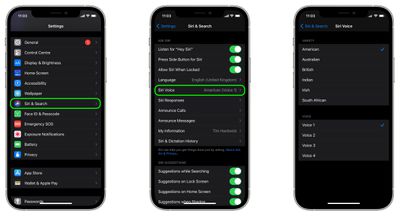
  1. Launch the Settings app on your iPhone or ‌iPad‌.
  2. Tap Siri & Search.
  3. Tap Siri Voice.
  4. Select a ‌Siri‌ "Variety" (previously called "Accent"), then choose a Voice from the selection available. A checkmark will appear next to your selection once the voice has been downloaded from Apple's servers.
    siri

Note that that number of Voice options available depends on the Variety that you choose. For example, American offers the most with four voices, whereas the Australian, British, Indian, Irish, and South African options offer two.
siri
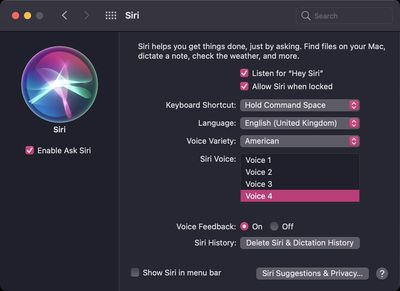
If you have a Mac that's updated to macOS 11.3, you can find the same options in System Preferences under the Siri preference pane. For more helpful articles covering the new features in iOS 14.5, be sure to check out our dedicated guide.


Related Forum: iOS 14

Top Rated Comments

antiprotest Avatar
69 months ago
Now Siri sounds so much better when she says she can't help me.

Score: 11 Votes (Like | Disagree)
69 months ago
I have to admit, I really like the new voices. The cadence and tones are very natural. In this respect, they really did a great job.

Score: 11 Votes (Like | Disagree)
69 months ago
I actually really like the new voices. But honestly. I’m struggling to change it. I know Siri’s voice has changed a bit since the beginning but to me it’s been the same Siri for so long that changing it’s voice makes me feel like I’m loosing a good friend. It’s stupid but I can’t bring myself to change it.
Score: 10 Votes (Like | Disagree)
69 months ago
Still waiting for a strong German accent male voice that a) sounds like Schwarzenegger and b) shouts everything at me to remind me of my childhood.
Score: 7 Votes (Like | Disagree)
69 months ago
Instead of focusing on adding 980970807 different voices, how about you translate iOS and MacOS in more languages? Still no Bulgarian despite Apple being around, what, 40 years? I don't feel represented and I am offended. Apple is supposed to be inclusive not divisive.
Score: 7 Votes (Like | Disagree)
GeoStructural Avatar
69 months ago
I can see someone complaining for designating a voice to be “male” or “female”.

These days we never know.
Score: 6 Votes (Like | Disagree)

Popular Stories

watchos 27

Siri AI Comes to Apple Watch in watchOS 27 Beta 3

Monday July 6, 2026 1:24 pm PDT by
With watchOS 27 beta 3, Apple added support for Siri AI and the Siri app, so Apple Watch users can now use the features right from their wrist. Apple said Siri AI would be coming to the watch back when watchOS 27 was first introduced, but the feature wasn't live until now. The Dynamic App Grid that pops up when the Digital Crown is pressed displays the Siri app in the center, and the...
iphone 16 teal

'Siri AI' Lawsuit Update: Apple to Pay Owners of These iPhone Models

Thursday July 9, 2026 7:08 am PDT by
In May, Apple agreed to pay $250 million to settle a U.S. class action lawsuit over Siri AI's delayed launch, and eligible iPhone users could receive up to a $95 payout. This week, the California court overseeing the case held a hearing regarding preliminary approval of the settlement, but the judge has not yet issued a ruling. It will likely be at least a few more months before eligible...
macOS iOS 27 Siri App Feature

Apple's Secret Siri Interface Buried in macOS 27 Beta: How to Enable

Monday July 20, 2026 4:09 am PDT by
Apple appears to be testing a hidden popover interface for Siri AI in the macOS 27 Golden Gate beta that surfaces Writing Tools and contextual actions whenever the user selects some text. Spotted by a member of Reddit's r/MacOSBeta community, the floating icon appears at the top-left of the selected text, expanding when the pointer hovers over it to a compact popover of the tools and...

🔗 Related Apple News & Rumors

Stay updated with the latest Apple ecosystem news and verified rumors