

Apple today officially released iOS 12, the latest operating system designed for the iPad, iPhone, and iPod touch. iOS 12 is available on all devices able to run iOS 11, which includes the iPhone 5s and later, the iPad mini 2 and later, the iPad Air and later, and the 6th-generation iPod touch.
The update is available on all eligible devices over-the-air in the Settings app. To access the update, go to Settings --> General --> Software Update. It could potentially take a few minutes for the update to propagate to all users due to high demand. As with all iOS updates, iOS 12 is free to download.
Watch on YouTubeiOS 12 is a major update that brings several new features and upgrades to Apple's iOS devices, along with some significant performance improvements. Apple has revamped the operating system from top to bottom to make iPhones and iPads, especially the older models, faster and more responsive.
Apps open more speedily than before, the keyboard pops up faster, and the Camera launches much quicker. Apple has also introduced optimizations for when the system is under load, making iOS devices faster when you need performance most.
On the iPhone X (and upcoming XS and XS Max models), there are new Animoji characters (Ghost, Koala, Tiger, and T-Rex) along with "Memoji," which are customizable, personalized, humanoid Animoji that can be used both in Messages and in FaceTime, plus there are fun new camera effects in both of those apps.
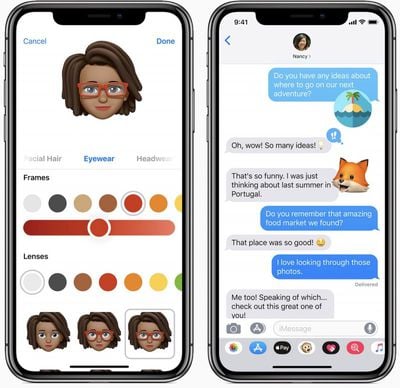
Apple originally planned to introduce Group FaceTime support in iOS 12, but the feature was removed during the beta testing period. It will be reintroduced later this fall in a future iOS 12 update.
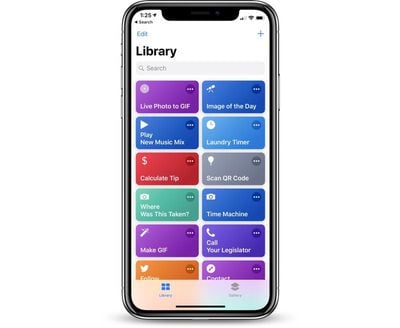
Siri is smarter than ever in iOS 12 with a new Shortcuts feature designed to let you create multi-step customized automations using first and third-party apps that can be activated with Siri voice commands. Shortcuts can be created through the Shortcuts app, which Apple is releasing alongside iOS 12.
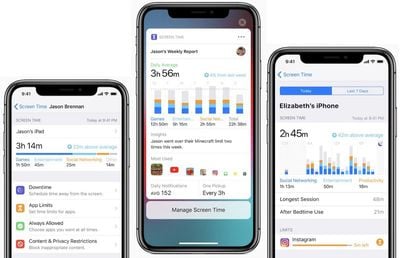
Apple built comprehensive time management and monitoring tools into iOS 12 with Screen Time, allowing you to keep track of how much time you're spending in apps on your iPhone and iPad. App limits can help you cut back on iOS device usage, and robust parental controls are included for families.
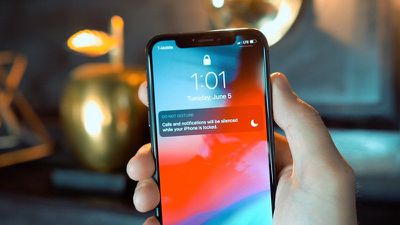
Updated Do Not Disturb options make activating Do Not Disturb more intuitive and simple, and a new Do Not Disturb at Bedtime feature cuts down on nighttime distractions and sleep interruptions by hiding notifications at night.
Grouped Notifications make incoming notifications easier to view and manage, while a new Instant Tuning feature lets you tweak your notification settings right on the Lock screen on a notification-by-notification basis to cut down on the number of notifications you receive.






/https://forums.macrumors.com/proxy.php%3Fimage=https://droid-life.com/wp-content/uploads/2011/09/Sad-Android.png&hash=cae141524e93a071a6bd89713122d95a)















































