Group FaceTime, which lets you chat with up to 32 people at one time, is relatively easy to use, but it may not be immediately obvious how a call is initiated nor how all of the group chat options work, which is why we've taken an in-depth look at the new feature. To use Group FaceTime, all participants must have iOS 12.1.4 or later installed.


Got a tip for us?Let us know
Subscribe to the MacRumors YouTube channel for more videos.
Placing a Call
There are two ways to initiate a Group FaceTime call, using the FaceTime app or the Messages app.
FaceTime App
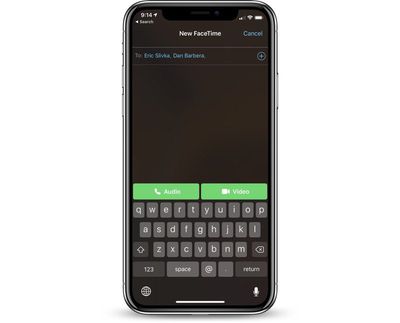
- Open up the FaceTime app
- Tap on the "+" button in the upper right hand corner.
- In the "To" field, type a name and tap it.
- Type another name.
- Continue typing in all of the names of the participants who you want to chat with.
- When ready to place the call, tap on either the audio or the video option and participants will receive a popup letting them know that you want to FaceTime with them.
Messages App
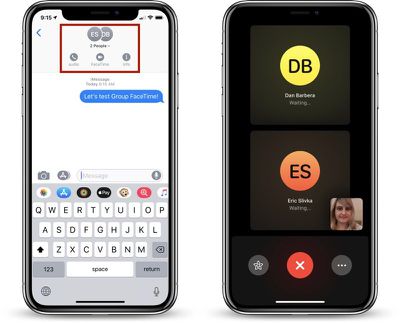
- Open up an existing multi-person conversation or create a new iMessage chat thread.
- At the top, where the names of the chat participants are listed, tap to bring up a menu bar.
- Choose the "FaceTime" option to transition from a text-based conversation to a video or audio call.
The Messages FaceTime interface works with just one person or with a group of people, and it's perhaps the easiest way to initiate a multi-person FaceTime call.
Receiving an Incoming Call Request
When a Group FaceTime chat is initiated either via FaceTime or through the Messages app, you will get a notification letting you know that a FaceTime call is initiating, which you can tap to join.

Joining an Existing Group FaceTime Call
When you're in a group chat in the Messages app and someone initiates a Group FaceTime conversation, any person in the chat can join the call at anytime.
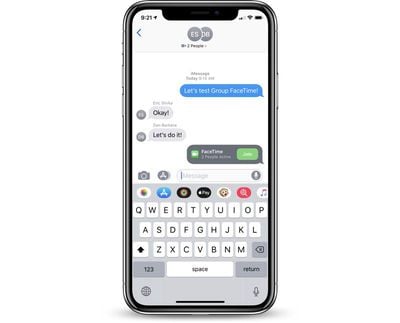
In the Messages interface, there's a chat popup that lets you know a call is ongoing, with a "Join" button available and the number of people active in the conversation.
Joining a conversation is as simple as tapping that "Join" button, which automatically adds you to the call. There's no approval interface, so be aware that if you're in the middle of a conversation, anyone from a group Messages chat can interrupt and join in.
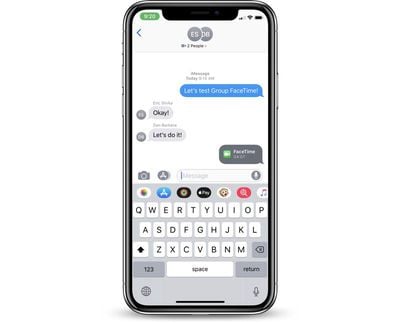
While in a Group FaceTime call, you'll also see a chat bubble that lets you know how long the call has been going on.
Adding Another Person Through FaceTime
While in a FaceTime call, you can easily add another person to the chat.
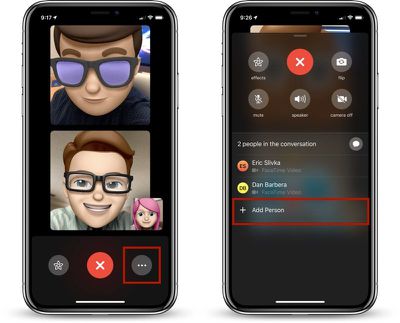
- In an active call, tap on the icon that features three dots.
- Tap on "Add Person."
- Choose a name from the list to send them a notification to join in.
Leaving a Group FaceTime Call
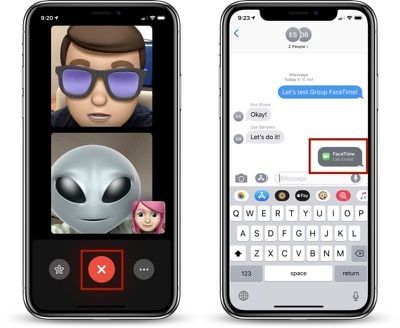
As with a standard FaceTime call, exiting a Group FaceTime chat is as simple as tapping the big red "X" button to end the chat.
Focusing on Chat Members
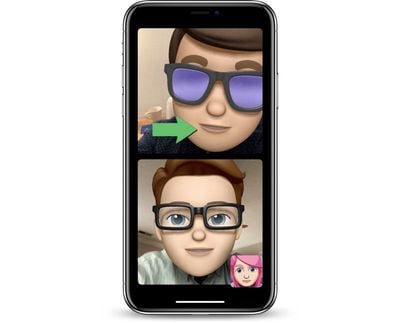
All Group FaceTime calls are displayed with a tiled interface that highlights the person who last spoke. If you have a call with multiple people, you'll see tiles of various sizes focusing on main participants, with those who haven't spoken recently minimized in small tiles.
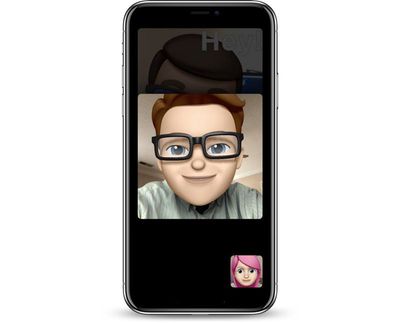
You can double tap on any person's tile to make it the focal point in your FaceTime view, enlarging the tile to its biggest possible size. Tap again to go back to the standard tiled view.
Applying Effects
In addition to multi-person FaceTime calls, iOS 12 adds a new FaceTime effects camera that you can use while chatting. While in a FaceTime call, tap on the star-shaped icon to the left of the end call button to access options that include Animoji and Memoji, filters, stickers, shapes, and text.
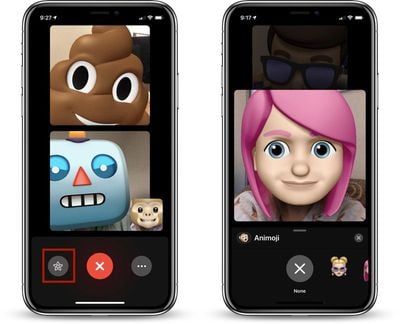
Multiple effects can be applied at once, which are displayed to all chat participants. The people you're chatting with can also choose different effects to use, leading to chats filled with different Memoji and Animoji characters. Memoji and Animoji are limited to devices with the TrueDepth camera system.
Tag: FaceTime Guide
Popular Stories

iPhone Duo's Hidden FaceTime Camera Takes 'Trash' Photos
The iPhone Duo's inner screen has an under-display front camera that's largely hidden from view. It's the first time we've seen an under-display camera on an iPhone, and it turns out there's a reason Apple hasn't used the technology before.
Apple said the camera offers 1080p video recording, but didn't mention photo quality. Gizmodo said it's a 4-megapixel camera and described the photos as...
Why Can't iPhone Duo Users Make Eye Contact on FaceTime?
FaceTime's Eye Contact setting is missing on the iPhone Duo, MacRumors can confirm. The setting was first flagged as absent by MacRumors forum member TwoBytes, who noticed their eyes looking "a little off" during a call.
Introduced in iOS 14, Eye Contact uses machine learning to subtly adjust your eyes during a video call to make it seem like you're looking into the camera lens, even though ...

iOS 27.2 Expands Dual Capture to Group FaceTime
The iOS 27.2 update Apple released today allows the FaceTime Dual Capture feature to be used in Group FaceTime calls.
Dual Capture is a feature that lets you stream FaceTime video content from the front and rear cameras at the same time. On a compatible device running iOS 27, flipping the camera while on a FaceTime call automatically turns on Dual Capture.
Dual Capture is available on...















































Top Rated Comments
Also no broadcast mode in this group chat with text commenting by viewers. Everyone else has done it on their systems and the whole “in a group messages chat and go to FaceTime with a click” shows there’s linking between the two.
Broadcast mode would be killer for schools. Even better would be a mode where more viewers could join and there could be limited but multiple speakers. Like say up to 4 speakers. Or even two on a phone but 4 on an iPad, Mac or Apple TV (with a special app for viewing such broadcasts). A teacher could link up two classes even across the planet, do an interview with some special guest etc.
"Yeah. Well. That don't apply to me cos I don't ave any of them intra professional skills anyway. Whatever that is. And the funny pictures with mouths speaking is funny innit? Look. A talking cat. Cat talking. Funny"
Ah yes. I see your argument Yes It is a lot easier to use than going to the hassle of actual social interaction
Pass me that iPhone thing again and I'll ring a few people and tell them I'll not pop over but will show a not-very-accurate caricaturised representation of myself instead It'll be exactly the same experience. Won't it? Good. Thank you Apple