

All of the Changes to Notifications in iOS 12 - MacRumorsOpen MenuShow RoundupsShow Forums menuVisit ForumsOpen Sidebar
Skip to Content

All of the Changes to Notifications in iOS 12

In iOS 12, Apple has introduced new notification features, providing an expanded set of tools for monitoring and managing notifications in quicker and more intuitive ways.

There have been no changes to the way that Notifications work on the whole, but many of these features make it easier to clear notifications, determine which notifications you want, and make adjustments on the fly.

Grouped Notifications

iPhone and iPad owners have been asking for the return of grouped notifications for years, and in iOS 12, Apple delivered.

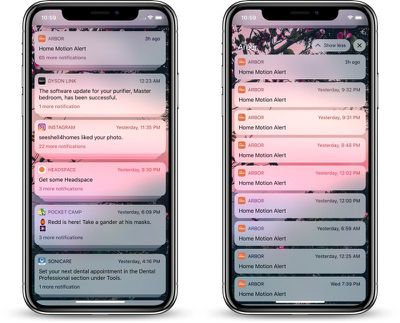
Multiple notifications from the same app will be grouped together on the Lock screen of the iPhone, cutting down on clutter. You can tap a set of notifications from a particular app to expand them to see all of the notifications in the list.
groupednotifications
You can tap on the "X" next to a notification group to clear all of those notifications at one time, or do the same thing with a swipe to the left.

In the Settings app, you can change the behavior of grouped notifications. Go to Settings > Notifications and tap on any app to see the "Notification Grouping" preferences. Tap that to choose "Automatic," "By App," or "Off" if you'd rather see all of the incoming notifications for a particular app like Messages.

Automatic sorts by app for the most part, but with this setting enabled, you might get two notification groups if you have email threads going with two different people in the Mail app, or multiple conversations in Messages, for example. Or different incoming Messages conversations.

By App will make sure all notifications from an app are in one stack, without the sorting that Automatic mode uses.

Instant Tuning

Instant Tuning is a feature that lets you manage a pesky notification right on the Lock screen, giving you the tools to turn notifications for that app off entirely or send notifications right to the Notification Center.

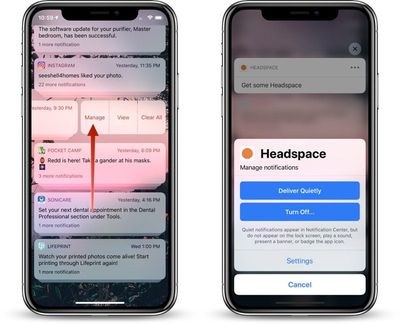
On any notification that's on the Lock screen or in the Notification Center when you swipe down, swipe left on a notification to see settings that include "Manage," "View," and "Clear All."
ios12instanttuning
Select "Manage" from this list to see Instant Tuning options. Notifications set to "Deliver Quietly" will be visible in Notification Center, but you won't see them on the Lock screen, there will be no banner, and there won't be a badge.

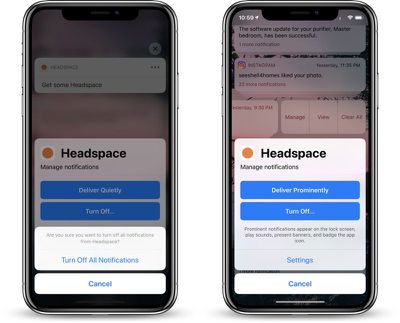
To reverse this, tap on a notification from the muted app again, follow the same instructions, and choose "Deliver Prominently." Notification settings can also be changed in the Settings app, also accessible from the Instant Tuning popup. Turn Off, as the name suggests, turns off notifications for that app entirely.
ios12instanttuning2
You can also get to your Instant Tuning settings by 3D Touching or long pressing on any notification and selecting the three ellipses. For more details on using Instant Tuning, make sure to check out our detailed how to.

Note: In iOS 12, Apple will send you alerts asking you if you would like to continue receiving notifications from a particular app if you've been getting a lot of notifications and haven't been interacting with them. When this happens, the alert will feature a "Manage" section so you can access your Instant Tuning settings for that particular app.

Critical Alerts

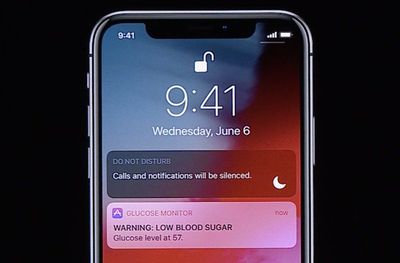
Critical Alerts are a new type of opt-in notification in iOS 12 that can ignore your Do Not Disturb settings to send important must-see notifications.
criticalalert1
These alerts are limited in scope and are available for medical and health related information, home security, and public safety. For example, a person who is diabetic might want to set critical alerts for a glucose monitor when blood sugar is low, so the notification will be delivered even if Do Not Disturb is turned on.
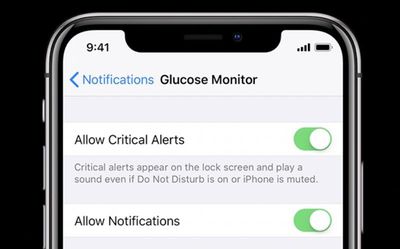
criticalalerts2
Critical alerts bypass Do Not Disturb and the ringer switch, and will always play a sound. They are meant to be disruptive and for that reason, are going to be highly limited to apps that need these kinds of immediate alerts.
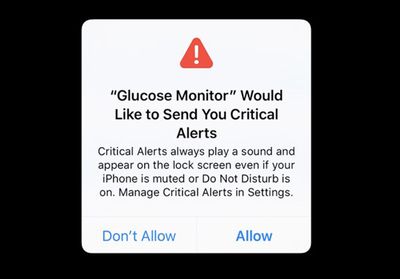
criticalalert3
Developers with apps appropriate for critical alerts will need to apply for an entitlement that needs to be approved by Apple. Users will be able to turn off critical alerts on a per app basis separately from other notifications.

Notification Count in Screen Time

Screen Time, Apple's new feature designed to provide you with the tools to monitor when and how you're using your iOS devices, keeps track of all of the notifications that apps are sending you, letting you know which apps are the noisiest.

This information can help you decide if you want to keep notifications turned on for a particular app, or if you might want to mute an app to cut down on interruptions.
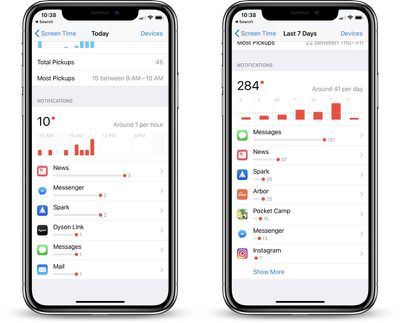
screentimenotifications
You can get to this section of Screen Time by opening the Settings app, choosing Screen Time, selecting "All Devices," and then scrolling down to the bottom. You can see your notifications from the last 24 hours or the last 7 days.

For more on using Screen Time, make sure to check out our Screen Time how to and our how to on App Limits and Downtime.

Richer Notifications

In iOS 12, app developers can build notifications that are able to accept user input, so you can interact with notifications in new ways, doing more on the Lock screen without having to open up your iPhone.

With Instagram, as an example, if the app sends you a notification that a friend posted, you might be able to view the photo and then add a like all from the notification.
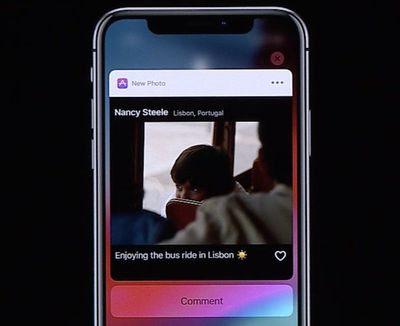
ios12touchnotifications

In this example, you can tap the heart to like the photo, something that wasn't possible in iOS 11.

Rich notifications were available in earlier versions of iOS, but Apple has removed the limits that previously restricted interactive touches.

What do you think of the changes to notifications in iOS 12? Are there other notification features you're hoping for in the future? Let us know in the comments.


Related Forum: iOS 12

Popular Stories

iPhone Duo Display Cracking

Apple Alerts Stores to iPhone Duo's Display Cracking Issue

Friday October 30, 2026 3:20 pm PDT by
In a memo shared with Apple Stores and Apple Authorized Service Providers this week, and later obtained by MacRumors, Apple provided technicians with guidance on how to diagnose and address the iPhone Duo's inner display cracking issue. If a customer reports the issue, Apple advised technicians to inspect the iPhone Duo and repair or replace it in accordance with their standard procedures....
iPad mini OLED feature 1

Apple Executive Comments on New iPad Mini Lacking 120Hz Display

Thursday October 29, 2026 1:47 pm PDT by
While the new iPad mini has an OLED display, the device does not support ProMotion, meaning the display's refresh rate is limited to 60Hz instead of 120Hz. ProMotion support would have allowed for the iPad mini's refresh rate to automatically adjust from 10Hz to 120Hz depending on the content being displayed, but evidently Apple has kept the feature exclusive to the iPad Pro among iPad...
Pinched iPad Mini

Apple Avoids Showing Pinched Fingers on iPad Mini Page in South Korea

Thursday October 29, 2026 11:52 am PDT by
In the U.S. and most other countries, Apple's website shows the new iPad mini being held by pinched fingers, but this is not the case in South Korea. The new iPad mini shown with pinched fingers on Apple's website in the U.S. On its South Korean website, Apple simply shows an image of the iPad mini on its own. The new iPad mini shown without pinched fingers on Apple's website in South Korea ...

Top Rated Comments

seatton Avatar
108 months ago
As long as I can set up my Tinder messages as a part of Critical Alert, I will stick with Apple for life.
Score: 15 Votes (Like | Disagree)
Infinite Vortex Avatar
108 months ago
Sounds nice… but at the end of the day its just more and more **** to manage in more and more complex ways. I'm getting to the point where Flight Mode is the answer to everything.


Score: 9 Votes (Like | Disagree)
L-Viz Avatar
108 months ago
As long as I can set up my Tinder messages as a part of Critical Alert, I will stick with Apple for life.
The only alert, that really can be critical, is coming from the bladder.
Score: 6 Votes (Like | Disagree)
brownbird Avatar
108 months ago
Here let me write this for them.

As a user I want to be able to schedule when notifications arrive so that I am not distracted by notifications all day long.

For example, I can set up a schedule where notifications arrive every 30 minutes. Imagine what kind of difference that would make in our ability to be present in the moment, enjoy the company of others, and be able to maintain control over our lives. Maybe that's too much to ask from a company who claims to care about the user and their experience? :shrug
Score: 6 Votes (Like | Disagree)
DEXTERITY Avatar
108 months ago
How about the ability to delete all mail? It makes no sense there is no way to select all email messages and delete. Who in Apple thinks it is efficient to delete one by one. Beyone annoying, mindboggling and stupid.

The same person who designs mail must be in charge of the apple music layout and settings.
Score: 5 Votes (Like | Disagree)
108 months ago
Getting closer to Android's notification functionality ever day. Maybe we'll get home screen customization with applets in the next 10 years :)
Maybe we'll get a freaking notification LED so I don't have to leave my freaking screen on 24/7.

You know, like in the freaking 1990s?!?

you wanna know why life was better in the 90s?

Because even freaking tape based answering machines had a freaking notification LED. Not to mention ALL cell phones.

No notification LED is INSANE.
Score: 4 Votes (Like | Disagree)
Latest Stories
Apple Watch Ultra 4 Hits All-Time Low Price With Amazon's $99 Discount
11 hours ago
Reminder: Apple's Big Discount on Beats 360 Ear Cushions Ends Today
12 hours ago
Here's a New Tour of Apple's HomeView Software
12 hours ago
Apple Reveals New iPad Mini's Battery Capacity
13 hours ago
Top Stories: Apple's Big MacBook Pro, iPad mini and iMac Updates
14 hours ago
'Pluribus' Season 2 Reportedly Starts Production Today
21 hours ago
iPhone 18 Pro Sales Surge in China, Offsetting Decline in U.S. and Japan
21 hours ago
HomeView Software 27.2: Wallpapers, Control Center, and More
1 day ago
Apple Alerts Stores to iPhone Duo's Display Cracking Issue
1 day ago
iOS 27.3 Will Enable These Apple Intelligence Features in China
1 day ago
Apple Says iOS 27.3 Beta Coming Next Week
1 day ago
Apple's Flash Storage Suppliers Are Finally 'Getting Their Revenge'
1 day ago
14 New Things Your iPhone Can Do in iOS 27.2
1 day ago
iPhone Duo Review: One Week Later
1 day ago
Samsung Mocks iPhone Duo Display Cracks in New Ad Campaign
1 day ago
The MacRumors Show: OLED MacBook Pro, iPad Mini 8, and More
1 day ago
MacBook Pro With Touch Display: 15 More Details Revealed
1 day ago
Russia Places Apple on State Surveillance Registry
2 days ago
Halloween Weekend Brings Discounts on Apple Accessories and Pre-Orders
2 days ago
Apple Has Released More Than 25 New Products in the Past Two Months
2 days ago
Local Code Launches as Free, Private AI Assistant Tool for Mac
2 days ago
Apple Acquires Ascend.io
2 days ago
HomePod Mini 2 Launches Today: All the New Features
2 days ago
AirTag 2 4-Pack Drops to New Low Price of $69.99
2 days ago
Rian Johnson's iPhone Camera App Goes Viral
2 days ago
Where Did All the iPhone Duos Go? Mostly to Apple's Stores
2 days ago
Apple's Touchscreen MacBook Pro Could Ship 1.5M Units in 2027
2 days ago
New Apple TV 4K and iPad Mini: RAM Amounts Revealed
2 days ago
Apple Executive Comments on New iPad Mini Lacking 120Hz Display
2 days ago
Here's a Hands-On Look at HomePod Mini 2's New Two-Tone Colors
2 days ago

🔗 Related Apple News & Rumors

Stay updated with the latest Apple ecosystem news and verified rumors










































