

One of the new features in iOS 12 is an augmented reality app called Measure, which Apple has designed to make it easier for you to measure various real-world objects using 3D spatial detection techniques.
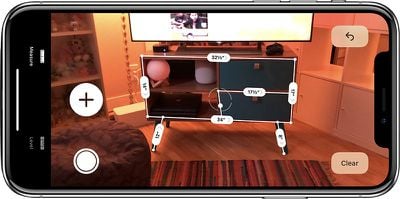
- Open up the Measure app.
- Follow the on-screen instructions and move your iPhone around the room so that it can get the dimensions of various objects.

- Once it's calibrated, denoted by a white dot in a circle, you're ready to start measuring.
- To take a measurement, line the white dot up with the corner of an object and then press the "+ button to create an anchor point.
- From the anchor point, pan the iPhone over to the other edge of the object.
- Press the "+" button again to get the final measurement of the line.
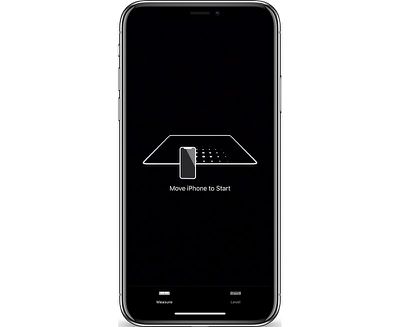
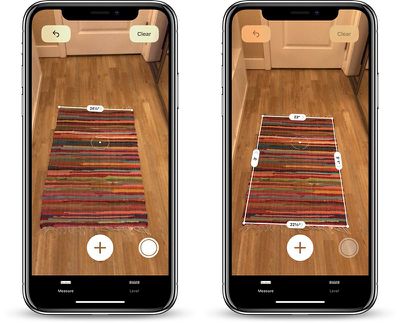
You can continue using this method to get the full dimensions of different objects in your room, with the ability to set multiple anchor points if desired.
Haptic feedback is included in the Measure app, so you'll feel little haptic taps whenever you set an anchor point, for physical feedback. Haptic taps are also included whenever the app detects an obvious stopping point for a measurement, such as the end of a wall.
To clear your anchor points and start over at any time, tap the "Clear" button.
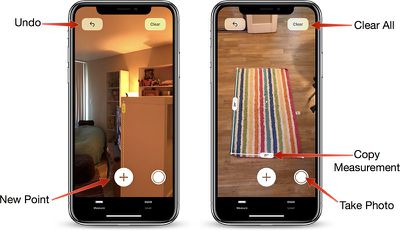
Once all of your measurements are in place, tap the white camera button to take a photo that displays all of the measurements overlaid on the object you're measuring.
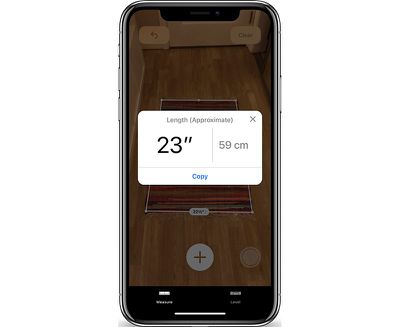
You can also tap on the arrow of one of the measurements to get a pop up with the current readings that you can copy and paste into another app like Messages or Notes.
Measurement Automatic Detection
For certain square-shaped objects that the Measure app detects, the detection of the dimensions will be automatic. To get an automatic measurement, choose a square or rectangular object and hold the iPhone in front of it.
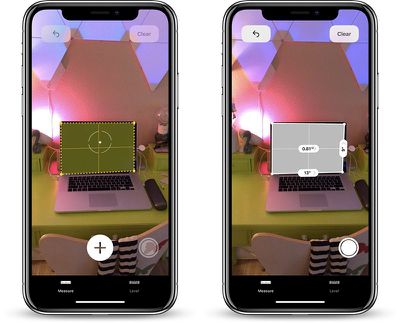
If it's going to take an automatic measurement, you'll see a yellow square appear, which you can then tap to get dimensions. If it's not going to do automatic detection, you're going to need to use the tap method to draw individual lines.
Accuracy
The accuracy of the Measure app depends heavily on the precision of where the end points are placed, so there's room for error.
It's great for quick measurements to get an idea of size, but where precise measurements are required, it's probably best to double check with a physical measuring method.
Level Feature
In iOS 12, the Measure app is also home to the Level feature that lets you use the iPhone to detect whether a surface is level. Prior to iOS 12, the Level feature was in the Compass app, so it's not new, just relocated.
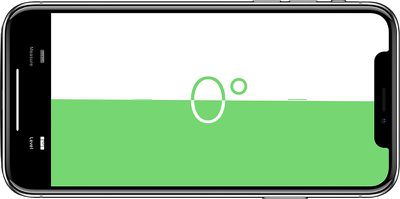
To use it, tap over to the level portion of the app, which is located at the bottom. Hold the iPhone in either portrait or landscape orientation with no case and balance it on an object such as a picture frame to get a reading.
If you tap the screen when using the level app, you can set a 0 degree reference angle to make measurements from, and laying the iPhone flat allows it to be used as a bubble level.
















































Top Rated Comments
New features need to be intuitive. That’s part of Apple’s whole philosophy. But if we have a website constantly jumping in to say look look this is how you use it, that defeats the purpose. Testers will be less likely to notify Apple that they couldn’t figure out a feature on their own.
This needs to be part of the beta testing process. When it’s deployed, that will ensure the feature is much more intuitive for the user. There is a reason why Apple never includes instruction manuals.
Apart from that, constant detailed articles about things that aren’t even released yet and which might change significantly before release seem pointless.
Yes, people want to know about beta features. But there’s a line between being informational and providing fully detailed instructional tutorials, and I think it’s crossed waaaay too often here. How about waiting until we have a released product to provide that information?