

How to Call Someone and Put Them on Speaker Without Picking up Your iPhone - MacRumorsOpen MenuShow RoundupsShow Forums menuVisit ForumsOpen Sidebar
Skip to Content

How to Call Someone and Put Them on Speaker Without Picking up Your iPhone

by

Next time you find yourself with your hands full and you want to make a call on your iPhone – or even if you're in bed and your phone's just out of reach – don't forget that you can get Siri to start a speakerphone call for you, handsfree.
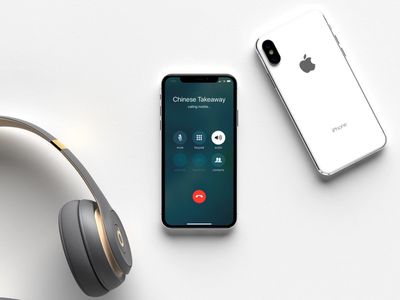
iphone x speakerphone call handsfree
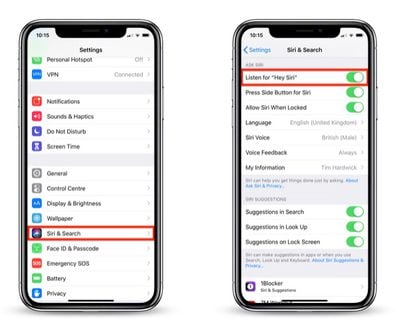
All you need to do beforehand is make sure that your iPhone is set up to listen for the "Hey Siri" voice command. You can check this by following the steps below:

Enable the "Hey Siri" Command on Your iPhone

  1. Launch the Settings app on your iPhone.
  2. Tap Siri & Search in the list.
    call handsfree speakerphone

  3. At the top of the screen, check that the Listen for "Hey Siri" slider is toggled to the green ON position.
With that done, you don't even have to pick up your iPhone to speak to someone on speakerphone. Simply say "Hey Siri, call [name] on speaker," and you'll be chatting in no time.
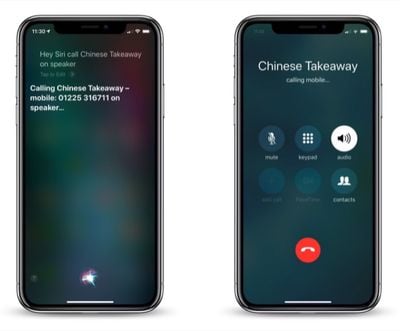
call handsfree speakerphone 1
What if the person you want to call isn't in your contacts list? No problem – just dictate the number to Siri instead: "Hey Siri, call [number] on speaker."

Remember this quick tip the next time you want to make a call and you might just save yourself some bother.

Related Forum: iOS 12

Top Rated Comments

jlc1978 Avatar
103 months ago
The idea is great, wasn’t it for Siri too often not understanding what I say

And really, do you want me to tell Siri the number, like 555-3462168???
I don’t even “remember “ or know my own wife’s number by heart anymore, let alone other people’s numbers.
"Hey Siri, Call wife on speaker"
"I can't find Wifon Speakerr. Did you mean John Speaks? I've found 6 of them near you..."

My general Siri experience. God help me if I try to use it when watching TV or a movie...

It's even worse if you are trying to call someone whose name is prounounced differently than it is spelt; for example an X in Portuguese so Xuxa is prononunces Shoo Sha. So unless you remember the Siri way with hard X's you can't call them and need to give them some other keyword in the contact.
Score: 10 Votes (Like | Disagree)
Bigskygangsta Avatar
103 months ago
"Hey Siri, Call wife on speaker"
"I can't find Wifon Speakerr. Did you mean John Speaks? I've found 6 of them near you..."

My general Siri experience. God help me if I try to use it when watching TV or a movie...

It's even worse if you are trying to call someone whose name is prounounced differently than it is spelt; for example an X in Portuguese so Xuxa is prononunces Shoo Sha. So unless you remember the Siri way with hard X's you can't call them and need to give them some other keyword in the contact.
[doublepost=1543068471][/doublepost]Simple solution to odd name pronunciations. Tell Siri to learn how to pronounce “xyz” contact and she’ll ask you how it’s pronounced and fix it. This has been available for years.
Score: 4 Votes (Like | Disagree)
103 months ago
I use my speakerphone for almost all my calls (The stereo speakers are outstanding on the newer iPhones) and I didn’t even think to ask Siri to invoke the speaker hands free. Good article.
Score: 4 Votes (Like | Disagree)
840quadra Avatar
103 months ago
I use this quite often, especially from iPad or HomePod.

Siri does far more, far better than many give it credit for.
Score: 3 Votes (Like | Disagree)
Michael Scrip Avatar
103 months ago
The idea is great, wasn’t it for Siri too often not understanding what I say

And really, do you want me to tell Siri the number, like 555-3462168??? I don’t even “remember “ or know my own wife’s number by heart anymore, let alone other people’s numbers.
The article explains two ways to call.

You could dictate each digit like you described. You're right... you might not remember their number.

Or you can call someone from your contact list by simply saying:

"Hey Siri, call [WIFE] on speaker"

:p
Score: 3 Votes (Like | Disagree)
mattopotamus Avatar
103 months ago
I thought this was actually going to show you how to answer on speaker. I usually use my Apple Watch and then handoff when my hands are free.


Score: 2 Votes (Like | Disagree)

Popular Stories

iOS 18 Siri Personal Context

Siri AI Settlement Website Now Live: Apple to Pay Some iPhone Owners

Sunday September 20, 2026 7:24 pm PDT by
In May, Apple agreed to pay $250 million to settle a U.S. class action lawsuit over Siri AI's delayed launch, and the settlement website is now live. Apple will pay an estimated $25 per eligible iPhone to eligible customers, who can submit a claim via the settlement website between September 21 and December 21 of this year. The exact payment may be higher or lower than $25 depending on the...
macOS iOS 27 Siri App Feature

Reminder: iOS 27's All-New Siri AI Has a Waitlist, Here's How to Sign Up

Tuesday September 15, 2026 8:54 am PDT by
Apple this week released iOS 27 following around three months of beta testing. If you just installed the software update on your iPhone, you might be wondering where the new-and-improved Siri AI and dedicated Siri app are. In case you missed it, you must join Apple's waitlist in order to gain access to these new features. Keep in mind that while iOS 27 is compatible with the iPhone 11 and...
macOS iOS 27 Siri App Feature

Apple's Siri AI Can Be Swapped Out for Claude, ChatGPT, Code Shows

Monday September 14, 2026 4:37 am PDT by
Code sleuth "pdfu" has uncovered iOS 27 and macOS Golden Gate private frameworks that show Apple has designed its new Siri architecture to work with third-party AI models at what appears to be a surprisingly deep level. One mechanism called Model Delegation allows Claude to appear as a Siri extension in the same way as the existing built-in ChatGPT extension. In pdfu's video, shared on X,...
Latest Stories
Apple TV Just Updated Its Selection of 'Bonus' Movies
6 minutes ago
iPhone 18 Pro Colors Buyer's Guide: Which Should You Choose?
13 minutes ago
Early Prime Big Deal Days: Best Discounts on Accessories, TVs, and More at Amazon
35 minutes ago
MacBook Pro With OLED Touch Screen Rumored to Launch in October or November
2 hours ago
Apple's All-New Home Hub Rumored to Launch in These Four Colors
2 hours ago
iPhone 18 Pro Aperture Control Goes Fully Manual in Halide 3.2
4 hours ago
Apple Stores Receive 'Do Not Open' Boxes Ahead of Smart Home Products Launch
4 hours ago
iPhone 18 Pro Sales Jump in China Ahead of iPhone Duo Launch
5 hours ago
Apple TV Still Down for Some Users Following Apple Services Outage
5 hours ago
PSA: Apple Mail on Mac May Stop Syncing Microsoft 365 Accounts Today
6 hours ago
Apple's Smart Home Hub: Everything We Know So Far
16 hours ago
Apple's Home Hub Borrows From the iPhone Duo's StandBy Mode
17 hours ago
Apple Invites App Updated With Three New Features
21 hours ago
Apple Event on October 13?
22 hours ago
Apple Watch SE 3 vs. Series 12 Buyer's Guide: Which Should You Buy?
1 day ago
iPad Mini 8 to Offer These 10 New Features
1 day ago
DoorDash Unveils AI Food Ordering Through Apple's Messages App
1 day ago
Amazon Takes Up to $150 Off Select M5 MacBook Air Models
1 day ago
Apple Still Plans to Release a New Full-Sized HomePod
1 day ago
Apple Working to Expand HomeKit
1 day ago
Apple Smart Home Hub to Feature iMac G4-Style Design
1 day ago
Three New Apple Smart Home Products Coming on October 13
1 day ago
Apple Pay Now Available in India With Axis Bank Cards
2 days ago
OpenAI Launches Always-On 'Dots' Agents to Rival Meta's Muse
2 days ago
AirPods 5 Teardown: Batteries Removable, Case Still Tough
2 days ago
iPhone 18 Pro Owners Complain of Speaker Crackling or Popping
2 days ago
You Can 'Get Ready' for iPhone Duo Pre-Orders on October 12
2 days ago
Apple Pay Reportedly Launching in India Today
2 days ago
Apple Releases New AirPods Beta Firmware
2 days ago
Apple Shares New Guide for Using iOS 27 Parental Controls
2 days ago

🔗 Related Apple News & Rumors

Stay updated with the latest Apple ecosystem news and verified rumors





































