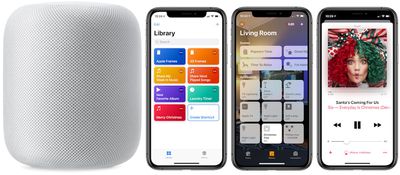
Although HomePod is available in Apple's Home app, the company's smart home speaker as of yet can't be integrated into HomeKit scenes and automations. With such a feature, users would be able to activate their favorite ‌HomeKit‌ scenes, alongside a specific Apple Music playlist, album, or song from their ‌HomePod‌.

how to homepod shorcuts pic
Reddit user Running_In_Space on r/HomeKit explained recently that this is actually possible today, thanks to a helpful (and super simple to create) Siri Shortcut. With the Shortcut, you can tie any Home scene together with any ‌Apple Music‌ playlist. While the Shortcut is limited to playlists, you can choose from your own playlists or those created by ‌Apple Music‌.

In the example below, we created a holiday themed ‌Siri‌ Shortcut that turns on Christmas tree lights (connected to an iDevices Switch) and shuffles a holiday playlist any time we say, "Hey ‌Siri‌, Merry Christmas." Also remember that you'll need an ‌Apple Music‌ subscription, HomeKit-enabled lights or other devices of some kind, and the updated ‌Siri‌ Shortcuts iOS app.

How to Create the Siri Shortcut

  1. Open the iOS "Shortcuts" app
  2. Tap "Create Shortcut"
  3. homepod how to shortcut 5

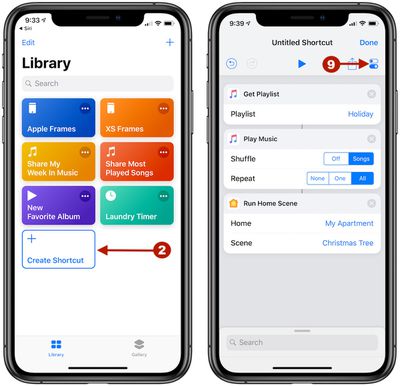
  4. In the search bar, type "Get Playlist" and add it into your Shortcut
  5. Next to Playlist, tap "Choose" and pick your desired playlist
  6. Search for "Play Music" and add it (here you can also edit settings for shuffling and/or repeating the playlist)
  7. Search for "Run Home Scene" and add it
  8. Next to Home, tap "Choose" and select your home
  9. Next to Scene, tap "Choose" and select your desired scene
  10. Before you tap "Done," select the toggle icon under the Done button at the top right corner of the screen
  11. siri shortcuts homepod how to 2

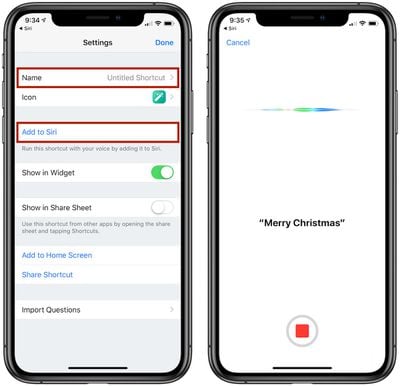
  12. Name the Shortcut, and tap "Add to ‌Siri‌" to record your preferred trigger phrase
  13. Tap "Done" until you're back on the Library screen of the app

Now you will be able to say, "Hey ‌Siri‌, [Trigger Phrase]" to your ‌HomePod‌ and have the selected Home scene activate along with the chosen ‌Apple Music‌ playlist, connected via AirPlay on your iPhone. ‌Siri‌ typically responds with, "Okay, running your shortcut," and it can take a bit longer than a normal scene activation in ‌HomeKit‌ due to the multiple actions.

There are numerous versions of this ‌Siri‌ Shortcut that could be created, like having a nighttime scene in ‌HomeKit‌ tied to a mellow ‌Apple Music‌ playlist that's triggered when you say, "Hey ‌Siri‌, goodnight." We tried testing out Home scenes that are activated via geofences, but in the few times we tried we could not get ‌HomePod‌ to turn on and play the specified ‌Apple Music‌ playlist when the arriving home scene in ‌HomeKit‌ was activated.

It's also worth noting that the desired ‌Apple Music‌ playlist will play on whatever device you are talking to ‌Siri‌ with, so in our example if we said, "Hey ‌Siri‌, Merry Christmas" and ‌HomePod‌ picked it up, then the holiday playlist played on ‌HomePod‌. If we said the same phrase to our ‌iPhone‌, the playlist would play there instead. In both scenarios, the Christmas tree lights were still activated regardless of the Apple device used.

Apple introduced ‌Siri‌ Shortcuts as an update to its Workflow iOS app back in September, and although creating Shortcuts can be an arduous task in some cases, there are a few super useful actions that have been shared over the past few months. Do you use ‌Siri‌ Shortcuts and have a favorite one to share? Give us the details in the comments below or Tweet us @MacRumors to let us know your most-used Shortcuts.

Related Roundup: HomePod
Buyer's Guide: HomePod (Neutral)

Top Rated Comments

benroberts3 Avatar
94 months ago
Very cool hack, but way too many compromises.

Set up myself and ran into a number of issues. With trial and error I finally got it right. Ultimately it’s party trick that’s cool, but flawed mostly because of where the music comes from depending on which device picks up the request.

+1 for the guy who said in the comments Apple needs to allow HomePod in HomeKit automation scenes
Score: 3 Votes (Like | Disagree)
mrderik Avatar
94 months ago
I really thought they would have 'fixed' this by now It's not tough Apple. Just put the homepod icon in the 'Scene' menu. I'd be perfectly happy just having it turn 'on' like any other device and have it continue playing where I 'paused' it. duhhh.
Score: 2 Votes (Like | Disagree)
ryannealcordwell Avatar
91 months ago
Very cool hack, but way too many compromises.

Set up myself and ran into a number of issues. With trial and error I finally got it right. Ultimately it’s party trick that’s cool, but flawed mostly because of where the music comes from depending on which device picks up the request.

+1 for the guy who said in the comments Apple needs to allow HomePod in HomeKit automation scenes
Likewise!

This seems like one of those blatantly obvious launch-features Apple would’ve worn on their sleeve, but we somehow won’t end up seeing for another long span of time.
Score: 1 Votes (Like | Disagree)
d5aqoëp Avatar
94 months ago
This is the new age of doing simple things in complicated way.
A small software update can make you re-learn to do same things differently.... again.
Score: 1 Votes (Like | Disagree)
travoose Avatar
94 months ago
This is neat. This is exactly how I have mine setup. However, the problem still is that you can't execute this without an iPhone to get the music from...which you would think since the HomePod has access to your entire Apple Music collection and it can execute running the HomeKit scenes along with playing a separate playlist individually, that there should be no problem in creating a Siri Shortcut that allows you to do both at the same time with one voice command. This is where Apple has dropped the ball.
Score: 1 Votes (Like | Disagree)
apendergast Avatar
94 months ago
homepod homekit siri shortcuts image ('https://www.macrumors.com/how-to/homepod-homekit-siri-shortcuts/')


Although HomePod is available in Apple's Home app, the company's smart home speaker as of yet can't be integrated into HomeKit scenes and automations. With such a feature, users would be able to activate their favorite HomeKit scenes, alongside a specific Apple Music playlist, album, or song from their HomePod.
homepod homekit siri shortcuts image

Reddit user Running_In_Space ('https://www.reddit.com/r/HomeKit/comments/a18ngb/play_music_on_homepod_via_scene/eanom8p/') on r/HomeKit ('https://www.reddit.com/r/HomeKit/comments/a18ngb/play_music_on_homepod_via_scene/') explained recently that this is actually possible today, thanks to a helpful (and super simple to create) Siri Shortcut. With the Shortcut, you can tie any Home scene together with any Apple Music playlist. While the Shortcut is limited to playlists, you can choose from your own playlists or those created by Apple Music.

In the example below, we created a holiday themed Siri Shortcut that turns on Christmas tree lights (connected to an iDevices Switch) and shuffles a holiday playlist any time we say, "Hey Siri, Merry Christmas." Also remember that you'll need an Apple Music subscription, HomeKit-enabled lights or other devices of some kind, and the updated Siri Shortcuts iOS app.

How to Create the Siri Shortcut

[LIST=1]
* Open the iOS "Shortcuts" app


* Tap "Create Shortcut"

homepod homekit siri shortcuts image


* In the search bar, type "Get Playlist" and add it into your Shortcut


* Next to Playlist, tap "Choose" and pick your desired playlist


* Search for "Play Music" and add it (here you can also edit settings for shuffling and/or repeating the playlist)


* Search for "Run Home Scene" and add it


* Next to Home, tap "Choose" and select your home


* Next to Scene, tap "Choose" and select your desired scene


* Before you tap "Done," select the toggle icon under the Done button at the top right corner of the screen

homepod homekit siri shortcuts image


* Name the Shortcut, and tap "Add to Siri" to record your preferred trigger phrase

* Tap "Done" until you're back on the Library screen of the app
Now you will be able to say, "Hey Siri, [Trigger Phrase]" to your HomePod and have the selected Home scene activate along with the chosen Apple Music playlist, connected via AirPlay on your iPhone. Siri typically responds with, "Okay, running your shortcut," and it can take a bit longer than a normal scene activation in HomeKit due to the multiple actions.

There are numerous versions of this Siri Shortcut that could be created, like having a nighttime scene in HomeKit tied to a mellow Apple Music playlist that's triggered when you say, "Hey Siri, goodnight." We tried testing out Home scenes that are activated via geofences, but in the few times we tried we could not get HomePod to turn on and play the specified Apple Music playlist when the arriving home scene in HomeKit was activated.

It's also worth noting that the desired Apple Music playlist will play on whatever device you are talking to Siri with, so in our example if we said, "Hey Siri, Merry Christmas" and HomePod picked it up, then the holiday playlist played on HomePod. If we said the same phrase to our iPhone, the playlist would play there instead. In both scenarios, the Christmas tree lights were still activated regardless of the Apple device used.

Apple introduced ('https://www.macrumors.com/2018/09/17/apple-releases-ios-12-shortcuts-app-for-all-users/') Siri Shortcuts as an update to its Workflow iOS app back in September, and although creating Shortcuts can be an arduous task in some cases, there are a few super useful actions that have been shared over the past few months. Do you use Siri Shortcuts and have a favorite one to share? Give us the details in the comments below or Tweet us @MacRumors ('https://twitter.com/MacRumors') to let us know your most-used Shortcuts.

Article Link: How To Play Music on HomePod When Activating HomeKit Scenes Using Siri Shortcuts ('https://www.macrumors.com/how-to/homepod-homekit-siri-shortcuts/')
Do I
homepod homekit siri shortcuts image ('https://www.macrumors.com/how-to/homepod-homekit-siri-shortcuts/')


Although HomePod is available in Apple's Home app, the company's smart home speaker as of yet can't be integrated into HomeKit scenes and automations. With such a feature, users would be able to activate their favorite HomeKit scenes, alongside a specific Apple Music playlist, album, or song from their HomePod.

homepod homekit siri shortcuts image

Reddit user Running_In_Space ('https://www.reddit.com/r/HomeKit/comments/a18ngb/play_music_on_homepod_via_scene/eanom8p/') on r/HomeKit ('https://www.reddit.com/r/HomeKit/comments/a18ngb/play_music_on_homepod_via_scene/') explained recently that this is actually possible today, thanks to a helpful (and super simple to create) Siri Shortcut. With the Shortcut, you can tie any Home scene together with any Apple Music playlist. While the Shortcut is limited to playlists, you can choose from your own playlists or those created by Apple Music.

In the example below, we created a holiday themed Siri Shortcut that turns on Christmas tree lights (connected to an iDevices Switch) and shuffles a holiday playlist any time we say, "Hey Siri, Merry Christmas." Also remember that you'll need an Apple Music subscription, HomeKit-enabled lights or other devices of some kind, and the updated Siri Shortcuts iOS app.

How to Create the Siri Shortcut

[LIST=1]
* Open the iOS "Shortcuts" app


* Tap "Create Shortcut"

homepod homekit siri shortcuts image


* In the search bar, type "Get Playlist" and add it into your Shortcut


* Next to Playlist, tap "Choose" and pick your desired playlist


* Search for "Play Music" and add it (here you can also edit settings for shuffling and/or repeating the playlist)


* Search for "Run Home Scene" and add it


* Next to Home, tap "Choose" and select your home


* Next to Scene, tap "Choose" and select your desired scene


* Before you tap "Done," select the toggle icon under the Done button at the top right corner of the screen

homepod homekit siri shortcuts image


* Name the Shortcut, and tap "Add to Siri" to record your preferred trigger phrase

* Tap "Done" until you're back on the Library screen of the app
Now you will be able to say, "Hey Siri, [Trigger Phrase]" to your HomePod and have the selected Home scene activate along with the chosen Apple Music playlist, connected via AirPlay on your iPhone. Siri typically responds with, "Okay, running your shortcut," and it can take a bit longer than a normal scene activation in HomeKit due to the multiple actions.

There are numerous versions of this Siri Shortcut that could be created, like having a nighttime scene in HomeKit tied to a mellow Apple Music playlist that's triggered when you say, "Hey Siri, goodnight." We tried testing out Home scenes that are activated via geofences, but in the few times we tried we could not get HomePod to turn on and play the specified Apple Music playlist when the arriving home scene in HomeKit was activated.

It's also worth noting that the desired Apple Music playlist will play on whatever device you are talking to Siri with, so in our example if we said, "Hey Siri, Merry Christmas" and HomePod picked it up, then the holiday playlist played on HomePod. If we said the same phrase to our iPhone, the playlist would play there instead. In both scenarios, the Christmas tree lights were still activated regardless of the Apple device used.

Apple introduced ('https://www.macrumors.com/2018/09/17/apple-releases-ios-12-shortcuts-app-for-all-users/') Siri Shortcuts as an update to its Workflow iOS app back in September, and although creating Shortcuts can be an arduous task in some cases, there are a few super useful actions that have been shared over the past few months. Do you use Siri Shortcuts and have a favorite one to share? Give us the details in the comments below or Tweet us @MacRumors ('https://twitter.com/MacRumors') to let us know your most-used Shortcuts.

Article Link: How To Play Music on HomePod When Activating HomeKit Scenes Using Siri Shortcuts ('https://www.macrumors.com/how-to/homepod-homekit-siri-shortcuts/')
Do I have to select an accessory to get it to play the playlist? I set up the shortcuts but the HomePod doesn’t respond. Do I have to tell it the specific ‘scene’ if so, I can’t create a scene without selecting an accessory. I don’t want to have to turn lights on just for music.
Score: 1 Votes (Like | Disagree)

Popular Stories

Aston Martin CarPlay Ultra Screen

Apple's CarPlay Ultra to Expand to These Vehicle Brands Later This Year

Sunday February 1, 2026 10:08 am PST by
Last year, Apple launched CarPlay Ultra, the long-awaited next-generation version of its CarPlay software system for vehicles. Nearly nine months later, CarPlay Ultra is still limited to Aston Martin's latest luxury vehicles, but that should change fairly soon. In May 2025, Apple said many other vehicle brands planned to offer CarPlay Ultra, including Hyundai, Kia, and Genesis. In his Powe...
Apple Logo Black

Apple's Next Launch is 'Imminent'

Sunday February 1, 2026 12:31 pm PST by
The calendar has turned to February, and a new report indicates that Apple's next product launch is "imminent," in the form of new MacBook Pro models. "All signs point to an imminent launch of next-generation MacBook Pros that retain the current form factor but deliver faster chips," Bloomberg's Mark Gurman said on Sunday. "I'm told the new models — code-named J714 and J716 — are slated...
Apple MacBook Pro M4 hero

New MacBook Pros Reportedly Launching Alongside macOS 26.3

Sunday February 1, 2026 5:42 am PST by
Apple is planning to launch new MacBook Pro models with M5 Pro and M5 Max chips alongside macOS 26.3, according to Bloomberg's Mark Gurman. "Apple's faster MacBook Pros are planned for the macOS 26.3 release cycle," wrote Gurman, in his Power On newsletter today. "I'm told the new models — code-named J714 and J716 — are slated for the macOS 26.3 software cycle, which runs from...
iOS 26

iOS 26.3 and iOS 26.4 Will Add These New Features to Your iPhone

Tuesday February 3, 2026 7:47 am PST by
We are still waiting for the iOS 26.3 Release Candidate to come out, so the first iOS 26.4 beta is likely still at least a week or two away. Following beta testing, iOS 26.4 will likely be released to the general public in March or April. Below, we have recapped known or rumored iOS 26.3 and iOS 26.4 features so far. iOS 26.3 iPhone to Android Transfer Tool iOS 26.3 makes it easier...
14 inch MacBook Pro Keyboard

Apple Changes How You Order a Mac

Saturday January 31, 2026 10:51 am PST by
Apple recently updated its online store with a new ordering process for Macs, including the MacBook Air, MacBook Pro, iMac, Mac mini, Mac Studio, and Mac Pro. There used to be a handful of standard configurations available for each Mac, but now you must configure a Mac entirely from scratch on a feature-by-feature basis. In other words, ordering a new Mac now works much like ordering an...