

Best Way to Transfer Data From Your Old iPhone to a New iPhone 13 - MacRumorsOpen MenuShow RoundupsShow Forums menuVisit ForumsOpen Sidebar
Skip to Content

Best Way to Transfer Data From Your Old iPhone to a New iPhone 13

by

If you've got a new iPhone 13 to replace your current iPhone, there are a few ways you can migrate your data across to the new device. You can restore your apps, data, and settings from your most recent iCloud backup, restore from a backup on your computer, or you can use device-to-device migration to transfer your data directly from your previous iPhone to your new one. There are currently known issues with restoring your data from a backup, so this article focuses on how to perform a wireless device-to-device migration.
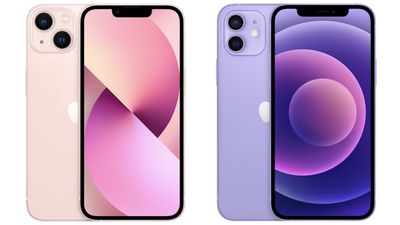
iphone 13 vs iphone 12
Without doubt, device-to-device migration will be the most convenient option for most owners of a new iPhone 13. It transfers over information like photos, app data, login credentials, device preferences and settings, and more. As with an ‌‌iCloud‌‌ backup, apps themselves are downloaded directly from the App Store rather than from your existing ‌iPhone‌. It may take a little longer than restoring from a backup, but the time saved from not having to log into all your apps again makes it worth the wait, which is why this process trumps the other transfer methods.

The following steps outline the Quick Start process that you can use to perform a wireless device-to-device migration. As always when transferring data between devices, make sure you have made a backup of your current iPhone, just in case anything untoward happens during the migration process.

It's also worth noting that if your current iPhone has an eSim plan, you'll be asked to "Transfer Cellular Plan" while setting up your iPhone 13: You can either select the numbers you want to transfer or opt to Decide Later to complete the plan transfer after you've set up your iPhone.

  1. Plug both iPhones into a power outlet, turn on your new iPhone 13 and place it near your current iPhone, which needs to be running iOS 12.4 or later for the transfer to work. The Quick Start screen will appear on your current iPhone and offer the option of using your Apple ID to set up your new device. Make sure that it's the ‌Apple ID‌ that you want to use, then tap Continue.
  2. Hold up your current iPhone and center the camera's viewfinder over the animation that appears on your iPhone 13. Wait for a message that says "Finish on New iPhone."
    set up iphone 13

  3. When prompted, enter your current passcode on your new iPhone 13.
  4. Follow the instructions to set up Face ID on your iPhone 13.
  5. Tap Transfer from iPhone to start transferring your data to your iPhone 13. You should be given the choice of whether to transfer some additional settings, such as Apple Pay and Siri, to your new iPhone.
  6. If you have an Apple Watch paired to your current iPhone, you'll be asked if you want to transfer your Apple Watch data and settings.
  7. Keep the two iPhones near each other and plugged into power until the data migration process is finished.
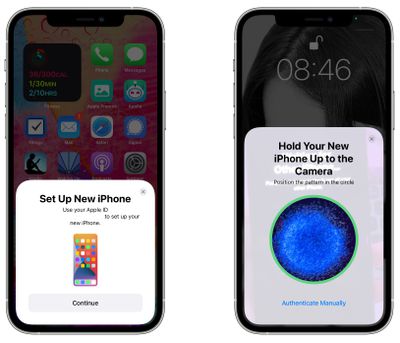
The amount of time that it takes to transfer data from one ‌iPhone‌ to another will vary based on what's on the existing ‌iPhone‌, but Apple provides a data transfer estimate on the main data transfer screen.

If the wireless network you're relying on is too slow, you can perform the data migration using a wired connection, but for that you'll need a Lightning to USB 3 Camera Adaptor and a Lightning to USB Cable. Connect the Camera Adaptor into your current iPhone, then plug the Lightning to USB Cable into your iPhone 13 and the other end into the adaptor. You'll then be able to follow the steps outlined above.

If you plan to sell or trade in your old iPhone to get a bit of extra cash, make sure to adequately erase everything on it to get it ready for its next owner.


Related Forum: iPhone

Top Rated Comments

bmodi Avatar
67 months ago
Also a restore is a "clean install". I think most misunderstand a "data transfer".
What it does is not to directly send everything from the old to the new. Just the settings get overtaken, which apps you had and so on. However all apps everything gets downloaded from the App Store like you would do it in case you do a manual setup. No difference. But overtaking it from the old Iphone will save you a lot of time!
Score: 8 Votes (Like | Disagree)
67 months ago
So at what stage do you swap the sim over?
Score: 5 Votes (Like | Disagree)
67 months ago
First time I experienced the 'device to device' migration by just holding the 2 phones next 2 each other 2 years ago with the iPhone 11Pro. By far the easiest most straightforward data transfer I've ever had. So much better than all the faff we used to have to endure backing everything up, plugging everything in etc.
Score: 4 Votes (Like | Disagree)
67 months ago
One great outcome for me was that the side-by-side transfer method allowed all of my music to be transferred - even the albums/songs I had ripped from CDs. Previously I had to use a third party app (e.g. iMazing) to transfer the music from a backup on my MacBook. The whole process took 45 minutes and was seamless. Well done Apple.
Score: 3 Votes (Like | Disagree)
67 months ago

I’m just going with a clean install. It’s slower overall but at least I get to control the order so the things I need are there first.
The only problem with clean installs is things like stickers or apps that aren't available anymore won't be available, even if you still use them on your current device. If you transfer, it keeps them. That might not be an issue for you, but I was bummed when I found some of the stuff that I was using didn't show up on my fresh install.
Score: 2 Votes (Like | Disagree)
67 months ago

what about the microsoft authenticator app? will it work either way you transfer?
Sadly no, both Microsoft and google authenticator did not transfer over my accounts using direct transfer.

Score: 2 Votes (Like | Disagree)

Popular Stories

Apple MacBook Pro with PROLED XDR Display family lineup feature

Apple Announces OLED MacBook Pro With Touch Display

Wednesday October 28, 2026 10:11 am PDT by
Apple today announced a new high-end MacBook Pro, which is available in 14-inch and 16-inch sizes. The new device has a PROLED XDR display that supports touch gestures, and a glowing rear Apple logo. Pricing on the MacBook Pro starts at $2,899 for the 14-inch model and $3,399 for the 16-inch model. Apple says the MacBook Pro has the "world's best display in a pro laptop." The PROLED...

iPhone Duo Display Cracking

Apple Alerts Stores to iPhone Duo's Display Cracking Issue

Friday October 30, 2026 3:20 pm PDT by
In a memo shared with Apple Stores and Apple Authorized Service Providers this week, and later obtained by MacRumors, Apple provided technicians with guidance on how to diagnose and address the iPhone Duo's inner display cracking issue. If a customer reports the issue, Apple advised technicians to inspect the iPhone Duo and repair or replace it in accordance with their standard procedures....
iPad mini OLED feature 1

Apple Executive Comments on New iPad Mini Lacking 120Hz Display

Thursday October 29, 2026 1:47 pm PDT by
While the new iPad mini has an OLED display, the device does not support ProMotion, meaning the display's refresh rate is limited to 60Hz instead of 120Hz. ProMotion support would have allowed for the iPad mini's refresh rate to automatically adjust from 10Hz to 120Hz depending on the content being displayed, but evidently Apple has kept the feature exclusive to the iPad Pro among iPad...
Latest Stories
Apple Watch Ultra 4 Hits All-Time Low Price With Amazon's $99 Discount
3 hours ago
Reminder: Apple's Big Discount on Beats 360 Ear Cushions Ends Today
3 hours ago
Here's a New Tour of Apple's HomeView Software
3 hours ago
Apple Reveals New iPad Mini's Battery Capacity
5 hours ago
Top Stories: Apple's Big MacBook Pro, iPad mini and iMac Updates
6 hours ago
'Pluribus' Season 2 Reportedly Starts Production Today
12 hours ago
iPhone 18 Pro Sales Surge in China, Offsetting Decline in U.S. and Japan
13 hours ago
HomeView Software 27.2: Wallpapers, Control Center, and More
20 hours ago
Apple Alerts Stores to iPhone Duo's Display Cracking Issue
21 hours ago
iOS 27.3 Will Enable These Apple Intelligence Features in China
21 hours ago
Apple Says iOS 27.3 Beta Coming Next Week
21 hours ago
Apple's Flash Storage Suppliers Are Finally 'Getting Their Revenge'
23 hours ago
14 New Things Your iPhone Can Do in iOS 27.2
23 hours ago
iPhone Duo Review: One Week Later
1 day ago
Samsung Mocks iPhone Duo Display Cracks in New Ad Campaign
1 day ago
The MacRumors Show: OLED MacBook Pro, iPad Mini 8, and More
1 day ago
MacBook Pro With Touch Display: 15 More Details Revealed
1 day ago
Russia Places Apple on State Surveillance Registry
1 day ago
Halloween Weekend Brings Discounts on Apple Accessories and Pre-Orders
1 day ago
Apple Has Released More Than 25 New Products in the Past Two Months
1 day ago
Local Code Launches as Free, Private AI Assistant Tool for Mac
1 day ago
Apple Acquires Ascend.io
1 day ago
HomePod Mini 2 Launches Today: All the New Features
1 day ago
AirTag 2 4-Pack Drops to New Low Price of $69.99
1 day ago
Rian Johnson's iPhone Camera App Goes Viral
1 day ago
Where Did All the iPhone Duos Go? Mostly to Apple's Stores
1 day ago
Apple's Touchscreen MacBook Pro Could Ship 1.5M Units in 2027
1 day ago
New Apple TV 4K and iPad Mini: RAM Amounts Revealed
2 days ago
Apple Executive Comments on New iPad Mini Lacking 120Hz Display
2 days ago
Here's a Hands-On Look at HomePod Mini 2's New Two-Tone Colors
2 days ago

🔗 Related Apple News & Rumors

Stay updated with the latest Apple ecosystem news and verified rumors










































