

There are two types of backup available to iOS users. iCloud backups are encrypted automatically and stored in the cloud, and you can create and use them anywhere with a Wi-Fi connection. By contrast, Mac-based backups are created and stored on your Mac, encryption is optional, and you have to connect your device to your computer to restore one. This article shows you how to back up your iPhone, iPad, or iPod touch to a Mac running macOS Catalina or later.
In macOS 10.4 and earlier, backing up an iOS device to your Mac involved using the iTunes app. However, since the release of macOS 10.5 Catalina in 2019, Apple has offered separate Mac apps for Music, Podcasts, and Apple TV, meaning the functions for managing a connected iPhone, iPad or iPod touch needed a new home.
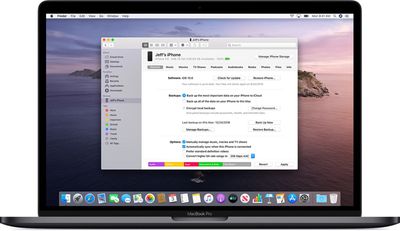
It's not immediately obvious, but Apple chose to integrate these device functions into the Finder, meaning that you can choose media sync settings, manage iCloud and local backups, and restore or update your iOS device without even opening another application on your Mac.
Keeping a local backup of your iOS device ensures that, should you ever lose it, you'll be able to restore all your information on a replacement device. You can also encrypt your local backup to keep private information like your passwords and personal health or activity data safe and secure. Keep reading to learn how.
How to Back Up Your iOS Device in macOS
- Plug your iPhone, iPad, or iPod touch into your Mac using the supplied cable.
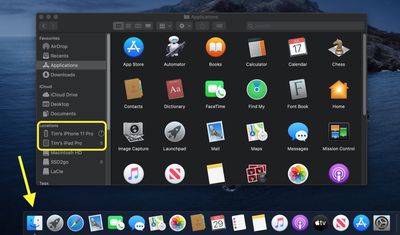
- Open a Finder window by clicking the Finder icon in the Dock.
- Click your iOS device's name in the sidebar.

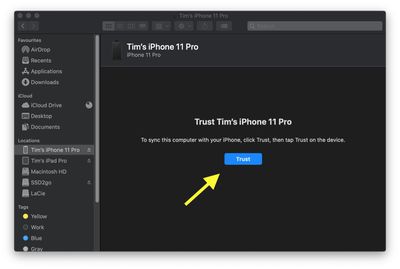
- If this is the first time connecting your device to your Mac, click Trust in the Finder window.
- Tap Trust on your device when prompted, then enter your passcode to confirm.
- In the General tab, click the circle next to where it says Back up all of the data on your [iPhone/iPad/iPod touch] to this Mac.
- If you don't want to create an encrypted backup, or you've already set up encrypted backups, click Back Up Now at the bottom of the General tab.
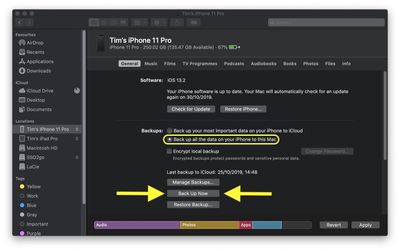
When the backup is finished, you can find the date and time of the last backup in the General tab, just above the Manage Backups button.
How to Encrypt an iOS Device Backup in macOS
- Plug your iPhone, iPad, or iPod touch into your Mac using the supplied cable.
- Open a Finder window by clicking the Finder icon in the Dock.
- Click your iOS device's name in the sidebar.
- If this is the first time connecting your device to your Mac, click Trust in the Finder window.
- Tap Trust on your device when prompted, then enter your passcode to confirm.
- Click the checkbox next to Encrypt local backup in the General tab.
- Choose a password to protect your device backup, then verify it and tick the box if you want to remember the password in your keychain.
- Click Set Password.
- Enter your passcode on your iOS device to begin the backup.
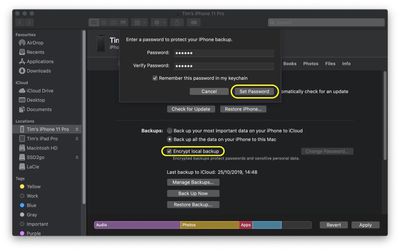
When the backup is finished, you can find the date and time of the last backup in the General tab, just above the Manage Backups button.

















































