How to Back Up Your iPhone or iPad Using iCloud - MacRumorsOpen MenuShow RoundupsShow Forums menuVisit ForumsOpen Sidebar
Skip to Content

How to Back Up Your iPhone or iPad Using iCloud

by

Creating an iPhone or iPad backup should be routine for most users, as it's a simple procedure and the easiest way to recover your data if your device is replaced, lost, or stolen.
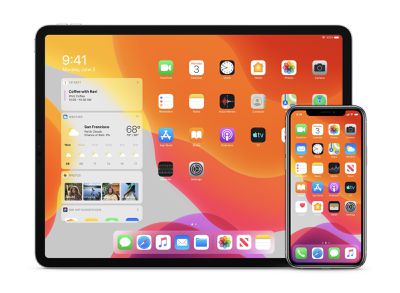
ios 13 iphone ipad duo
There are two types of backup available to iOS users. iCloud backups are encrypted automatically and stored in the cloud, and you can create and use them anywhere with a Wi-Fi connection. By contrast, computer-based backups are created and stored on your Mac or PC, encryption is optional, and you have to connect your device to your computer to restore one.

Here, we're going to show you how to make an ‌iCloud‌ backup of your iPhone or ‌iPad‌, which doesn't require a computer.

How to Create an iCloud Backup

  1. Connect your iOS device to a Wi-Fi network.
  2. Launch the Settings app.
    how to back up ios device

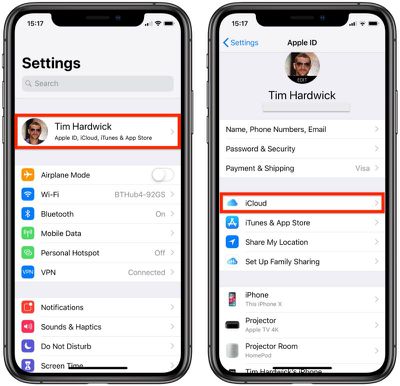
  3. Tap your name in the top banner.
  4. Tap iCloud.
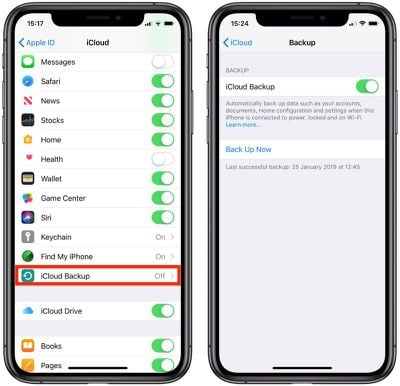
  5. Tap iCloud Backup.
    how to back up ios device 1 1

  6. Toggle the iCloud Backup switch to the green ON position.
  7. Tap Back Up Now and wait for the process to complete.
Once you've switched on the toggle next to ‌iCloud‌ Backup, your device will automatically back up each day, so long as the device's screen is unlocked and it's connected to a power source and a Wi-Fi network. Also make sure that you have enough available space in ‌iCloud‌ for the backup. ‌iCloud‌ comes with 5GB of storage for free, but most users will quickly eat that up. Fortunately, plans start at just $0.99 for 50GB of storage.

If you also subscribe to Apple services such as Apple Music or Apple TV+, you may be able to save money by subscribing to Apple One. With Apple One, you can choose a subscription plan that includes 50 GB, 200 GB or 2 TB of ‌iCloud‌ storage.

Tag: iCloud

Popular Stories

iCloud iPhone 17 Pro

iPhone Users Who Pay for iCloud Storage Get Two New Perks on iOS 27

Thursday July 2, 2026 6:10 am PDT by
If you pay for certain iCloud+ storage plans beyond the 5GB that Apple offers for free, you will receive two more perks on iOS 27 at no additional cost. A summary of the two new iCloud+ perks on iOS 27:Increased daily usage limits for some new Apple Intelligence features, including image generation in the revamped Image Playground app. HomeKit Secure Video cameras receive generated video...

iCloud General Feature Redux

Apple Raises iCloud+ Prices in 8 Countries

Friday July 17, 2026 11:56 am PDT by
Apple has increased the price of iCloud+ in Nigeria, Türkiye, Vietnam, Japan, Egypt, New Zealand, the Philippines, and Indonesia, according to an updated version of its iCloud support document. Price increases range from 11 percent to 55 percent depending on the plan and the country. Nigeria saw the biggest hike, and a 50GB plan is now ₦1,300, up from ₦900. Türkiye saw the next largest...
General iCloud App Feature

Apple Plans Paid iCloud+ Upgrades for Heavy AI Users

Thursday July 30, 2026 4:11 pm PDT by
Apple is planning to let users pay to increase their AI limits, with upgrade possibilities available through iCloud+. During today's earnings call for the third fiscal quarter of 2026, Apple CEO Tim Cook said it's early, but the company expects to offer options for people who want to make heavy use of AI services. In terms of what it means for compute cost, it's obviously early going for...

🔗 Related Apple News & Rumors

Stay updated with the latest Apple ecosystem news and verified rumors