iOS 15: How to Select the Images That Appear in a Photos Memory - MacRumorsOpen MenuShow RoundupsShow Forums menuVisit ForumsOpen Sidebar
Skip to Content

iOS 15: How to Select the Images That Appear in a Photos Memory

by

In iOS 15, Apple has enhanced the Memories experience in Photos to make individual memories more customizable, more intelligent, and generally more enjoyable to watch and interact with.

iOs 15 Photos Feature
One notable change in this overhaul to Memories is the ability to easily manage which images appear in a memory. With the new interface, you can quickly select which pictures you want included in the memory and which ones you want to leave out, and your changes will be remembered for next time.

The following steps show you how to select images in Memories in iOS 15.

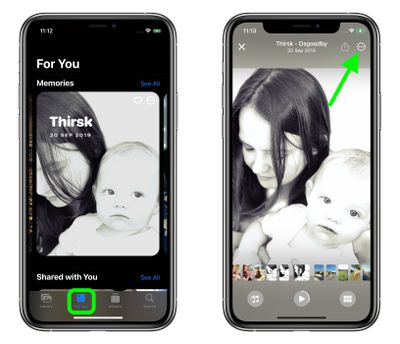
  1. Launch the Photos app on your iPhone or iPad, then tap the For You tab.
  2. Under "Memories," select the memory that you want to manage.
  3. Tap the playing memory to bring up the overlay controls, then tap the circular ellipsis icon in the upper right corner of the screen.
    photos

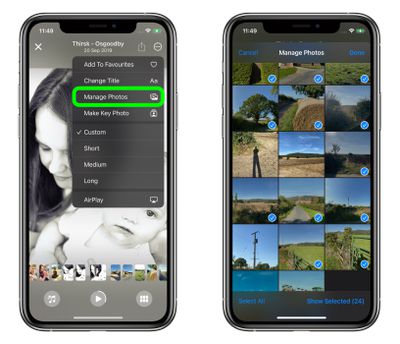
  4. Select Manage Photos in the dropdown menu.
  5. Now, tap an image to select it or deselect it, or Select All. Images that are selected to appear in the memory are indicated by a blue tick. You can also view the selected images individually in fullscreen by tapping Show Selected.
  6. Tap Done in the upper right corner when you're finished making changes, and they will be applied to the memory instantly.
    photos

Did you know that you can add Apple Music tracks and color filters to memories in the ‌Photos‌ app in iOS 15? Click on the links to learn how, or check out our dedicated Photos guide.

Related Forum: iOS 15

Popular Stories

apple intelligence photos tools

Apple to Bring AI Reframing and Editing Tools to Photos App

Monday June 8, 2026 11:16 am PDT by
Apple today announced new AI-powered photo editing tools coming to the Photos app as part of Apple Intelligence, including an upgraded Clean Up tool, a new Extend tool, and a new Spatial Reframing feature. Spatial Reframing allows users to reposition the virtual camera angle of a photo after it has already been taken. By touching and dragging, users can adjust the framing and perspective of...
iOS 26 Glass Photos Feature

Apple Photos Finally Gets a Slideshow Maker

Monday June 8, 2026 5:04 pm PDT by
Apple today announced new slideshow features coming to the Photos app, allowing users to play any set of photos and videos as a slideshow. There are options to set the slide duration, transition style, and music. iOS 27 also lets users save any slideshow directly as a video to their Photos library for easy playback later. Additional new features include the ability to save individual...
Apple Acquires Award Winning App Play Feature

Apple Acquires Award-Winning App 'Play'

Monday June 29, 2026 7:39 am PDT by
In February, Apple notified the European Commission that it would be acquiring certain assets from and have the right to hire certain employees from Rabbit 3 Times, the company behind the award-winning app design tool Play. The notification was published on the European Commission's website this week, following a four-month waiting period. Play was a Mac and iPhone app that allowed designers ...

🔗 Related Apple News & Rumors

Stay updated with the latest Apple ecosystem news and verified rumors