iOS 15: How to Enhance Photos App Memories With 'Memory Looks' - MacRumorsOpen MenuShow RoundupsShow Forums menuVisit ForumsOpen Sidebar
Skip to Content

iOS 15: How to Enhance Photos App Memories With 'Memory Looks'

by

In iOS 15, Apple's native Photos app features a considerable update to Memories, including a new design, integration with Apple Music, a more interactive interface, and "Memory Looks." This article explains what Memory Looks are and how you can apply them to your own Memories in the ‌Photos‌ app.

iOs 15 Photos Feature
In the latest version of the ‌Photos‌ app, Apple has added the ability for users to customize the look of photos and videos that feature in its auto-generated Memories. These "Memory Looks" are basically photo/video filter and can add a particular mood to the content of Memories.

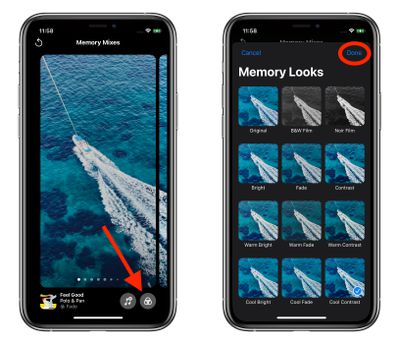
There are 12 Memory Looks that you can choose from. Each one works by analyzing each photo and video, and applying the correct amount of contrast and color adjustment for a consistent look. Here's how you can add them to your Memories in iOS 15.

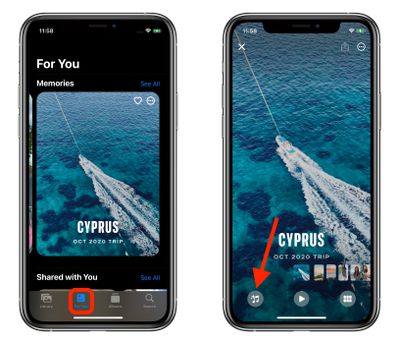
  1. Launch the Photos app on your iPhone or iPad.
  2. Tap the For You tab.
  3. Under the Memories section, select a Memory you want to edit.
  4. Tap the playing Memory and pause it, then tap the Memory Mixes icon in the lower left corner (it looks like a musical note with stars).
    photos

  5. Tap the Memory Looks icon in the lower right corner (it looks like three overlapping circles or a Venn diagram).

  6. Tap a Memory Look thumbnail preview to select it.
  7. Tap Done in the upper right corner to apply your selection.photos

Tip: On the Memory Mixes screen, if you swipe left or right, the ‌Photos‌ app will use machine learning to marry suggested music tracks from ‌Apple Music‌ with different Memory Looks that may go together.

Related Forum: iOS 15

Popular Stories

apple intelligence photos tools

Apple to Bring AI Reframing and Editing Tools to Photos App

Monday June 8, 2026 11:16 am PDT by
Apple today announced new AI-powered photo editing tools coming to the Photos app as part of Apple Intelligence, including an upgraded Clean Up tool, a new Extend tool, and a new Spatial Reframing feature. Spatial Reframing allows users to reposition the virtual camera angle of a photo after it has already been taken. By touching and dragging, users can adjust the framing and perspective of...
iOS 26 Glass Photos Feature

Apple Photos Finally Gets a Slideshow Maker

Monday June 8, 2026 5:04 pm PDT by
Apple today announced new slideshow features coming to the Photos app, allowing users to play any set of photos and videos as a slideshow. There are options to set the slide duration, transition style, and music. iOS 27 also lets users save any slideshow directly as a video to their Photos library for easy playback later. Additional new features include the ability to save individual...


Apple Acquires Award Winning App Play Feature

Apple Acquires Award-Winning App 'Play'

Monday June 29, 2026 7:39 am PDT by
In February, Apple notified the European Commission that it would be acquiring certain assets from and have the right to hire certain employees from Rabbit 3 Times, the company behind the award-winning app design tool Play. The notification was published on the European Commission's website this week, following a four-month waiting period. Play was a Mac and iPhone app that allowed designers ...

🔗 Related Apple News & Rumors

Stay updated with the latest Apple ecosystem news and verified rumors