macOS: How to Edit a Sent iMessage - MacRumorsOpen MenuShow RoundupsShow Forums menuVisit ForumsOpen Sidebar
Skip to Content

macOS: How to Edit a Sent iMessage

by

In macOS Ventura, Apple has added major updates to the Messages app, introducing some features that rival third-party messaging platforms have had for years. One of these changes is the ability to edit iMessages‌. Keep reading to learn how it works.

General Apps Messages
Almost all mobile users can relate to the situation where you send a text message only to immediately realize that the meaning of the message is unintended because of an innocent typo. In earlier versions of macOS and iOS, Apple's iMessage service functioned just like regular texts in this way. In other words, once the message was sent, there was nothing you could do about it.

Fortunately, that's not the case in ‌iOS 16‌ and macOS Ventura. For the first time, Apple lets you edit a message up to a maximum of 15 minutes after it was sent. But before you use the edit function outlined below, there are some caveats to the feature that you should be aware of. First, it only works with iMessages, not SMS messages, so both people need to have an Apple device for it to work effectively.

Second, using the message editing feature requires participants to be using Apple's latest software updates, including ‌‌iOS 16‌‌, ‌iPadOS 16‌, ‌macOS Ventura‌, and watchOS 9. People on an earlier version of iOS or those on Android will see text that says "Edited to [text]" when receiving an edited iMessage.

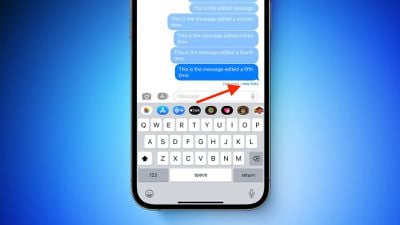
Third, and perhaps most importantly for some, when you edit a message, the edit history is sent to the recipient along with the edit, so the original content is visible. Recipients of an edited message can tap on the small blue "Edited" label to see the edit history, and hide it again by tapping Hide Edits.
iMessage

How to Edit a Sent iMessage

With all that in mind, here's how you edit a sent iMessage on a Mac running macOS Ventura. (They are similar to the equivalent steps for iOS 16.)

  1. With the Messages app open, select the conversation thread containing the sent message that you want to edit.
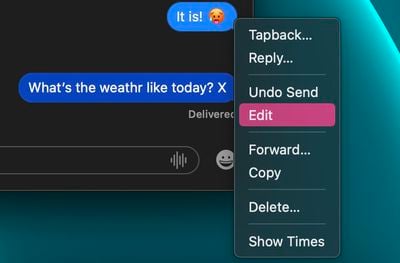
  2. Right-click (or Ctrl-click) the sent message that you want to fix. (If you don't see the option, the message was sent over 15 minutes ago and you cannot edit it.)
  3. Select Edit from the contextual menu.
    messages

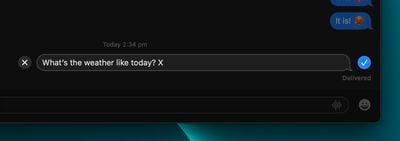
  4. Make the desired changes in the input field, then click the blue tick on the right to confirm. If you decide you don't want to edit the message, tap the grey X on the left.
    messages

That's all there is to it. Did you know that you can also unsend iMessages in macOS Ventura? Check out our dedicated how-to to learn how.


Popular Stories

doordash

DoorDash Unveils AI Food Ordering Through Apple's Messages App

Wednesday September 30, 2026 7:24 am PDT by
DoorDash is inviting U.S. customers to join a waitlist for an AI assistant that can take food orders through Apple's Messages app (via Bloomberg). The phone number used in the conversation connects the request to a customer's DoorDash account. The assistant can use previous purchases and preferences to help put together an order, then use a saved payment method at checkout. Customers can...

Home Hub Command Center with Dome Base Feature

Apple Smart Home Hub to Feature iMac G4-Style Design

Wednesday September 30, 2026 4:36 am PDT by
Apple's long-rumored smart home hub will have an iMac G4-style design and a host of unique features, Bloomberg's Mark Gurman reports. The smart home hub is said to feature a square 6-inch display, with variants that can be placed on a countertop or mounted on a wall. It features a single FaceTime camera on the front, with microphones and speakers in its connected base. Gurman described the...
HomePod minis on gradient feature 1 1

Three New Apple Smart Home Products Coming on October 13

Wednesday September 30, 2026 4:04 am PDT by
Apple plans to introduce a series of new smart home products on Tuesday, October 13, according to Bloomberg's Mark Gurman. Apple reportedly plans to debut its long-awaited smart home hub device, a new HomePod mini, and a new Apple TV on the date. The new HomePod mini and Apple TV are set to retain their existing designs, but tout faster chips to support Siri AI. The new HomePod mini will...
Latest Stories
iPhone 18 Pro Sales Jump in China Ahead of iPhone Duo Launch
2 minutes ago
Apple TV Still Down for Some Users Following Apple Services Outage
48 minutes ago
PSA: Apple Mail on Mac May Stop Syncing Microsoft 365 Accounts Today
1 hour ago
Apple's Smart Home Hub: Everything We Know So Far
12 hours ago
Apple's Home Hub Borrows From the iPhone Duo's StandBy Mode
13 hours ago
Apple Invites App Updated With Three New Features
17 hours ago
Apple Event on October 13?
18 hours ago
Apple Watch SE 3 vs. Series 12 Buyer's Guide: Which Should You Buy?
20 hours ago
iPad Mini 8 to Offer These 10 New Features
20 hours ago
DoorDash Unveils AI Food Ordering Through Apple's Messages App
21 hours ago
Amazon Takes Up to $150 Off Select M5 MacBook Air Models
21 hours ago
Apple Still Plans to Release a New Full-Sized HomePod
23 hours ago
Apple Working to Expand HomeKit
1 day ago
Apple Smart Home Hub to Feature iMac G4-Style Design
1 day ago
Three New Apple Smart Home Products Coming on October 13
1 day ago
Apple Pay Now Available in India With Axis Bank Cards
2 days ago
OpenAI Launches Always-On 'Dots' Agents to Rival Meta's Muse
2 days ago
AirPods 5 Teardown: Batteries Removable, Case Still Tough
2 days ago
iPhone 18 Pro Owners Complain of Speaker Crackling or Popping
2 days ago
You Can 'Get Ready' for iPhone Duo Pre-Orders on October 12
2 days ago
Apple Pay Reportedly Launching in India Today
2 days ago
Apple Releases New AirPods Beta Firmware
2 days ago
Apple Shares New Guide for Using iOS 27 Parental Controls
2 days ago
Apple Creator Studio and Final Cut Camera Get New Features
2 days ago
Apple Explains Why It Removed ICE Tracking Apps Last Year
2 days ago
Amazon Expands $779.99 Apple Watch Ultra 4 Deal to More Models
2 days ago
Switch Siri AI for ChatGPT on Your Mac
2 days ago
Apple Says Emergency SOS via Satellite Now Available in Norway
2 days ago
AppleCare Guide: Is it Worth Paying For?
2 days ago
Apple Reportedly Planned to Replace 5,000 Support Employees With AI
2 days ago

🔗 Related Apple News & Rumors

Stay updated with the latest Apple ecosystem news and verified rumors