

How to Hide Home Screen App Pages on iPhone in iOS 14 - MacRumorsOpen MenuShow RoundupsShow Forums menuVisit ForumsOpen Sidebar
Skip to Content

How to Hide Home Screen App Pages on iPhone in iOS 14

by

With so many apps available for iPhone on the App Store, it doesn't take long before you download so many that managing them can start to get a bit tiresome and unwieldy. Having multiple pages of apps extending off the initial Home Screen can be a burden, especially if you like to organize what you can see on the screen into any sort of meaningful order.
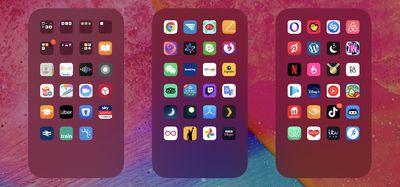
apps
Fortunately, in iOS 14 and later, Apple allows you to hide individual pages of apps from sight. This not only gives your iPhone a tidier look and feel, but it also serves to bring the App Library closer to your initial ‌Home Screen‌, making it that much easier to access using fewer swipes.

How to Hide iPhone App Pages on the Home Screen

  1. Long press on a blank area of the ‌Home Screen‌ or any additional page of apps.
  2. Once in jiggle mode, tap the app page dot icons just above the Dock at the bottom of the screen.
  3. Tap to uncheck any app pages that you want to hide.
  4. Tap Done in the top-right corner of the screen to finish.
  5. Tap Done in the top-right corner to exit out of jiggle mode.
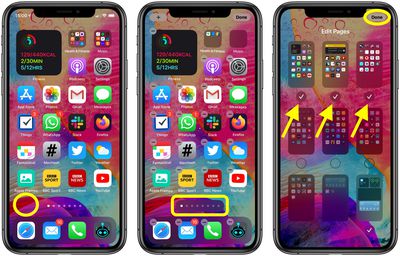
home screen apps

To reinstate any app pages you hid using this method, simply follow the steps again, but in step 3, check the app pages you want to unhide instead.


Related Forum: iOS 14

Top Rated Comments

H3boy Avatar
77 months ago
Am I the only person that has everything not on the home page in a folder?
Score: 10 Votes (Like | Disagree)
itsmilo Avatar
77 months ago

Am I the only person that has everything not on the home page in a folder?
yeah. Home Page has my most frequently used apps and the 2nd page is just apps put into categorized folders. Same reason I have no use for the new App Library screen
Score: 8 Votes (Like | Disagree)
jclo Avatar
77 months ago

Is 'jiggle mode' official terminology? :D
Sure is. https://support.apple.com/guide/iphone/move-and-organize-apps-iph822ece7dd/ios

Bonus:
Score: 6 Votes (Like | Disagree)
77 months ago
My wife needs this article. She has like 12 pages of apps, which drives me crazy when I have to use her phone.
Score: 6 Votes (Like | Disagree)
adrianlondon Avatar
77 months ago
Answers to some questions asked:

Can you remove/disable the App Library? No, just don't keep swiping right.

Can you hide every homescreen? No, you have to have one selected.

Can the homescreens be re-arranged? No. Shame.

Why is this thing a thing? Dunno; maybe for people who have a page full of work apps they want to hide at home, or a page full of dating apps and porn links they want to hide at work.
Score: 4 Votes (Like | Disagree)
alexandr Avatar
77 months ago

My wife needs this article. She has like 12 pages of apps, which drives me crazy when I have to use her phone.
so really it's you who needs this article ;)
Score: 4 Votes (Like | Disagree)

Popular Stories

HomePod mini and Apple TV Sage

New Apple TV and HomePod Mini Are 'Nearly Ready' to Launch, New Siri Remote Also Rumored

Sunday May 31, 2026 8:47 am PDT by
New models of the Apple TV 4K and HomePod mini are "nearly ready to go," according to the latest word from Bloomberg's Mark Gurman. Subscribe to the MacRumors YouTube channel for more videos. Both devices have been ready "for months," but Apple is holding off on launching them until the more personalized version of Siri is available, he said. "I am told the hardware for the next Apple TV...
iphone 17 pro black feature

iPhone 18 Pro's Camera Upgrade Will Cost Apple 50% More

Friday May 29, 2026 3:44 am PDT by
The iPhone 18 Pro and iPhone 18 Pro Max's all-new variable aperture lens will cost Apple 50% more than the camera unit used in current models, according to supply chain analyst Ming-Chi Kuo. Variable aperture has been one of the most persistent iPhone camera rumors of the past few years. Kuo first flagged the feature in late 2024, and it has since been corroborated by multiple reports and...
iphone 18 pro color dummies

First Look at iPhone 18 Pro Color Options Revealed by Dummy Models

Friday May 29, 2026 4:50 am PDT by
Leaker Sonny Dickson today shared images of iPhone 18 Pro dummy models in the device's four rumored colors, offering the first real-world look at what to expect from the lineup visually. Corroborating previous rumors, the dummies show the iPhone 18 Pro Max in Light Blue, Black, Silver, and Dark Cherry. Dickson said "Cherry will probably be the next hit, orange did very well." Cosmic Orange...

🔗 Related Apple News & Rumors

Stay updated with the latest Apple ecosystem news and verified rumors















