

iOS 17: How to Choose Which App Siri Uses to Send a Message - MacRumorsOpen MenuShow RoundupsShow Forums menuVisit ForumsOpen Sidebar
Skip to Content

iOS 17: How to Choose Which App Siri Uses to Send a Message

by

In iOS 17, Siri has learned a few more useful features worth knowing about. One is the ability to use Siri to send messages to friends and family over compatible third-party apps. Keep reading to learn how it's done.
iOS 17 Siri Feature
When you ask ‌Siri‌ to send a message in iOS 17, you can now tap to select which app on your iPhone that you want to send it from. This allows you to send messages not just from Apple's built-in Messages app, but also third-party apps like Telegram and WhatsApp.

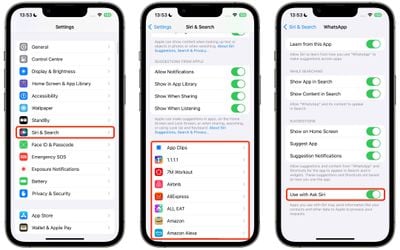
The feature is compatible with any third-party app whose settings include the "Use with Ask ‌Siri‌" option. To check if an app has the option, or to enable/disable it, follow these steps.

  1. Open the Settings app on your iPhone.
  2. Tap Siri & Search.
  3. Scroll down to the apps list and tap the app in question.
  4. Toggle the switch next to Use with Ask Siri.
settings

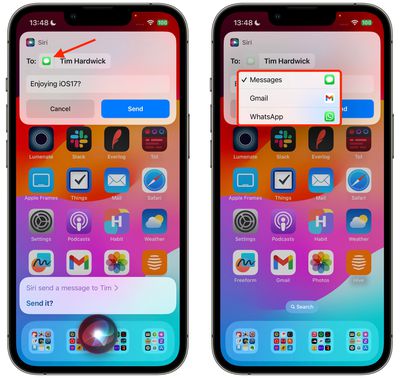
If "Use with Ask Siri" is enabled for a particular app, you can manually choose it each time you ask the voice assistant to send a message. Here's how.

  1. Activate Siri by saying "Hey Siri" or just "Siri," or by pressing and holding the Side button on your iPhone until the Siri orb appears on the screen.
  2. Ask Siri to send a message to one of your contacts.
  3. In the message card that appears at the top of the screen, tap the Messages icon next to the person's name.
  4. Tap another compatible messaging app in the dropdown to select it.
  5. Type your message in the input field, then tap Send.
siri

There's nothing more to it. ‌In iOS 17, Siri‌ is also able to recognize and respond to multiple back-to-back requests without needing to be reactivated.

You can, for example, ask ‌Siri‌ to tell you the time, and then follow that up with a request to text your friend that you're going to be late all in the same ‌Siri‌ request. For more details on what's new for Siri in iOS 17, check out our dedicated guide.

Top Rated Comments

Leon Ze Professional Avatar
40 months ago
Me Speaking: Siri, send my messages to WhatsApp!
Siri Speaking: What's an app? 😏
Score: 7 Votes (Like | Disagree)
Gnomeo86 Avatar
40 months ago
The whole point of using Siri is that you can do stuff without holding your phone, e.g., in the car. Therefore it would seem from this article that this new drop-down menu is totally useless.

However, I just tried it out and surprise – when I asked Siri to send a message to my partner, Siri said something like "It seems that you usually use WhatsApp to send messages to X, so I'll use that app." Nice change :)
Score: 5 Votes (Like | Disagree)
NightFox Avatar
40 months ago
Maybe I missed something, but it seems a bit pointless being able to ask Siri to do something if you've then got to tap away at the screen to do it. Does it not support 'Siri, send John Smith a message on WhatsApp'?
Score: 5 Votes (Like | Disagree)
40 months ago
Good article. But hopefully Siri gets better in the future

Score: 4 Votes (Like | Disagree)
repoman016 Avatar
40 months ago

People really use Siri?
lol I thought the same thing. The only time I ever use it is to set a random alarm if im taking a nap or cooking. Otherwise anytime I ask it something it just says "here's what we found on the web" and I might as well have just searched it from the beginning

Score: 2 Votes (Like | Disagree)
40 months ago

Yes, many do. You're missing out, my friend! 😀
Don't think so, my wife tried to use Siri in the car today and it kept getting confused. Took multiple tries just to send a text message hands free. It was very distracting to her driving, let alone the words Siri didn't like.
Score: 1 Votes (Like | Disagree)

Popular Stories

macOS iOS 27 Siri App Feature

Apple's Siri AI Can Be Swapped Out for Claude, ChatGPT, Code Shows

Monday September 14, 2026 4:37 am PDT by
Code sleuth "pdfu" has uncovered iOS 27 and macOS Golden Gate private frameworks that show Apple has designed its new Siri architecture to work with third-party AI models at what appears to be a surprisingly deep level. One mechanism called Model Delegation allows Claude to appear as a Siri extension in the same way as the existing built-in ChatGPT extension. In pdfu's video, shared on X,...
iOS 27 Out Now Thumb

Apple Releases iOS 27 and iPadOS 27 With Siri AI and Liquid Glass Update

Monday September 14, 2026 10:04 am PDT by
Apple today released iOS 27 and iPadOS 27, the newest operating system updates for the iPhone and iPad. The software is available for free on all compatible devices, and can be downloaded over the air by going to Settings > General > Software Update. Subscribe to the MacRumors YouTube channel for more videos. It can take several minutes for the updates to propagate to all users due to high...
apple watch series 12 siri recap

Apple Explains What Happens to Conversations Siri Recap Hears

Thursday September 10, 2026 4:38 pm PDT by
The Apple Watch Series 12 and Ultra 4 have new Audio Intelligence features that include Sound Recognition, Music Recognition, Live Rewind, and Siri Recap. When these features are activated, the new Apple Watches are always listening to what's going on around the wearer. With Siri Recap, the Apple Watch listens to your conversations throughout the day and takes notes. It uses Apple...

🔗 Related Apple News & Rumors

Stay updated with the latest Apple ecosystem news and verified rumors











































