How to Change App Icons on Your iPhone's Home Screen - MacRumorsOpen MenuShow RoundupsShow Forums menuVisit ForumsOpen Sidebar
Skip to Content

How to Change App Icons on Your iPhone's Home Screen

by

Are you looking to personalize your iPhone's Home Screen beyond the standard layout? Changing app icons is a creative way to customize your device's appearance and make it uniquely yours. Whether you're aiming for a themed aesthetic or just want to refresh the look of your most-used apps, altering app icons on your iPhone is a simple yet effective way to revamp your Home Screen.
ios 15 home screen icons yellow
In this article, we'll guide you through the steps to change app icons on your iPhone, offering you the freedom to tailor your device to match your style and preferences. But before you read on, you will need to find or make an image for your new app icon. Fortunately, there are plenty of free icons available for download that you can find with a simple search online.

Once you have your icon image, it's time to make use of it. The following steps explain how you can add a custom icon for any app. The process effectively involves creating a Shortcut to open an app, and then adding an image to that Shortcut so that it appears the way you want it to look on the Home screen.

How to Change an App's Icon With Shortcuts

Shortcuts can be a complex app to use, as it allows users to create multi-step processes to run on their device, but when it comes to changing up app icons, it's a really simple procedure.

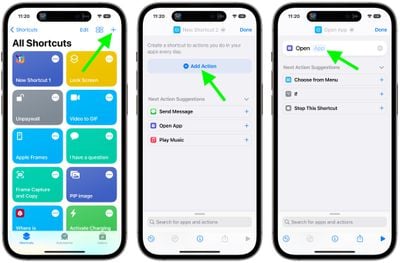
  1. Launch the Shortcuts app on your iPhone or iPad, then tap the + icon in the top-right corner of the screen.
  2. Tap Add Action, then use the text field to search for Open App.
  3. Select Open App.
  4. Tap App.

    shortcuts

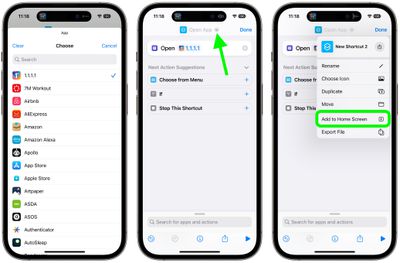
  5. Use the search field to find the app you want to change the icon of, then select it in the list.
  6. Tap the down facing chevron at the top next to "Open App".
  7. Tap Add to Home Screen.

    shortcuts

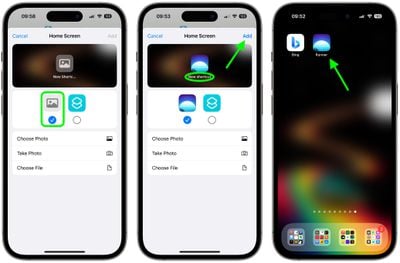
  8. Tap the placeholder picture icon on the left.
  9. From the drop-down menu that appears, select Take Photo, Choose Photo, or Choose File, depending on where your replacement app icon image is located.
  10. Select your replacement image.
  11. In the text field, rename the app as you want it to appear on the home screen.
  12. Finally, tap Add.
    shortcuts

Your Shortcut has now been created. You'll be returned to the home screen where you should see the shortcut in the next available space.

If you already had the app on your home screen, you will now have two different icons for it. In order to keep only your newly-created icon, simply move the old icon to the App Library. To do so, long press on the icon, tap Remove App, then choose Remove From Home Screen. Note: You must not delete the original app.

Since this process can be quite time-consuming, especially when it includes finding or making custom icons, you likely won't want to do it for every app. But if you have the time and patience, what's stopping you?


Top Rated Comments

motm95 Avatar
79 months ago
This really is a terrible workaround for what could be simple - iOS native ability to change app icons and icon packs in the app store.
Score: 25 Votes (Like | Disagree)
newyorksole Avatar
79 months ago
I’m all for options and customization, but to me a lot of what I’m seeing people post looks tacky Lol.

I’m very much a “default home screen / wallpaper” guy. I like the way things look as is.

But again, people seem to be loving it so that’s great.

EDIT: Also, this just seems like sooo many steps. 😂
Score: 17 Votes (Like | Disagree)
Lucas284 Avatar
79 months ago
Thanks.


Attachment Image
Score: 16 Votes (Like | Disagree)
tkermit Avatar
79 months ago
Limitations


* Tapping Custom App Icons launch Shortcuts first, and then the App

that sounds incredibly annoying.
Score: 12 Votes (Like | Disagree)
tha_man Avatar
79 months ago

Sorry but this just looks awful. Apple shouldn’t allow it. Looks cheap and android.
Yes, it should also not allow to put the iPhones into cheap case, other than the Apple one. And while we're at it, government shouldn't allow us to dress into cheap clothing from H&M and only allow us to drive black premium limos from now on...

I think it's great to be able to customise the look of your device. Some people are more than just simple users, they are enthusiast and enjoy doing stuff like this. If you want the default look on your device, nothing is stopping you to not change absolutely anything.
Score: 12 Votes (Like | Disagree)
mattopotamus Avatar
79 months ago

This really is a terrible workaround for what could be simple - iOS native ability to change app icons and icon packs in the app store.
I wouldn't be shocked if 1 of two things happens:

1) Apple realizes this is popular and allows it with future updates

2) Apple kills of this feature in shortcuts.
Score: 9 Votes (Like | Disagree)

Popular Stories

Home Hub Command Center with Dome Base Feature

Apple Smart Home Hub to Feature iMac G4-Style Design

Wednesday September 30, 2026 4:36 am PDT by
Apple's long-rumored smart home hub will have an iMac G4-style design and a host of unique features, Bloomberg's Mark Gurman reports. The smart home hub is said to feature a square 6-inch display, with variants that can be placed on a countertop or mounted on a wall. It features a single FaceTime camera on the front, with microphones and speakers in its connected base. Gurman described the...
HomePod minis on gradient feature 1 1

Three New Apple Smart Home Products Coming on October 13

Wednesday September 30, 2026 4:04 am PDT by
Apple plans to introduce a series of new smart home products on Tuesday, October 13, according to Bloomberg's Mark Gurman. Apple reportedly plans to debut its long-awaited smart home hub device, a new HomePod mini, and a new Apple TV on the date. The new HomePod mini and Apple TV are set to retain their existing designs, but tout faster chips to support Siri AI. The new HomePod mini will...
Apple TV Sans Remote Feature

New Apple TV 4K Leaked

Friday September 25, 2026 8:16 am PDT by
MacRumors contributor Aaron Perris has uncovered an image file from Apple for an unreleased Apple TV 4K, suggesting that a new model will finally be released soon. The image is specifically for an "Apple TV 4K (4th generation)" model. Apple TV 4K (4th generation) image (on a gradient) The image reveals that the Apple TV will have the same external design as the current model, with all of its...
Latest Stories
Apple Stores Receive 'Do Not Open' Boxes Ahead of Smart Home Products Launch
11 minutes ago
iPhone 18 Pro Sales Jump in China Ahead of iPhone Duo Launch
33 minutes ago
Apple TV Still Down for Some Users Following Apple Services Outage
1 hour ago
PSA: Apple Mail on Mac May Stop Syncing Microsoft 365 Accounts Today
2 hours ago
Apple's Smart Home Hub: Everything We Know So Far
12 hours ago
Apple's Home Hub Borrows From the iPhone Duo's StandBy Mode
13 hours ago
Apple Invites App Updated With Three New Features
17 hours ago
Apple Event on October 13?

18 hours ago
Apple Watch SE 3 vs. Series 12 Buyer's Guide: Which Should You Buy?
20 hours ago
iPad Mini 8 to Offer These 10 New Features
20 hours ago
DoorDash Unveils AI Food Ordering Through Apple's Messages App
22 hours ago
Amazon Takes Up to $150 Off Select M5 MacBook Air Models
22 hours ago
Apple Still Plans to Release a New Full-Sized HomePod
23 hours ago
Apple Working to Expand HomeKit
1 day ago
Apple Smart Home Hub to Feature iMac G4-Style Design
1 day ago
Three New Apple Smart Home Products Coming on October 13
1 day ago
Apple Pay Now Available in India With Axis Bank Cards
2 days ago
OpenAI Launches Always-On 'Dots' Agents to Rival Meta's Muse
2 days ago
AirPods 5 Teardown: Batteries Removable, Case Still Tough
2 days ago
iPhone 18 Pro Owners Complain of Speaker Crackling or Popping
2 days ago
You Can 'Get Ready' for iPhone Duo Pre-Orders on October 12
2 days ago
Apple Pay Reportedly Launching in India Today
2 days ago
Apple Releases New AirPods Beta Firmware
2 days ago
Apple Shares New Guide for Using iOS 27 Parental Controls
2 days ago
Apple Creator Studio and Final Cut Camera Get New Features
2 days ago
Apple Explains Why It Removed ICE Tracking Apps Last Year
2 days ago
Amazon Expands $779.99 Apple Watch Ultra 4 Deal to More Models
2 days ago
Switch Siri AI for ChatGPT on Your Mac
2 days ago
Apple Says Emergency SOS via Satellite Now Available in Norway
2 days ago
AppleCare Guide: Is it Worth Paying For?
2 days ago

🔗 Related Apple News & Rumors

Stay updated with the latest Apple ecosystem news and verified rumors