How to Use Interactive Widgets on iPhone - MacRumorsOpen MenuShow RoundupsShow Forums menuVisit ForumsOpen Sidebar
Skip to Content

How to Use Interactive Widgets on iPhone

by

In recent versions of iOS, Apple has made some dramatic changes to the Home Screen of iPhone. In particular, it has introduced the concept of ‌Home Screen‌ widgets, which are similar to the widgets available on Android phones.
widgets
Previously, use of widgets was limited to the Today View, which can be accessed by swiping from left to right on the ‌Home Screen‌. In ‌‌iOS 14‌‌, however, widgets got a design and functionality overhaul, allowing any widget that's available in the Today View to be added to the ‌Home Screen‌ alongside your apps. Then in iOS 17, Apple made widgets fully interactive, meaning you can perform actions with them without opening the associated app.

How to Add Widgets to the Home Screen

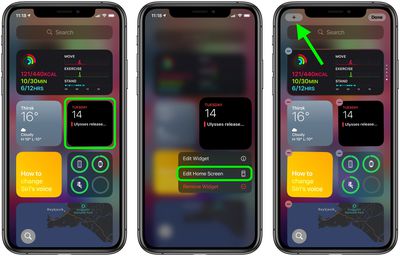
There a couple of ways you can add widgets to the ‌Home Screen‌. If you long press on a widget in the Today View, you'll see an Edit Home Screen option in the popup menu. Tapping this enters jiggle mode, and from there you can drag widgets out of the Today View and place them anywhere on the ‌Home Screen‌.

widgets
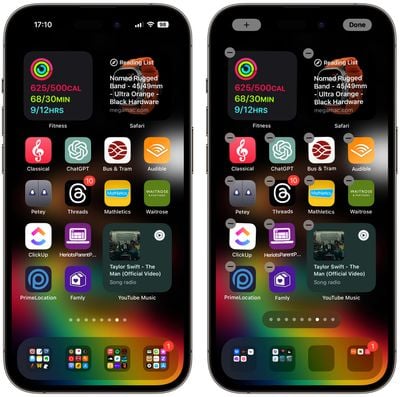
When in jiggle mode, notice the plus (+) button in the top-left corner of the screen. You'll find the same button appear if you long press on a blank area of the ‌Home Screen‌ or any additional page of apps. Tapping this button opens the Widget Gallery, where you can add and customize widgets.
widgets
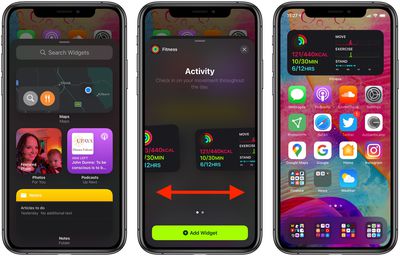
In the Widget Gallery, you can search for a specific widget or scroll through the available options. Tapping on a widget in the list lets you see the size and content options that are available for the widget. To add a widget to the Today View or the ‌Home Screen‌, select it, choose a size (small, medium, or large), and then tap the Add Widget button.

Widget Sizes and Other Functions

When you customize a new widget, you'll notice that the larger the size of the widget, the more content it can display. In the Weather widget, for example, the smallest widget shows the current conditions, while the largest displays the forecast for the next few days.

Bear in mind that bigger widgets take up more space on your ‌Home Screen‌. A small widget takes up the space of four apps in a square shape, but a medium widget takes up the space of eight apps in a rectangle shape, and a large widget takes up the space of 16 apps in a square shape.
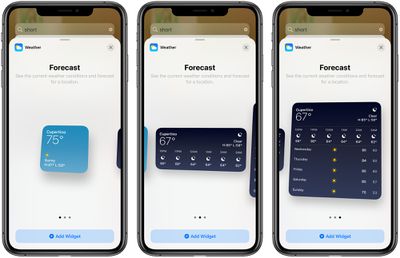
ios14widgetsizes
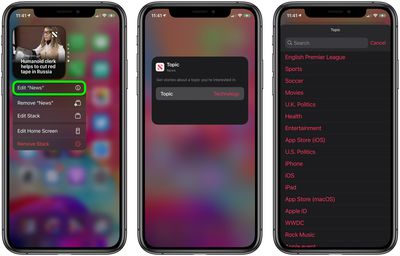
Some apps also have different widget options based on function. In the ‌Apple News‌ widget, for example, you can choose to see relevant news from the day or get stories about a specific topic of interest. You can change this function on an existing ‌Apple News‌ widget anytime. Just long press on the widget and then select Edit "News."
widgets
When you've got some widgets on your ‌Home Screen‌, you can move them around, just like apps. Simply long press on the screen to enter jiggle mode and then drag a widget around with your finger.

Additionally, don't forget that many widgets made since iOS 17 was released are fully interactive, so you can tap buttons and items within these widgets to perform actions without leaving the ‌Home Screen‌.

Siri Suggestions Widget

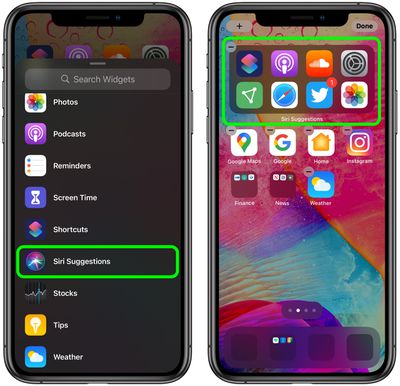
In the Widget Gallery, if you scroll down to the list section you'll see a Siri Suggestions widget. This dynamic widget displays app suggestions based on your ‌iPhone‌ usage habits, similar to what shows up under ‌Siri‌ Suggestions when you use an ‌iPhone‌'s search function.

widgets

Widget Stacks

With widget stacks, you can stack multiple widgets on top of one another, so you can put all of your favorites together and then swap between them with an upward or downward swipe of the finger.

Apple has also added a special "Smart Stack," which is a widget stack that uses ‌Siri‌ Intelligence to surface the most relevant and useful widget based on your iPhone usage habits.
Top Rated Comments

82 months ago
I don’t know but is it me...those iOS 14 screen shots just look like a convoluted mess just so busy with widgets and icons. Just doesn’t look clean.
Score: 8 Votes (Like | Disagree)
82 months ago

'Does anyone else miss the days when the interface wasn’t so confusing that you didn’t need extensive instructions to walk you through steps and hidden interface elements to figure out how to do stuff?'
Even in those supposed days there were still manuals and how-tos available for all kinds of things, especially something newer.
Score: 7 Votes (Like | Disagree)
jozeppy26 Avatar
82 months ago
I can’t figure out how to organize things. It’s frustrating that the App Library doesn’t give you the ability to rearrange and rename folders. So far, I regret altering my Home Screen with widgets.

Score: 6 Votes (Like | Disagree)
Morgenland Avatar
82 months ago
Does anyone else miss the days when the interface wasn’t so confusing that you didn’t need extensive instructions to walk you through steps and hidden interface elements to figure out how to do stuff?
Apple learned Android and Windows Phone OS.
Score: 4 Votes (Like | Disagree)
JNGold Avatar
82 months ago
Geez, what's with all the whining? If you don't want to use a home screen widget, then guess what? Don't. Your iOS device will work just fine with your existing home screens and folders. Heck, you can even hide some of those graveyard home screens 2,3,4 or more pages away. Sounds like a win/win there.


Score: 3 Votes (Like | Disagree)
82 months ago

I can’t figure out how to organize things. It’s frustrating that the App Library doesn’t give you the ability to rearrange and rename folders. So far, I regret altering my Home Screen with widgets.
You can create your own folders and organize things as you want, like before, right?
Score: 3 Votes (Like | Disagree)

Popular Stories

Apple HomeView lineup feature5

Apple HomeView Has These 15 Apps, Some CarPlay Apps and Widgets Also Supported

Wednesday October 14, 2026 9:03 am PDT by
Apple's tech specs page for its all-new HomeView smart home hub contains a list of all of the built-in Apple apps available on the device. While it has no App Store, the HomeView can also display CarPlay-enabled audio and video apps from a paired iPhone. This includes Audiobooks, Apple Music Classical, Apple News, and Apple TV, along with third-party apps such as Spotify, according to WIRED. ...
Apple MacBook Pro with PROLED XDR Display family lineup feature

Apple Announces OLED MacBook Pro With Touch Display

Wednesday October 28, 2026 10:11 am PDT by
Apple today announced a new high-end MacBook Pro, which is available in 14-inch and 16-inch sizes. The new device has a PROLED XDR display that supports touch gestures, and a glowing rear Apple logo. Pricing on the MacBook Pro starts at $2,899 for the 14-inch model and $3,399 for the 16-inch model. Apple says the MacBook Pro has the "world's best display in a pro laptop." The PROLED...
iPad mini OLED feature 1

Apple Executive Comments on New iPad Mini Lacking 120Hz Display

Thursday October 29, 2026 1:47 pm PDT by
While the new iPad mini has an OLED display, the device does not support ProMotion, meaning the display's refresh rate is limited to 60Hz instead of 120Hz. ProMotion support would have allowed for the iPad mini's refresh rate to automatically adjust from 10Hz to 120Hz depending on the content being displayed, but evidently Apple has kept the feature exclusive to the iPad Pro among iPad...
Latest Stories
Apple Reveals New iPad Mini's Battery Capacity
27 minutes ago
Top Stories: Apple's Big MacBook Pro, iPad mini and iMac Updates
2 hours ago
'Pluribus' Season 2 Reportedly Starts Production Today
8 hours ago
iPhone 18 Pro Sales Surge in China, Offsetting Decline in U.S. and Japan
9 hours ago
HomeView Software 27.2: Wallpapers, Control Center, and More
16 hours ago
Apple Alerts Stores to iPhone Duo's Display Cracking Issue
17 hours ago
iOS 27.3 Will Enable These Apple Intelligence Features in China
17 hours ago
Apple Says iOS 27.3 Beta Coming Next Week
17 hours ago
Apple's Flash Storage Suppliers Are Finally 'Getting Their Revenge'
18 hours ago
14 New Things Your iPhone Can Do in iOS 27.2
19 hours ago
iPhone Duo Review: One Week Later
20 hours ago
Samsung Mocks iPhone Duo Display Cracks in New Ad Campaign
22 hours ago
The MacRumors Show: OLED MacBook Pro, iPad Mini 8, and More
22 hours ago
MacBook Pro With Touch Display: 15 More Details Revealed
22 hours ago
Russia Places Apple on State Surveillance Registry
1 day ago
Halloween Weekend Brings Discounts on Apple Accessories and Pre-Orders
1 day ago
Apple Has Released More Than 25 New Products in the Past Two Months
1 day ago
Local Code Launches as Free, Private AI Assistant Tool for Mac
1 day ago
Apple Acquires Ascend.io
1 day ago
HomePod Mini 2 Launches Today: All the New Features
1 day ago
AirTag 2 4-Pack Drops to New Low Price of $69.99
1 day ago
Rian Johnson's iPhone Camera App Goes Viral
1 day ago
Where Did All the iPhone Duos Go? Mostly to Apple's Stores
1 day ago
Apple's Touchscreen MacBook Pro Could Ship 1.5M Units in 2027
1 day ago
New Apple TV 4K and iPad Mini: RAM Amounts Revealed
2 days ago
Apple Executive Comments on New iPad Mini Lacking 120Hz Display
2 days ago
Here's a Hands-On Look at HomePod Mini 2's New Two-Tone Colors
2 days ago
Apple Lowers App Store Fees in Taiwan Starting October 31
2 days ago
HomeView Pre-Order Returns to $289.99 on Amazon
2 days ago
Apple Avoids Showing Pinched Fingers on iPad Mini Page in South Korea
2 days ago

🔗 Related Apple News & Rumors

Stay updated with the latest Apple ecosystem news and verified rumors