

With iOS 13, Apple added a Picture in Picture Mode to the iPad, and with iOS 14, that Picture in Picture functionality is available for the iPhone too, letting users do things like watch videos and take FaceTime calls while doing other things on their device.
This guide covers everything that you need to know about using Picture in Picture on the iPhone.
Using Picture in Picture With Apps
Picture in Picture works with apps that play video content, but when it comes to third-party apps, app developers have to implement support for the feature.
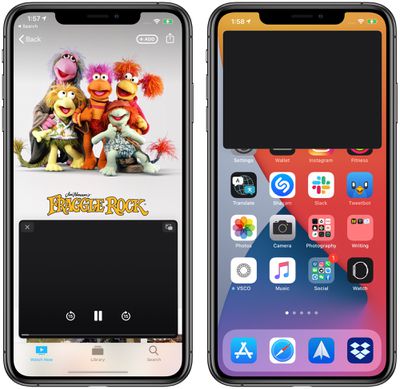
In a compatible app, which includes Apple's apps such as Apple TV, you can tap on the Picture in Picture icon available at the top of the app to activate Picture in Picture mode, double tap on the video with two fingers, or swipe upward from the bottom of the iPhone's display to activate Picture in Picture mode.
Exiting out of Picture in Picture Mode and returning to full screen mode with the app reopened can be done by tapping on the same icon in the upper right corner of the Picture in Picture window or double tapping with two fingers. Closing the Picture in Picture window and existing out of the app can be done by tapping on the X in the left corner.
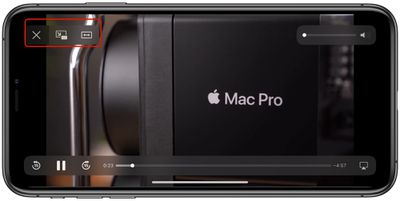
Picture in Picture mode controls for apps that play television and movie content include play/pause and an option to tap to skip 15 seconds forward and 15 seconds back.
Apple's apps that work with Picture in Picture include anything with a video feed, such as Apple TV+ or video footage from HomeKit-enabled cameras in the Home app.
YouTube Picture in Picture
YouTube, unfortunately, has not implemented Picture in Picture support yet, so the YouTube app doesn't work with the feature. There are some doubts that YouTube will ever support this feature, but YouTube has been testing it on the iPad. Fortunately, there is a workaround for now, using YouTube on the web.
Using Picture in Picture on the Web
Picture in Picture with the Safari app works with almost any video and website developers don't need to implement support. On a site with a video, tap to play the video and then tap the Picture in Picture icon or do a two finger double tap on the video. You can also swipe upwards from the bottom of the iPhone to activate Picture in Picture.
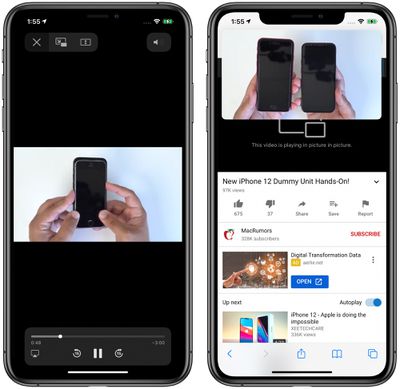
There are some video types that don't work, such as the videos that some sites embed in webpages, so there may need to be some tweaks to some websites before those kinds of videos can be used in Picture in Picture mode. It is compatible with videos from sites like YouTube and Vimeo, however, so websites that use these embeds will have content compatible with Picture in Picture.
Note that to use Picture in Picture mode with Safari, if you want to continue browsing another website while a video plays, you need to open a new Safari tab.
Using Picture in Picture with FaceTime
Picture in Picture works with FaceTime in iOS 14, and that's perhaps the most useful way to take advantage of it. In iOS 13, if you need to do something on your phone, you have to swipe out of the FaceTime window, which pauses your video for the person you're speaking with.
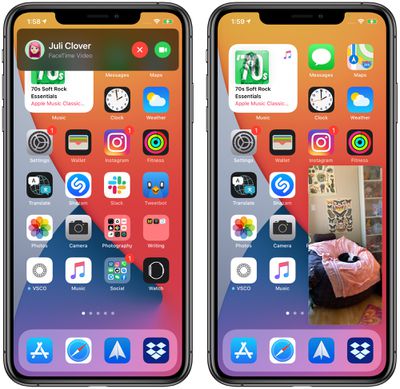
In iOS 14, if you swipe out of a FaceTime call it automatically minimizes into a Picture in Picture window that continues to be visible even while you access other apps so you and the other person you're talking to can continue your conversation without the iPhone being otherwise unusable.
You can double tap on the FaceTime window to change its size from large to medium or small and then back again, and if you just single tap the Picture in Picture window expands back to the full size of the iPhone's display. You can also move the Picture in Picture window to the optimal spot on the screen.
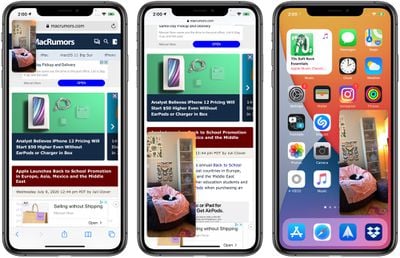
Customizing Picture in Picture Window Size and Position
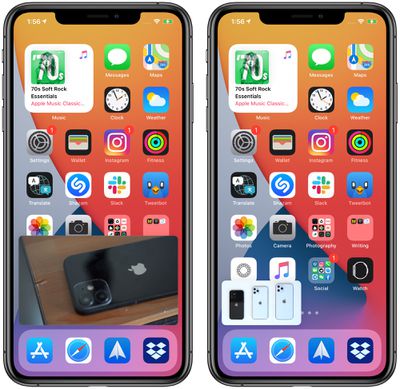
You can double tap on any Picture in Picture window or use pinch gestures to change the Picture in Picture window size. There are three sizes to choose from: small, medium, and large.
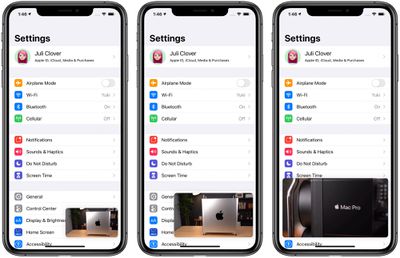
The small window is about the size of two app icons, the medium is as wide as about three app icons and as tall as one and a half, while the largest window is the size of eight app icons.
All of the windows are shown in a landscape orientation on the iPhone's Home Screen with the exception of FaceTime, which is shown in portrait mode.
Picture in Picture windows can be used with almost any app or while on the Home Screen. The small and medium windows can be moved to any corner of the iPhone's display, while the large Picture in Picture window can be placed at the top or the bottom of the screen.
Moving the Picture in Picture Window Off Screen
You can pull a Picture in Picture window of any size over to the side of the iPhone with drag and drop gestures, moving it off of the screen.
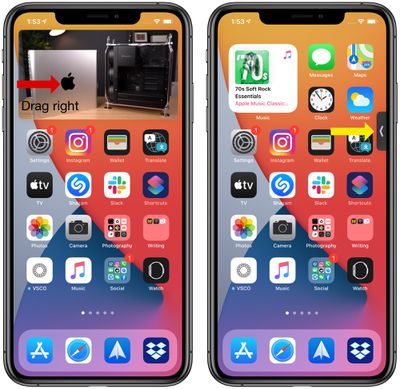
With the Picture in Picture window off screen, you will continue to hear the audio from the video or FaceTime call, but it won't be visible on the iPhone's display.
Guide Feedback
Have questions about the Picture in Picture mode on the iPhone, know of a feature we left out, or want to offer feedback on this guide? Send us an email here.



















































