Add Custom Backgrounds to Messages in iOS 26 - MacRumorsOpen MenuShow RoundupsShow Forums menuVisit ForumsOpen Sidebar
Skip to Content

Add Custom Backgrounds to Messages in iOS 26

by

Apple's iOS 26 finally brings custom conversation backgrounds to the Messages app, letting you personalize your chats with photos, colors, or images generated by Image Playground. Third-party messaging apps like WhatsApp have offered this kind of feature for years, so finally iPhone owners can now also add their own visual flair to text conversations in Apple's stock messaging app.
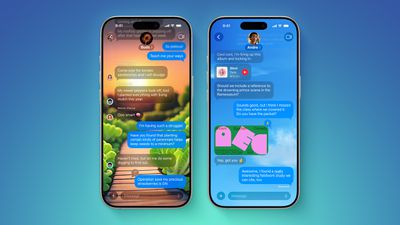
ten messages features
Custom backgrounds can help you organize conversations at a glance and add a personal touch to your most important chats. You might choose a sunset photo for family group chats, a solid color for work messages, or a fun AI-generated image for conversations with friends. Just note that when you change the background, everyone in the conversation will also see it.

Bear in mind that iOS 26 is currently in beta testing and will see a general release this fall.

How to Change a Messages Background

The following steps show you how to customize any conversation background in iOS 26:

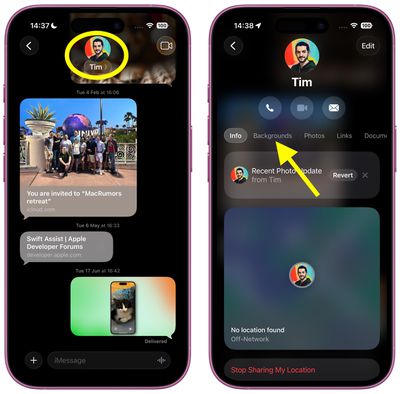
  1. Open Messages on your iPhone, then tap the conversation you want to customize.
  2. Tap the contact name or group name at the top of the conversation, then tap Backgrounds.
    messages

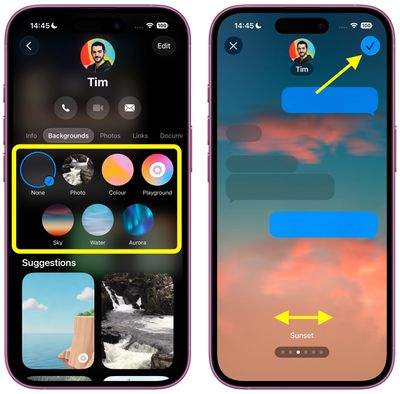
  3. Choose from the available options: Photo (select an image from your photo library), Color (pick from preset solid colors), or Playground (describe an image for Image Playground to generate it). Alternatively, choose from Sky, Water, Aurora, or one of the Suggestions.
  4. Swipe left and right to preview the available Styles.
  5. Tap the top-right check button to apply your selection.
    messages

How to Reset to Default Background

If you want to return to the standard Messages background:

  1. Open the conversation with the custom background, then tap the contact name or group name at the top.
  2. Tap Backgrounds.
  3. Tap the None option, foremost in the selection screen, then tap the back arrow to confirm.

Tips for Better Backgrounds

Choose backgrounds that don't interfere with text readability. Dark photos work well with light text bubbles, while lighter backgrounds pair better with dark text. iOS 26 automatically adjusts text contrast, but some combinations work better than others.
messages
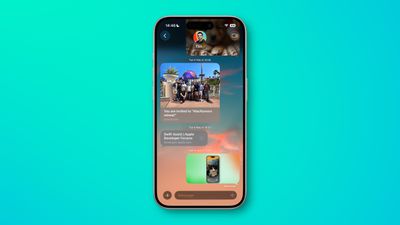
Custom backgrounds sync across all your devices signed in with the same Apple Account, so changes you make on your iPhone will appear on your iPad and Mac as well, provided they are updated to iPadOS 26 and macOS Tahoe, respectively.


Top Rated Comments

adrianlondon Avatar
14 months ago
Looks great! Legibility is overrated. (MacOS 26)



Attachment Image
Score: 16 Votes (Like | Disagree)
Attirex Avatar
14 months ago
Why you would want to make your text thread look like a geocities web page ca. 1996 is beyond me.
Score: 12 Votes (Like | Disagree)
jdawgnoonan Avatar
14 months ago
To me this should never be an operating system level major feature. It is on par with new emojis.
Score: 10 Votes (Like | Disagree)
Diopter Avatar
14 months ago
It is kind of ridiculous that you can’t set a background just for yourself, without having to force it on the other person/people in the conversation.

Other apps like LINE allow you to set a background that only you see.
Score: 9 Votes (Like | Disagree)
miamialley Avatar
14 months ago

It is kind of ridiculous that you can’t set a background just for yourself, without having to force it on the other person/people in the conversation.

Other apps like LINE allow you to set a background that only you see.
Completely agree. Apple really baffling lately with a lot of things.
Score: 8 Votes (Like | Disagree)
14 months ago
Looks horrendous.

I'll block anyone who turns in on for our conversations.
Score: 6 Votes (Like | Disagree)

Popular Stories

Apple Event Logo

Apple Working on All-New Operating System

Wednesday July 29, 2026 11:39 am PDT by
Apple is developing an all-new operating system that is essentially a mix of tvOS, watchOS, and iOS, according to Bloomberg's Mark Gurman. In a report this week, he said the operating system will feature a grid of icons, widgets, and apps, along with customizable clock faces. The new software platform is intended for Apple's long-rumored smart home hub. With built-in facial recognition,...
imac video apple feature

Apple Made Its Second-Biggest Acquisition Ever This Year

Wednesday July 29, 2026 12:03 pm PDT by
Apple this year acquired Israeli startup Q.ai for close to $2 billion, according to the Financial Times. That would make this Apple's second-biggest acquisition ever, after it paid $3 billion for the popular headphone maker Beats in 2014. This is also the largest known Apple acquisition since the company purchased Intel's smartphone modem business and patents for $1 billion in 2019. Q.ai...
Dynamic Island iPhone 18 Pro Feature

iPhone 18 Pro: Twelve Changes Coming to Apple's Next Flagship

Thursday July 30, 2026 3:43 am PDT by
We're less than two months out from the launch of Apple's premium next-generation smartphone lineup, and while we're not expecting a dramatic change in terms of functionality, there are still several enhancements rumored to be coming to the iPhone 18 Pro and iPhone 18 Pro Max. One thing worth noting is that Apple is reportedly planning a major change to its iPhone release cycle this year,...

🔗 Related Apple News & Rumors

Stay updated with the latest Apple ecosystem news and verified rumors