

Universal Control vs. Sidecar: What's the Difference? - MacRumorsOpen MenuShow RoundupsShow Forums menuVisit ForumsOpen Sidebar
Skip to Content

Universal Control vs. Sidecar: What's the Difference?

Apple's Macs and iPads include support for two separate features called Sidecar and Universal Control that allow the devices to be used together, but in different ways.


In this guide, we'll go over everything you need to know about Universal Control and how it differs from the Sidecar feature that's been available since 2019.

What is Universal Control?

As of iPadOS 15.4 and macOS Monterey 12.3, both currently in beta, Apple has introduced support for Universal Control, the long-awaited feature that's designed to allow multiple Macs and iPads to be controlled with a single mouse and keyboard.
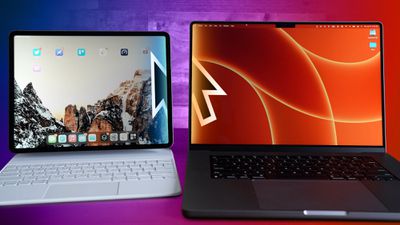
With Universal Control, you can use the same cursor and keyboard on any nearby Mac or ‌iPad that's signed into your iCloud account, and it works between multiple Macs and between multiple Macs and iPads positioned within 10 meters (30 feet) of each other.

How is Universal Control Different from Sidecar?

With Universal Control, if you have a Mac and an ‌iPad‌ next to each other, or even multiple Macs and iPads, you can use the keyboard and cursor on one device across all of them. So, for example, if you have a MacBook Pro and an iPad on your desk, the MacBook Pro's trackpad can be used over on the ‌iPad‌ just by swiping across, and the Mac's keyboard will become the iPad's input device. The same is also true of the ‌iPad‌ if you have a keyboard attached to it.


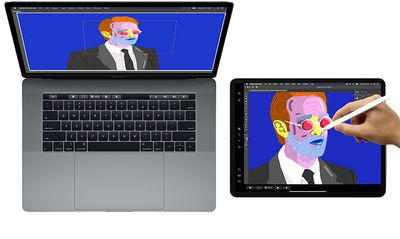
Sidecar works quite differently. Announced in 2019 as part of macOS Catalina, Sidecar is designed to let you use an iPad as a secondary display for your Mac. Up to one iPad can be used to either mirror the content on your Mac's display or turn it into a secondary display for extra screen real estate in macOS. Universal Control does not extend your Mac's display to the iPad, so if you want your Mac's content displayed on the iPad, you'll need to use Sidecar.

Note that while Universal Control lets you use your Mac's keyboard and trackpad to navigate your iPad, it functions over two different operating systems – macOS and iPadOS – so some quirks are to be expected. For example, if you drag a photo from Mac to iPad, you first need to open the Photos app in iOS to transfer it across – it can't be placed on the Home screen.


In contrast, Sidecar is designed as a secondary Mac display, so it works like any other secondary display you might use with your Mac to bring greater desktop screen space to macOS. Using Sidecar, you can drag windows from the Mac to the ‌iPad‌ and vice versa, and interact with both using your Mac's trackpad.

Notable Features and Limitations

Universal Control doesn't require any complicated setup and works pretty much automatically, although there are a few controls you can adjust and you can also disable it completely. In the current beta, for example, you can disable the function that lets your Mac's cursor connect to a nearby Mac or iPad by pushing against the edge of the display. You can also stop your Mac from automatically reconnecting to any nearby Mac or iPad you've previously connected to.

Universal Control Colored Feature
Note that Universal Control requires at least one Mac to use. For example, you can't just use it between two iPads. However, you can use Universal Control between Macs, with no iPads involved. Apart from the at-least-one-Mac caveat, there doesn't appear to be a limit to how many devices you can control using just the one keyboard and trackpad/mouse. Universal Control is limited to mouse/trackpad and keyboard support. You can't, for example, use an Apple Pencil with Universal Control.

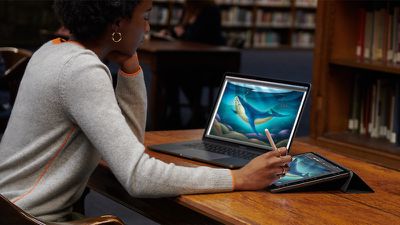
With Sidecar, you can use an Apple Pencil (first or second generation depending on your ‌iPad‌) as a mouse alternative for clicking, selecting, and other on-screen macOS control tasks. Think of the ‌Apple Pencil‌ as a mouse or trackpad when using it with Sidecar.

sidecarmacoscatalina
In apps like Photoshop and Illustrator, the ‌Apple Pencil‌ does even more. You can draw right in Photoshop or other similar Mac apps, which transforms the ‌iPad‌ into a graphics tablet for your Mac, not unlike a Wacom graphics tablet.

Sidecar also optionally adds a Touch Bar to the bottom of the ‌iPad‌, which is the same as the Touch Bar on the Touch Bar MacBook Pro models. Even if your Mac doesn't naturally have a Touch Bar, these Touch Bar controls can be displayed on the iPad screen.

Should I Use Sidecar or Universal Control?

Should you use Sidecar or Universal Control on your Macs and iPads? The question really comes down to your personal use case.

If you'd like to extend your macOS desktop space to your iPad's screen, and you don't intend to use iPadOS, then the simple answer is to use Sidecar. If you want to use your iPad and Apple Pencil to draw or illustrate something that you're working on in a Mac app, then Sidecar is the option to take.

macos catalina sidecar
If you want to control multiple Macs and iPads with the same input devices, and you're happy to live with some interoperability limitations between macOS and iPadOS (drag-and-drop, for example) then Universal Control is the ideal solution.

Can I Use Universal Control and Sidecar at the Same Time?

Provided you have enough iPads and Macs, you can actually use Sidecar and Universal Control at the same time and enjoy the best of both worlds.

For example, you could connect your Mac to one iPad via Sidecar for some extra macOS screen space, and on the other side of your Mac you could control a second iPad or Mac using the Mac's keyboard and trackpad.

How to Use Sidecar and Universal Control

For full instructions on how to set up and use Sidecar and Universal Control, including device compatibility information for the two features, be sure to check out our dedicated guides by following the above hyperlinks.

Tag: Sidecar Guide
Related Forum: iOS 15

Popular Stories

Apple TV 4K HomeView HomePod Mini tweaked

New Apple TV 4K, HomeView, and HomePod Mini: 16 Details Just Leaked

Sunday October 11, 2026 12:56 pm PDT by
Just two days before Apple's "Welcome home" experience in New York, Bloomberg's Mark Gurman has leaked several details about the new products set to be unveiled, including an all-new smart home hub, a HomePod mini 2, and a new Apple TV 4K. Here is an all-in-one summary of the details shared by Gurman:Apple's home hub with a touch-enabled display will be named HomeView, seemingly confirming a ...
Apple HomeView lineup feature1

Apple Announces 'HomeView' Smart Home Hub

Tuesday October 13, 2026 6:00 am PDT by
Apple today announced the "HomeView," an all-new kind of smart home hub featuring a 7-inch Liquid Retina display and Siri AI. Apple's senior vice president of Worldwide Marketing Greg Joswiak said: Apple HomeView is designed to be shared by everyone in the home yet feel completely personal to each user. It recognizes your face to shift from a household screen to your own experience,...
Apple TV 4K 4th Generation feature4

New Apple TV 4K Announced With A19 Chip, Updated Siri Remote, More

Tuesday October 13, 2026 6:08 am PDT by
Apple today announced the fourth-generation Apple TV 4K, with key features including an A19 chip, Siri AI support, an updated Siri Remote that has Find My support with Precision Finding, built in far-field microphones, support for surround sound with four HomePods in front and rear pairs, and more. The A19 chip in the new Apple TV 4K delivers up to 50% faster CPU performance and up to twice...

Top Rated Comments

Infinite Vortex Avatar
61 months ago
I have to say, I still don't get it. What it is I'm going to do on an iPad with the keyboard and mouse of a MacBook (for instance) that I wouldn't, let alone prefer, to do on the MacBook itself. Hmmmmm! I'm sure this is something to have in front of me to see its value but looking from the outside I straight don't get it.
Score: 13 Votes (Like | Disagree)
61 months ago
I don't think this feature will be used much. The initial THATS COOL will wear out.

I would be more excited to run IOS Apps on my Mac. downloaded and installed from anywhere.

Like Android apps and Windows 11.
Score: 10 Votes (Like | Disagree)
TheYayAreaLiving 🎗️ Avatar
61 months ago
Well explained! Universal Control + Sidecar = Total Awesomeness.

I have no idea how it’s 2022, and we manage to live without it. Can’t wait till it’s officially out to the public.
Score: 8 Votes (Like | Disagree)
Westside guy Avatar
61 months ago
Technically interesting, for sure. But it seems like a rather niche feature. I suspect the majority people will try it a few times and then forget about it completely.
Score: 5 Votes (Like | Disagree)
TracesOfArsenic Avatar
61 months ago
Two half cooked features makes a whole feature! Yay!
Score: 5 Votes (Like | Disagree)
Leon Ze Professional Avatar
61 months ago
Great explanation in the video. Much appreciated. Thanks!
Score: 4 Votes (Like | Disagree)
Read All Comments
Latest Stories
Touchscreen MacBook Pro Could Launch on November 6
1 hour ago
New Withings Users Must Pay $99/Year for Apple Health Syncing
1 hour ago
Meta and Apple Bring Muse Spark Open AI Model to Mac Studio
3 hours ago
iPad Mini 8: Apple Has Tested Both 60Hz and 120Hz ProMotion Displays
3 hours ago
Apple TV 4K 2022 vs. 2026 Buyer's Guide: All Differences Compared
4 hours ago
Apple CEO John Ternus on Early Foldables: 'Kind of Cheap and Crappy'
5 hours ago
Greg Joswiak Says Apple Isn't Focused on Making AI for 'Lunatic Fringe'
6 hours ago
Amazon Offers $120 Discount on AirPods Max 2, $50 Off AirPods Pro 3
6 hours ago
Apple CEO John Ternus Featured on Cover of TIME Magazine: 'New Era'
7 hours ago
Apple Announces Deadline to 'Get Ready' to Pre-Order the iPhone Duo
7 hours ago
MKBHD is 'Not Convinced' About Apple's New HomeView, Here's Why
8 hours ago
Apple's Wall-Mounted HomeView Ships Without a Power Adapter
8 hours ago
Rare Apple-1 With Steve Jobs Letter Sells for $1.15 Million
8 hours ago
Apple Now Inviting Media to October 28 'Launch Experience'
9 hours ago
iPhone Duo's A20 Pro Chip Benchmarked Ahead of Launch
20 hours ago
10 HomeView Features You Might Have Missed
21 hours ago
Apple Becomes Second Company to Close Above $5 Trillion
22 hours ago
Which Apple Home Devices Get Siri AI, and When
23 hours ago
Apple's Long-Delayed HomeView Was Already Being Tested in 2024
1 day ago
Apple Intelligence Coming to China in December With iOS 27.3
1 day ago
Apple Invites App Updated With Two New Features
1 day ago
OpenAI Says Ex-Employee Showed Its Device Plans to Apple
1 day ago
Discover the Best Cases and Screen Protectors for Your New iPhone Duo
1 day ago
Apple Store Near Los Angeles Closed Due to 'Events Beyond Our Control'
1 day ago
No, HomePod Mini 1 Won't Support Siri AI as CNET Reported
1 day ago
iPhone Duo Compromises: Everything You Have to Give Up
1 day ago
Apple HomeView Has These 15 Apps, Some CarPlay Apps and Widgets Also Supported
1 day ago
iPhone Duo: Apple Charging $49 for New Cover Layer, $229 for Battery
1 day ago
iPhone Duo: Skipping AppleCare+ Could Be $1,499 Mistake
1 day ago
Ready for HomeView? Don't Miss These Smart Home Accessory Deals
1 day ago

🔗 Related Apple News & Rumors

Stay updated with the latest Apple ecosystem news and verified rumors









































