Everything New With Siri and Dictation in iOS 16

With every iteration of iOS, Apple makes improvements to the built-in Siri voice assistant, and iOS 16 is no exception. Offline support has been expanded, ‌Siri‌ can finally hang up calls, and there's improved guidance on when and where you can access ‌Siri‌.

iOS 16 Siri Guide Feature
This guide outlines everything that's new with ‌Siri‌ in iOS 16, which is available now for all eligible devices, plus it includes details on the updates to Dictation.

Siri

Simpler Shortcuts

Shortcuts activated by ‌Siri‌ no longer require a setup process to use them. When you download and install an app, shortcuts can be activated by ‌Siri‌ right away.

Emoji in Texts

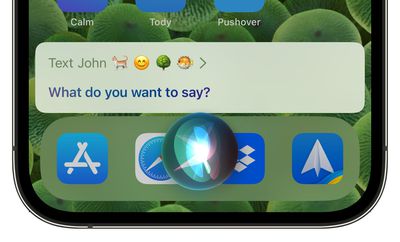
When you're sending a message using ‌Siri‌, you can ask ‌Siri‌ to insert an emoji into your message. You'll need to be specific about the character that you're requesting, and it's also helpful to say "emoji" after each request so ‌Siri‌ doesn't get confused.

emoji siri messages ios 16

Hanging Up Calls

If you're having a hands-free conversation with someone and it ends, you can ask ‌Siri‌ to hang up the call.

Automatic Message Sending

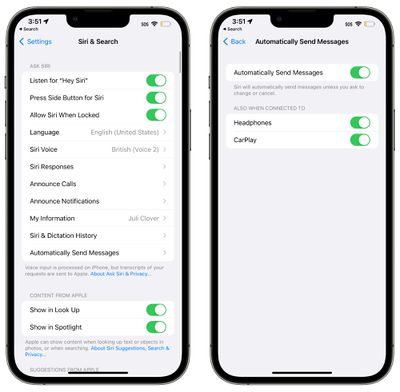
In the Settings app, the ‌Siri‌ and Search section has a new option for automatically sending a message with ‌Siri‌, which removes the confirmation step that you have to go through when sending text through ‌Siri‌.

siri automatically send messages ios 16
Having to approve each message can be a frustration if you're having a long conversation with someone and you don't have access to your phone to type, so this streamlines the process, plus it works with CarPlay. It is an opt-in feature and it can be toggled off for the car and headphones if desired.

Siri Command Guidance

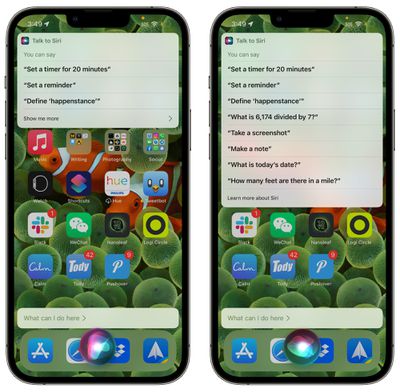
If you want to know more about how you can take advantage of ‌Siri‌, just ask. When you're in an app or doing something on your iPhone, say "Hey ‌Siri‌, what can I do here?" to get details on what ‌Siri‌ is capable of.

siri ios 16 capabilities
You can also ask ‌Siri‌ about a specific app with a command like "Hey ‌Siri‌, what can I do with [insert app name]?"

More Offline Functionality

‌Siri‌ is able to do more on device in iOS 16 without having to contact an Apple server, which means there are a wider array of functions that are available when you don't have an internet connection.

‌Siri‌ can process HomeKit, Intercom, and Voicemail requests when you are offline.

Accessibility Features

In the Accessibility section of the Settings app under the "‌Siri‌" heading, there are new options to change ‌Siri‌'s pause time, which causes the voice assistant to wait for you to finish speaking for a longer period of time. ‌Siri‌ Pause Time can be set to Default, Longer, and Longest.
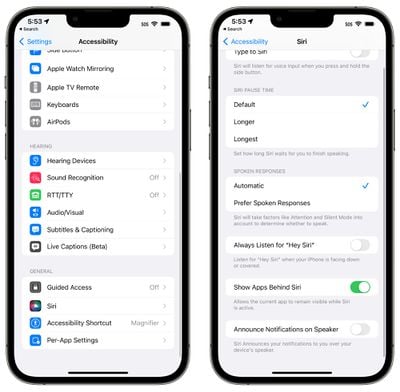
ios 16 siri accessibility
There's also an option to "Announce Notifications on Speaker" to have ‌Siri‌ speak notifications aloud, and a "Prefer Spoken Responses" option can be toggled on to cause ‌Siri‌ to speak aloud in situations such as the phone being silenced.

Dictation

Apple with iOS 16 entirely overhauled the dictation experience, making it easier to swap between voice and touch. When you're dictating text on the ‌iPhone‌ or iPad, you can tap into the text field and type with the keyboard to make edits and insert QuickType suggestions without having to stop the dictation process.

There's also a new cursor popover that's available when you're dictating text, and if you tap it, you can stop the dictation more quickly.

Automatic Punctuation

While you dictate text, your device will intelligently add punctuation, putting in commas, periods, and question marks where appropriate.

The ‌iPhone‌ or ‌iPad‌ will listen to what you're saying, wait for you to finish, and then add commas and periods based on the structure of your words. It's not always perfect, but it's better than having to speak punctation as is required in iOS 15 and earlier.

Emoji Support

As with ‌Siri‌, the built-in dictation feature also supports inserting emoji by voice command.

Dictation in Messages

In the iOS 16 Messages app, the Dictation icon is right in the messages text box, making it much easier to get to. If Dictation is enabled, you'll see a tappable microphone icon that starts a dictation setting.

The Dictation icon replaces the voice message icon that was at the right side of the Messages text entry box in iOS 15. If Dictation is not enabled, there is no icon in the text box.

Guide Feedback

Have questions about Dictation and ‌Siri‌ in iOS 16 , know of a feature we left out, or want to offer feedback on this guide? Send us an email here.


Popular Stories

Aston Martin CarPlay Ultra Screen

Apple's CarPlay Ultra to Expand to These Vehicle Brands Later This Year

Sunday February 1, 2026 10:08 am PST by
Last year, Apple launched CarPlay Ultra, the long-awaited next-generation version of its CarPlay software system for vehicles. Nearly nine months later, CarPlay Ultra is still limited to Aston Martin's latest luxury vehicles, but that should change fairly soon. In May 2025, Apple said many other vehicle brands planned to offer CarPlay Ultra, including Hyundai, Kia, and Genesis. In his Powe...
Apple Logo Black

Apple's Next Launch is 'Imminent'

Sunday February 1, 2026 12:31 pm PST by
The calendar has turned to February, and a new report indicates that Apple's next product launch is "imminent," in the form of new MacBook Pro models. "All signs point to an imminent launch of next-generation MacBook Pros that retain the current form factor but deliver faster chips," Bloomberg's Mark Gurman said on Sunday. "I'm told the new models — code-named J714 and J716 — are slated...
Apple MacBook Pro M4 hero

New MacBook Pros Reportedly Launching Alongside macOS 26.3

Sunday February 1, 2026 5:42 am PST by
Apple is planning to launch new MacBook Pro models with M5 Pro and M5 Max chips alongside macOS 26.3, according to Bloomberg's Mark Gurman. "Apple's faster MacBook Pros are planned for the macOS 26.3 release cycle," wrote Gurman, in his Power On newsletter today. "I'm told the new models — code-named J714 and J716 — are slated for the macOS 26.3 software cycle, which runs from...
iOS 26

iOS 26.3 and iOS 26.4 Will Add These New Features to Your iPhone

Tuesday February 3, 2026 7:47 am PST by
We are still waiting for the iOS 26.3 Release Candidate to come out, so the first iOS 26.4 beta is likely still at least a week or two away. Following beta testing, iOS 26.4 will likely be released to the general public in March or April. Below, we have recapped known or rumored iOS 26.3 and iOS 26.4 features so far. iOS 26.3 iPhone to Android Transfer Tool iOS 26.3 makes it easier...
14 inch MacBook Pro Keyboard

Apple Changes How You Order a Mac

Saturday January 31, 2026 10:51 am PST by
Apple recently updated its online store with a new ordering process for Macs, including the MacBook Air, MacBook Pro, iMac, Mac mini, Mac Studio, and Mac Pro. There used to be a handful of standard configurations available for each Mac, but now you must configure a Mac entirely from scratch on a feature-by-feature basis. In other words, ordering a new Mac now works much like ordering an...

Top Rated Comments

Karma*Police Avatar
46 months ago
Siri is awful. You know it’s bad when Rene Ritchie trashes it. I expected Siri to be so much better by now but it’s as if Siri has stood still all these years since Steve Jobs introduced it.
Score: 26 Votes (Like | Disagree)
DogHouseDub Avatar
46 months ago
Me: Hey Siri, open garage door 2

Siri: OK, which garage door would you like to open; garage door 1 or garage door 2?

Me: Garage door 2

Siri: OK, which garage door would you like to open; garage door 1 or garage door 2?

Me: two

Siri: I’m sorry, I don’t recognize that.
Score: 21 Votes (Like | Disagree)
kenni417 Avatar
46 months ago
imagine hearing someone on the other end of the call saying “hey siri hang up the call”
Score: 19 Votes (Like | Disagree)
gaximus Avatar
46 months ago

She is even worse now. She won't recognize the message now if I say, "Hey Siri, message <soandso> <message>" I will rattle the whole thing off, and she will ask me what I want to message <soandso> I already told you!!
The worst one I've ever had was, I said "Hey Siri, tell my wife I'm headed home" and Siri responded "I don't know who <my wife's actual name> is, its not in the contacts" then how do you know her name?
Score: 14 Votes (Like | Disagree)
compwiz1202 Avatar
46 months ago

Siri is awful. You know it’s bad when Rene Ritchie trashes it. I expected Siri to be so much better by now but it’s as if Siri has stood still all these years since Steve Jobs introduced it.
She is even worse now. She won't recognize the message now if I say, "Hey Siri, message <soandso> <message>" I will rattle the whole thing off, and she will ask me what I want to message <soandso> I already told you!!
Score: 12 Votes (Like | Disagree)
CarAnalogy Avatar
46 months ago

imagine hearing someone on the other end of the call saying “hey siri hang up the call”
Even funnier is the next ten seconds of “on it…” “just a sec…” “something went wrong.”

And then the sounds of cursing and a finger angrily jabbing at the screen. Then the call ends.
Score: 11 Votes (Like | Disagree)