iOS 15 Photos Guide: Features, Text Recognition, Changes - MacRumorsOpen MenuShow RoundupsShow Forums menuVisit ForumsOpen Sidebar
Skip to Content

iOS 15 Photos Guide: Features, Text Recognition, Changes

Apple made some major improvements to the Photos app in iOS 15, adding some long-awaited and requested features along with unique capabilities that enable you to do more with your images than ever.

iOs 15 Photos Feature
There's a new Memories feature that lets you relive your favorite moments, metadata info can be viewed and edited, Visual Lookup lets you identify plants, landmarks, and more, and with Live Text, you can copy and paste the text from any image on your iPhone. This guide highlights all of the new features that are available in the ‌Photos‌ app.

Memories

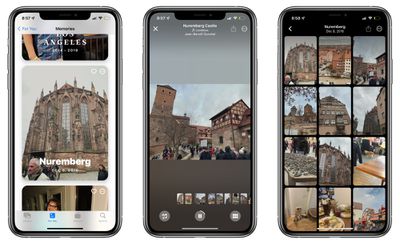
The Memories section of the ‌Photos‌ app has been overhauled in iOS 15, making it easier than ever to resurface your favorite memories.
photos memories app
The Memories feature has a new look that includes animated cards with adaptive titles, new animation and transition styles, and multiple image collages for a more cinematic feel. There are new memory looks that are added to Memories based on each photo and video, with Apple using machine learning to apply the right contrast and color adjustment for a consistent look. Apple says that this feature is designed to mimic what colorists at film studios do.

When playing a Memory, there's an interactive interface that lets you tap to pause, replay the last photo, skip to the next photo, or jump ahead, with the music designed to keep playing. Changing a song, removing or adding photos, or adjusting a Memory look is done in realtime with no need to recompile. To make it easier to make adjustments to Memories, there's a new Browse view so you can see all of the photos and videos in a bird's eye view.

Apple Music Integration

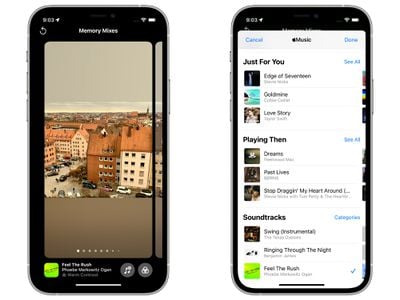
When creating and viewing Memories, the ‌Photos‌ app has always supported integrated music, but now Apple Music subscribers can choose to add any ‌Apple Music‌ song to a Memory.

memories apple music
The Memories feature makes personalized ‌Apple Music‌ song suggestions based on your music tastes and the content of your photos and videos. Song suggestions can include songs that were popular at the time and location of the memory, songs that you listened to while you were traveling, or a song from an artist if the memory includes a concert.

You can customize a Memory by swiping through various Memory mixes, which lets you experiment with different songs, pacing, and Memory looks.

New Memory Types

There are new kinds of Memories that are built from your ‌Photos‌ library, with Apple adding new international holidays, child-focused memories, and trends over time. Pet Memories have been improved and iOS devices can recognize individual dogs and cats.

Watch Next

After you've finished a Memory, Memories will suggest related content so that you can keep going through your photo content.
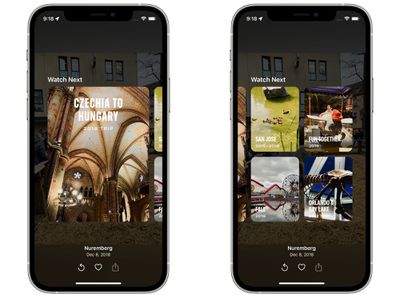
photo memory suggestions

Suggest Less Often

If there's someone popping up in your Memories or in Featured ‌Photos‌, you can use a new quick access "Feature Less" button to see less of that specific person.

feature less photos
This "Feature Less" option also works for dates, places, and holidays.

Live Text

Any text that's in a photograph or an image on your iPhone is now recognized by the iPhone through the new Live Text feature.
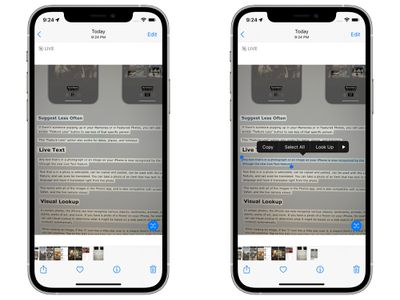
photos live text
Text that is in a photo is selectable, can be copied and pasted, can be used with the Lookup feature, and can even be translated. You can take a photo of an item that has text in a foreign language and have it translated right from the photo.

This works with all of the images in the ‌Photos‌ app, and is also compatible with screenshots, Safari, and the live camera viewer.

Visual Lookup

In certain photos, the iPhone can now recognize various objects, landmarks, animals, books, plants, works of art, and more. If you have a photo of a flower on your iPhone, for example, you can use Visual Lookup to determine what it might be based on a web search of images that Apple conducts automatically.
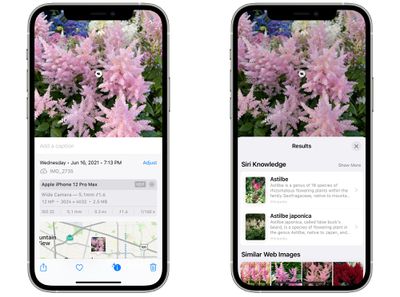
photos visual lookup
When viewing an image, if the "I" icon has a little star over it, it means there's a Visual Lookup you can examine. Tap on the Info icon and then tap on the little leaf icon to open up a search.

Metadata Viewing and Editing

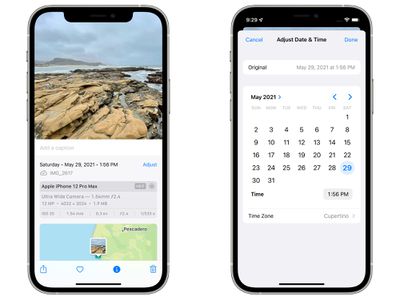
In iOS 15, if you tap on the new "Info" icon below a photo, you can view the camera that was used to take it, the lens, shutter speed, megapixels, size, aperture, and more, which is all of the EXIF info you can get from the desktop ‌Photos‌ app.

photos app metadata
In this interface, you can add captions and adjust the date and time of a photo through an added "Adjust" button. Prior to iOS 15, none of this information was available on iOS devices.

Faster iCloud Photos Library Syncing

Apple says that when you upgrade to a new device, iCloud Photos syncs more quickly than before, making it faster than ever for you to get access to your photo library.

People Identification and Naming Improvements

The "People" album on the iPhone has improved recognition for the various individuals that are in your pictures, and the iOS 15 ‌Photos‌ app is able to detect people in extreme poses, people wearing accessories, and people with occluded faces.

ios 15 improved people recognition
Apple has also added a full workflow for correcting naming mistakes. When selecting a person, if you tap on the "..." icon and then choose "Manage Tagged ‌Photos‌," you can untag any photos that might not be that person. This is also the interface used to tag additional photos if iOS finds untagged images.

Selection Order for Photos Picker

The ‌Photos‌ image picker that's available across iOS lets you select photos in a certain order for sharing purposes, so if you have a photo sequence, you can be sure they're shared in the order that you intend.

Shared With You

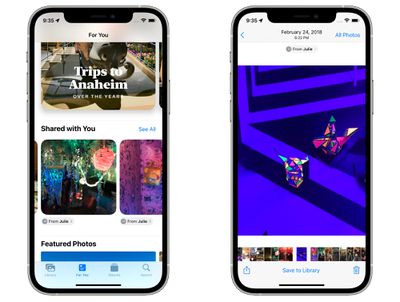
If someone shares a photo or video with you in the Messages app, it will show up in a new "Shared With You" section in the ‌Photos‌ app.

photos shared with you
If it's a photo that was taken when you were present, it will appear in the All ‌Photos‌ view and in the Days, Months, and Years view, as well as in Featured ‌Photos‌ and Memories.

‌Photos‌ in the Shared With You section can easily be saved to the ‌Photos‌ Library, and you can respond to a message with a tap right from the ‌Photos‌ app.

In iOS 15, you can search through your entire ‌Photos‌ library using Spotlight. You can search by locations, people, scenes, or things in the photos like plants or pets thanks to Visual Lookup.
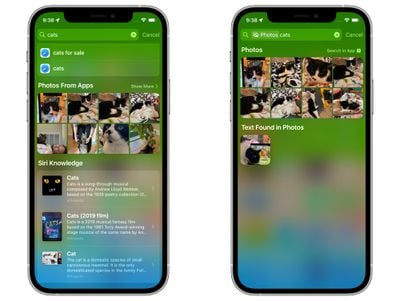
spotlight search photos app

Guide Feedback

Have questions about ‌Photos‌ in iOS 15, know of a feature we left out, or want to offer feedback on this guide? Send us an email here.


Popular Stories

Apple HomeView lineup feature1

Apple Announces 'HomeView' Smart Home Hub

Tuesday October 13, 2026 6:00 am PDT by
Apple today announced the "HomeView," an all-new kind of smart home hub featuring a 7-inch Liquid Retina display and Siri AI. Apple's senior vice president of Worldwide Marketing Greg Joswiak said: Apple HomeView is designed to be shared by everyone in the home yet feel completely personal to each user. It recognizes your face to shift from a household screen to your own experience,...
Apple TV 4K 4th Generation feature4

New Apple TV 4K Announced With A19 Chip, Updated Siri Remote, More

Tuesday October 13, 2026 6:08 am PDT by
Apple today announced the fourth-generation Apple TV 4K, with key features including an A19 chip, Siri AI support, an updated Siri Remote that has Find My support with Precision Finding, built in far-field microphones, support for surround sound with four HomePods in front and rear pairs, and more. The A19 chip in the new Apple TV 4K delivers up to 50% faster CPU performance and up to twice...
iOS 26 Home Feature

RIP, homeOS

Tuesday October 13, 2026 9:39 am PDT by
MacRumors was first to reveal the name "HomeView" last week, after discovering a trademark filing from a secretive shell company that we correctly suspected was linked to Apple. Apple was likely behind a "homeOS" trademark filing as well, but the company ultimately decided to stick with generic "HomeView software" naming, just like it refers to the HomePod's operating system as "HomePod...

Top Rated Comments

KittyKatta Avatar
69 months ago
Missing Feature: Family Sharing

Seriously, doesnt anyone at Apple have a family? If they offer $10/mo for 2TB of family shared data then it should include an OPTION for a family bucket of full-res photos so that parents can choose to combine all/some of their library.
Score: 29 Votes (Like | Disagree)

69 months ago
Can you finally add missing faces? It’s annoying when iOS does not recognise when a face is in a picture, as you can’t add one and then specify which person it is.
Score: 17 Votes (Like | Disagree)
69 months ago
Can they bring back the map view with pins? The map view with numbers really doesn't do anything for me. Does it matter if I took 23 or 19 photos in a particular location?
Score: 9 Votes (Like | Disagree)
leolabs Avatar
69 months ago

Spotlight should be able to search text in photos
It can, and it’s pretty speedy as well:

Attachment Image
Score: 7 Votes (Like | Disagree)
69 months ago

Someone care to explain why upgrading to a new decide will mean faster iCloud syncing? Why wouldn’t all existing devices also have this if they upgrade to iOS 15?
Existing devices would have the data already on them.

This just means that devices that have been erased or are being setup new will pull in initial data faster. Not that it has to be a literal brand new device.
Score: 6 Votes (Like | Disagree)
69 months ago

Can you finally add missing faces? It’s annoying when iOS does not recognise when a face is in a picture, as you can’t add one and then specify which person it is.
I second that and add: can you finally add geo location manually?
Score: 6 Votes (Like | Disagree)
Latest Stories
Apple's $79 iPhone Duo Case Sticks On With Adhesive
7 minutes ago
Apple TV 4K and HomePod Mini Price Increases 'Much More Striking' Than New Features
2 hours ago
The MacRumors Show: Was HomeView Worth the Wait?
4 hours ago
Apple Refers to HomeView as 'HomePodDevice' in Legal Document
4 hours ago
Apple Pre-Orders Kick Off With First Discounts on HomeView and Apple TV 4K
6 hours ago
Developers Question Scope of Potential Apple Antitrust Settlement
6 hours ago
iPhone Duo Resold for $5,000 on eBay After Selling Out
6 hours ago
Massive Discounts Hit 2026 MacBook Pro With Up to $800 Off
6 hours ago
iPhone Duo is Sold Out for Christmas as Shipping Estimates Slip to 2027
7 hours ago
Didn't Pre-Order an iPhone Duo Yet? Wait Times Are Significant Now
8 hours ago
First Apple TV 4K Pre-Order Discount Arrives at Amazon
8 hours ago
iPhone Duo Pre-Order Deals: The Best Carrier Offers From AT&T and T-Mobile
8 hours ago
iPhone Duo Now Available to Pre-Order From Apple
8 hours ago
iPhone 18 Pro vs. iPhone Duo Buyer's Guide: Which Should You Choose?
10 hours ago
Apple Store Down Ahead of iPhone Duo Pre-Orders
10 hours ago
Oops, Apple's Website Just Hinted at iPad Mini 8
20 hours ago
OLED MacBook Pro Won't Get M7 Chips Until Late 2027
22 hours ago
Apple Pledged $25 Million to Trump's White House Ballroom
23 hours ago
Touchscreen MacBook Pro Could Launch on November 6
1 day ago
New Withings Users Must Pay $99/Year for Apple Health Syncing
1 day ago
Meta and Apple Bring Muse Spark Open AI Model to Mac Studio
1 day ago
iPad Mini 8: Apple Has Tested Both 60Hz and 120Hz ProMotion Displays
1 day ago
Apple TV 4K 2022 vs. 2026 Buyer's Guide: All Differences Compared
1 day ago
Apple CEO John Ternus on Early Foldables: 'Kind of Cheap and Crappy'
1 day ago
Greg Joswiak Says Apple Isn't Focused on Making AI for 'Lunatic Fringe'
1 day ago
Amazon Offers $120 Discount on AirPods Max 2, $50 Off AirPods Pro 3
1 day ago
Apple CEO John Ternus Featured on Cover of TIME Magazine: 'New Era'
1 day ago
Apple Announces Deadline to 'Get Ready' to Pre-Order the iPhone Duo
1 day ago
MKBHD is 'Not Convinced' About Apple's New HomeView, Here's Why
1 day ago
Apple's Wall-Mounted HomeView Ships Without a Power Adapter
1 day ago

🔗 Related Apple News & Rumors

Stay updated with the latest Apple ecosystem news and verified rumors