iOS 15: How to Adjust the Date and Time of Photos - MacRumorsOpen MenuShow RoundupsShow Forums menuVisit ForumsOpen Sidebar
Skip to Content

iOS 15: How to Adjust the Date and Time of Photos

by

In iOS 15, the Photos app has been given a significant update that includes a richer Info pane to view information about a photo in your library, such as the camera, lens, and shutter speed used, the file size of the image, and where the image came from if it was saved from within another app.

iOs 15 Photos Feature
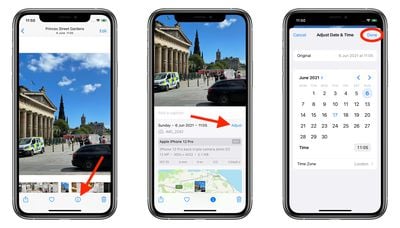
In another notable addition, you can also edit the date and time when a photo was taken. Here's how it's done in the latest ‌iOS 15‌ developer beta, a version of which will be available to the public in July.

  1. Launch the Photos app and tap a photo to select it.
  2. Tap the info button (the encircled "i" icon) below the image.
  3. Tap Adjust next to the date and time.
  4. Use the calendar and the time dial to choose a new date and time, then tap Done.
photos
Elsewhere in ‌Photos‌, iOS 15 features a considerable update to Photo Memories, which now feature a new design, integration with Apple Music, a more interactive interface, and more intelligent memory types, such as improved pet memories, including the ability to recognize individual dogs and cats.

For more information on iOS 15, check out our dedicated roundup. Apple will make ‌iOS 15‌ available for general release this fall.

Related Forum: iOS 15

Top Rated Comments

66 months ago
Also I can imagine this being useful for older photos that are scanned from prints.

Can this edit be done in batches?
Score: 21 Votes (Like | Disagree)
66 months ago
Why would this be useful? Serious question! Change evidence? 😂
Score: 13 Votes (Like | Disagree)
66 months ago
Can you also change location? I always have to go to my Mac to set location.

As to why you would change date and location. Not all pictures are taken with an iPhone! When I take pictures with my camera, they don’t have location information, so I input those on my Mac after upload. Great if I could do it on my iPad. Also, the camera might not have the correct date and time, for example when you travel to a different time-zone and forget to change the time in the camera. So, it’s nice to be able to correct it.
Score: 11 Votes (Like | Disagree)
66 months ago
This is not new. I have used this feature in Photos for many years. I scan old family photos from the 50's through the 00's, fix them up, and of course the date on the picture is then the current scan date rather than the year and day it was actually shot on film. So, in Photos, I have always been able to change the date and make a correct geotag in Photos app.
Score: 8 Votes (Like | Disagree)
66 months ago

Can you also change location? I always have to go to my Mac to set location.

As to why you would change date and location. Not all pictures are taken with an iPhone! When I take pictures with my camera, they don’t have location information, so I input those on my Mac after upload. Great if I could do it on my iPad. Also, the camera might not have the correct date and time, for example when you travel to a different time-zone and forget to change the time in the camera. So, it’s nice to be able to correct it.
Yes. I have scanned old family photos for years now, and in all versions of Photos I have fixed the date and LOCATION to the actual place and time the picture was shot.
Score: 6 Votes (Like | Disagree)
66 months ago

As others have stated, IF you scan old photos this will be helpful.
Beyond that, doesn’t make sense to me
Not all cameras have location information. People do use real cameras still.

Score: 5 Votes (Like | Disagree)

Popular Stories

apple intelligence photos tools

Apple to Bring AI Reframing and Editing Tools to Photos App

Monday June 8, 2026 11:16 am PDT by
Apple today announced new AI-powered photo editing tools coming to the Photos app as part of Apple Intelligence, including an upgraded Clean Up tool, a new Extend tool, and a new Spatial Reframing feature. Spatial Reframing allows users to reposition the virtual camera angle of a photo after it has already been taken. By touching and dragging, users can adjust the framing and perspective of...

iOS 26 Glass Photos Feature

Apple Photos Finally Gets a Slideshow Maker

Monday June 8, 2026 5:04 pm PDT by
Apple today announced new slideshow features coming to the Photos app, allowing users to play any set of photos and videos as a slideshow. There are options to set the slide duration, transition style, and music. iOS 27 also lets users save any slideshow directly as a video to their Photos library for easy playback later. Additional new features include the ability to save individual...
Apple Acquires Award Winning App Play Feature

Apple Acquires Award-Winning App 'Play'

Monday June 29, 2026 7:39 am PDT by
In February, Apple notified the European Commission that it would be acquiring certain assets from and have the right to hire certain employees from Rabbit 3 Times, the company behind the award-winning app design tool Play. The notification was published on the European Commission's website this week, following a four-month waiting period. Play was a Mac and iPhone app that allowed designers ...

🔗 Related Apple News & Rumors

Stay updated with the latest Apple ecosystem news and verified rumors