iOS 15: How to Translate Text in Photos - MacRumorsOpen MenuShow RoundupsShow Forums menuVisit ForumsOpen Sidebar
Skip to Content

iOS 15: How to Translate Text in Photos

by

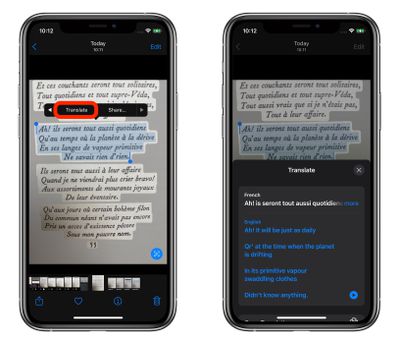
Apple entered the translation game in iOS 14 with native Safari browser translation and a dedicated translation app. Now, in iOS 15 and iPadOS 15, translation has gone systemwide, which means you can take advantage of Apple's new Live Text feature to translate other languages that appear in your photos.
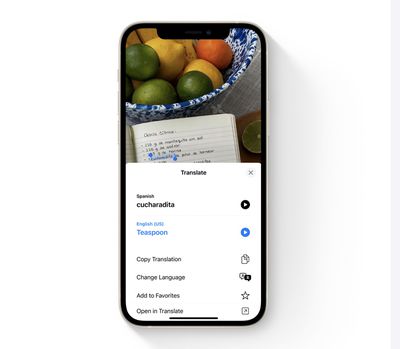
live text translate
The following steps show you how it's done in the Photos app. Note that by using largely the same procedure as described below, you can also translate text whenever it appears in the viewfinders of Apple's stock Camera app.

  1. Launch the Photos app on an iPhone or iPad running iOS 15, then select a photo in your library that contains text in a language that you want to translate.
  2. Tap the text capture icon that appears in the lower right corner of the picture.
  3. Now tap a portion of the captured text and drag the selection tool to highlight the words that you want to translate.
  4. Tap the rightmost arrow in the popup menu to reveal more options.
    photos

  5. Tap the revealed Translate option in the popup menu.
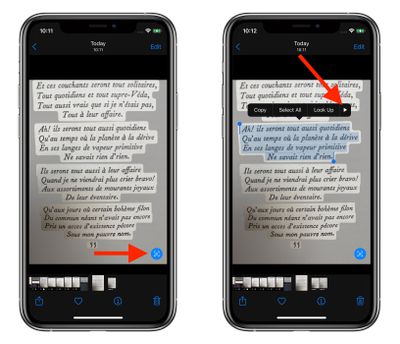
photos
A card will scroll up from the bottom of the screen showing the translation below the selected text. You can also choose to copy the translation in the Actions menu that appears below that for pasting elsewhere, change the translation to another language, and hear the translation spoken out loud.

Related Forum: iOS 15

Popular Stories

apple intelligence photos tools

Apple to Bring AI Reframing and Editing Tools to Photos App

Monday June 8, 2026 11:16 am PDT by
Apple today announced new AI-powered photo editing tools coming to the Photos app as part of Apple Intelligence, including an upgraded Clean Up tool, a new Extend tool, and a new Spatial Reframing feature. Spatial Reframing allows users to reposition the virtual camera angle of a photo after it has already been taken. By touching and dragging, users can adjust the framing and perspective of...
iOS 26 Glass Photos Feature

Apple Photos Finally Gets a Slideshow Maker

Monday June 8, 2026 5:04 pm PDT by
Apple today announced new slideshow features coming to the Photos app, allowing users to play any set of photos and videos as a slideshow. There are options to set the slide duration, transition style, and music. iOS 27 also lets users save any slideshow directly as a video to their Photos library for easy playback later. Additional new features include the ability to save individual...
Apple Acquires Award Winning App Play Feature

Apple Acquires Award-Winning App 'Play'

Monday June 29, 2026 7:39 am PDT by
In February, Apple notified the European Commission that it would be acquiring certain assets from and have the right to hire certain employees from Rabbit 3 Times, the company behind the award-winning app design tool Play. The notification was published on the European Commission's website this week, following a four-month waiting period. Play was a Mac and iPhone app that allowed designers ...


🔗 Related Apple News & Rumors

Stay updated with the latest Apple ecosystem news and verified rumors